.webp)
Key takeaways:
A customer service rep at a food distributor opens the morning's orders and finds a line for an item the company stopped carrying in March, at a price from January. The account is still ordering from a guide nobody reissued. Before the order can go to the warehouse, the rep has to call the kitchen, offer a substitute and explain the price.
Nobody in that story did anything careless. The catalog simply had no owner, no update path and no way for a change on the distributor's side to reach the person actually placing the order.
Catalog management is the work that closes that gap. It covers how product data gets in, how it is structured, who is allowed to change it, how it reaches each buyer in a form that matches their agreement, and how often somebody checks that it is still true.
This guide is written for the food distribution case specifically, where the catalog is shared between two companies rather than owned by one, and where a pack size error costs a kitchen its service.
The term carries two meanings that rarely meet. In ecommerce, a catalog is a customer-facing product listing and catalog management is about presentation: titles, images, attributes, search. In procurement, a catalog is an internally curated buying list and catalog management is about control: which suppliers, which items, at which negotiated price.
Distribution sits in the middle and needs both. The distributor maintains a master item file the way a retailer would, then exposes a restricted, priced view of it to each customer the way a procurement team would.
That dual job is why generic advice on the subject rarely lands. Product catalog management written for a direct-to-consumer brand assumes one audience seeing one price, which is the one assumption a distributor cannot make.
Everything downstream depends on this file being right. Order entry, picking, invoicing and dispute resolution all read from it, so an error introduced once at the catalog level repeats on every order until somebody notices. Most distributor ordering solutions assume the catalog underneath them is already correct.
Ask a distributor's sales rep what catalog management means and you may get a blank look. Ask about order guides and you will get a five-minute answer, because building, correcting and reissuing them account by account is work reps and customer service teams do every week.
An order guide is a per-account catalog: the subset of the distributor's items that this customer buys, at this customer's negotiated prices, in the pack sizes this customer takes. It is the catalog as far as the buyer is concerned, and it is the artifact where catalog quality becomes visible or costly.
This is exactly the shape VoiceOrder Solutions is built around. The distributor keeps one back end and issues a tailored catalog per account or location, with account-specific pricing and pack sizes, and items an account cannot order hidden rather than listed and refused.
Framing the order guide as a catalog rather than as a document changes what you do about it. A document gets reprinted when somebody complains. A catalog gets an owner, a change log, and a rule about how a discontinued item disappears from every account that could see it.
The practical test is simple. If a price changes on Monday, how many separate places does somebody have to edit, and how would you know if one was missed? Before the change goes out, a price change calculator shows what it does to your margin and how much volume you can lose and still come out ahead.
Most catalog problems are one bad field rather than a bad system. Grouping the fields by what they do makes it obvious which ones you cannot afford to get wrong.
| Field group | What it holds | What breaks without it |
|---|---|---|
| Identity | GTIN or item number, supplier part number, your internal SKU | Two records for one product, and split ordering history |
| Classification | Category, sub-category, search terms, allergens | Buyers cannot find items and order the wrong substitute |
| Commercial | Contract price, price effective dates, minimum quantity | Budgeting off stale numbers, disputed invoices |
| Pack | Unit of measure, units per case, catchweight flag | The single most expensive error class in food, see below |
| Availability | Active flag, seasonal window, substitute item | Orders placed for items that cannot ship |
| Assets | Image, spec sheet, certificate, origin | Chefs guessing at product they have never seen |
Identity is the field group worth the most attention up front, because errors there are the hardest to unwind later. Once two records for one product have each accumulated a year of order history, merging them means deciding which history was real.
That item master is also what everything else reads from, which is why ERP software for distribution inherits whatever state you leave it in rather than correcting it.
A distributor's catalog is assembled from other people's data. Every manufacturer sends its own template, its own attribute names and its own idea of which fields are mandatory, and the distributor absorbs all of it.
Standards exist to fix this and partially do. Peer-reviewed work by Niemir and Mrugalska in the European Research Studies Journal describes the GS1 Global Data Synchronization Network, running since 2004, which lets trading partners exchange master product data to a common model. The GTIN identifier at its center is issued by an organization associating over 2 million companies, with codes on 100 million different products.
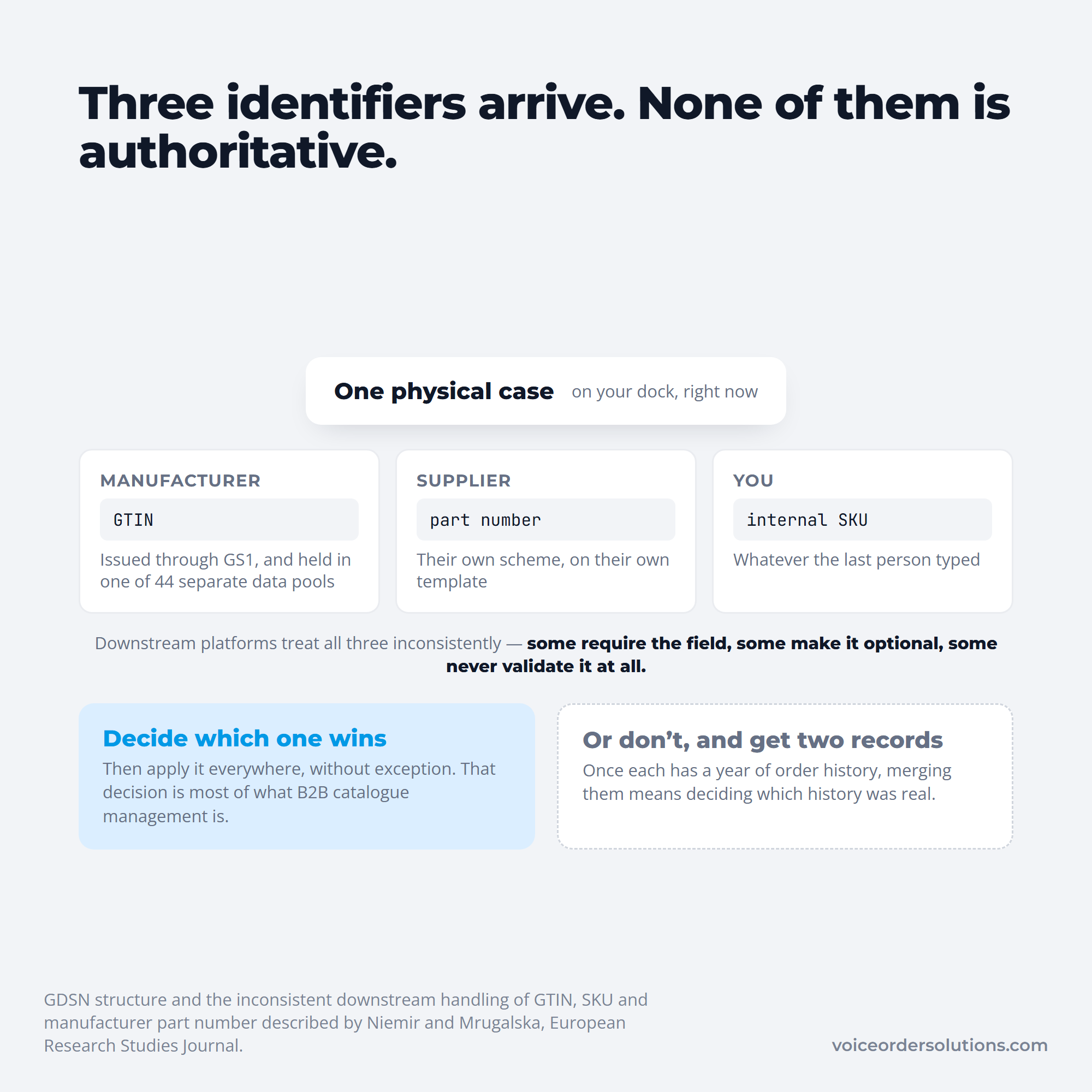
The same paper explains why standardization has not solved the problem. GDSN data is not centralized: it lives in 44 separate data pools worldwide, each operated by a different company, with only references held centrally in the Global Registry. The commerce platforms downstream then treat GTIN, SKU and manufacturer part number inconsistently, with some requiring a field, some making it optional and some never validating it at all.
The practical consequence for a distributor is that the same physical product can arrive with three identifiers and none of them authoritative. B2B catalog management is largely the discipline of deciding which identifier wins and applying that decision consistently.
All three arrive with the same case, and nothing outside your own decision ranks them.
Buyers notice when that discipline is missing. A maintenance engineer on Reddit describes distributors running catalogs off spreadsheets and phone calls, sending quotes back with part numbers missing and "call for availability" where a number should be. A distributor in the replies confirms the supply-side half of it: much of the catalog knowledge lives with staff of thirty years who are retiring, and the manufacturers feeding them data are worse.
That is the honest state of the problem in distribution. The catalog exists, but a good share of it is in someone's head, and no amount of software fixes a field that was never written down.
That reconciliation work is also why wholesale food distribution software tends to keep the item master somewhere central rather than letting each channel hold its own copy.
Catalog management in procurement has a taxonomy that distribution rarely uses but should, because it names the trade-off between control and freshness precisely.
| Type | Who holds it | Trade-off |
|---|---|---|
| Hosted | The buyer, loaded from a supplier file | Full control, goes stale between loads |
| Punchout | The supplier, reached from the buyer's system | Always current, buyer controls less of the experience |
| Static | The buyer, fixed for a contract term | Predictable pricing, needs a contract to hang it on |
| Dynamic | Synced by API on a schedule or live | Current without manual loads, needs both sides to support it |
| Tiered | Either, with volume or location rules applied | Matches real agreements, more rules to test |
A distributor's order guide is usually a tiered hosted catalog whether anyone calls it that or not, which explains its characteristic failure. It is held on the buyer's side as a sheet, the pricing rules are real, and nothing refreshes it except somebody remembering to.
Moving that guide to a dynamic feed removes the staleness without giving up the account-specific pricing, and it is the single highest-value change available to most distributor and customer pairs. That is the shift customizable ordering software is built to make.
Ordering four of something is meaningless until you know whether the four are cases, eaches or pounds. Food catalogs carry all three and the distinction is frequently implicit in a description string rather than explicit in a field.
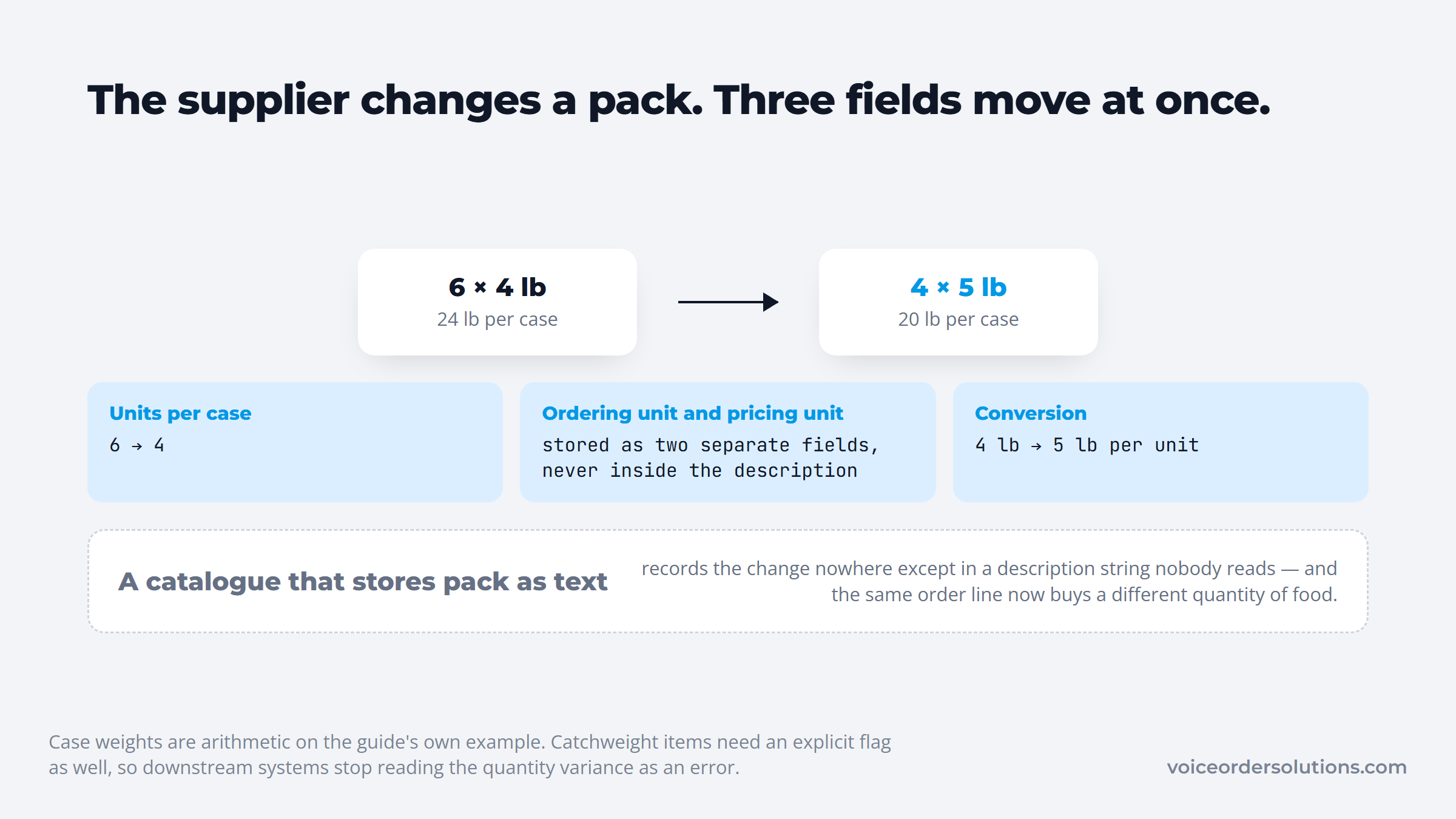
Catchweight makes it harder. A case of ribeye is priced per pound but ordered per case, so the catalog has to carry an ordering unit, a pricing unit and a conversion between them, and the invoice will not match the order line exactly by design.
A single pack change moves all three of those fields together.
Three specific rules prevent most of the damage in practice, and each of them is a catalog decision rather than a training issue.
When a supplier changes a pack from 6x4lb to 4x5lb, all three of those fields move at once. A catalog that stores pack information as text will show the change nowhere except in a description nobody reads. The change also moves what each pound really costs, and a unit price calculator puts the old and new pack side by side.
An item does not have a price. It has a price for this customer, under this agreement, in this window, which is the structural difference between a distribution catalog and a retail one.
Model it that way from the start. The item record carries a list or base price, and a separate price layer carries account, effective date, expiry and any volume break, so a contract renewal changes one row rather than a thousand item records.
Split in two, the renewal only ever touches the smaller half.
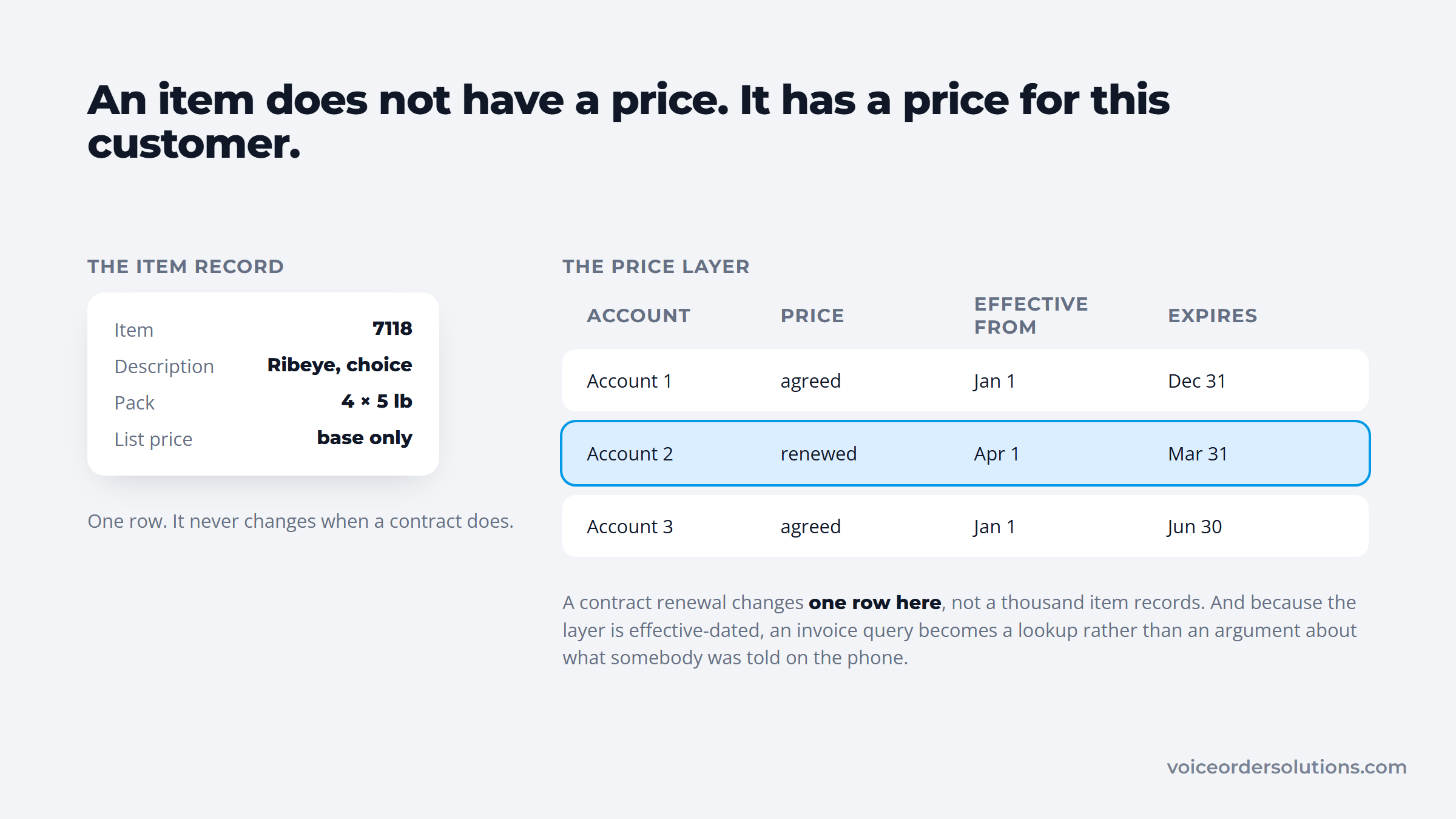
Effective dating is the part most often skipped and the part that settles disputes. If the catalog knows a price was valid from the first of the month, an invoice query becomes a lookup rather than an argument about what somebody was told on the phone.
Price staleness is also the most visible failure to a customer. A kitchen budgeting from a months-old sheet discovers the gap at invoice time, and the credibility damage lands on the distributor even though nobody misquoted anything.
"The catalog is up to date" is a feeling until somebody attaches a number to it. Target's product data team built exactly that number and published how it moved, which makes it the most useful public benchmark on the subject.
Working with GS1 US, Target settled on one top metric it calls issues per item, then wrote category-specific validation rules into an internal application. In over-the-counter liquid remedies, for example, any unit of measure not recorded as a fluid ounce raises an error.
The result, reported in the GS1 case study, was a fall from 2.1 issues per item to 0.9 across seven months, a 60% improvement. The scale is worth noting alongside it: hundreds of thousands of items averaging around 100 attributes each.
The move is easier to judge with the two scores side by side.
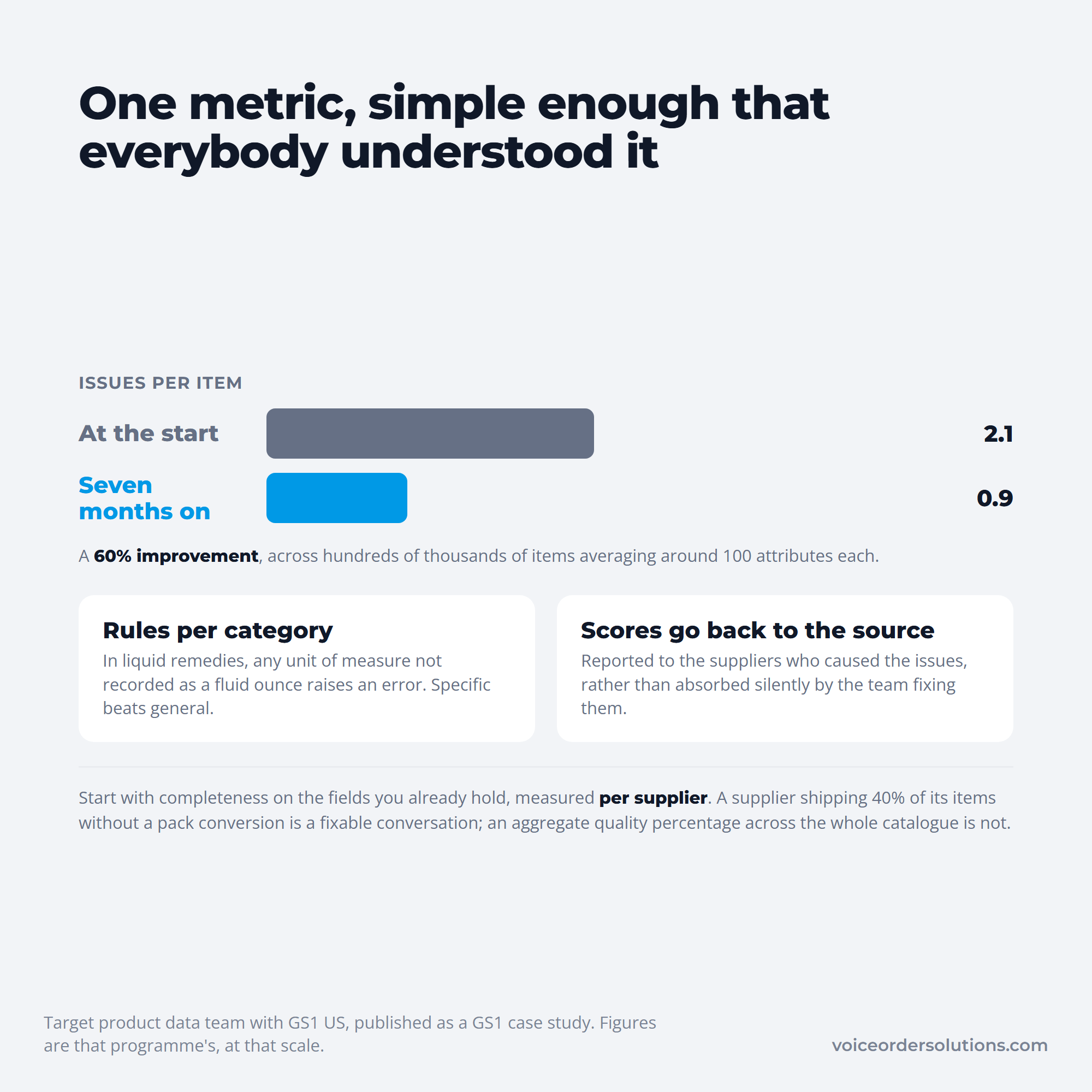
Two things in that account transfer directly to a distributor of any size. The metric is deliberately simple enough that everyone understands it, and the scores get reported back to the suppliers who caused the issues rather than absorbed silently by the team fixing them.
Start with completeness on the fields in the table above, measured per supplier. A supplier that ships 40% of its items without a pack conversion is a fixable conversation; an aggregate quality percentage across the whole catalog is not.
Digital catalog management fails most often at the second stage, not the first. The initial load gets budget, attention and a deadline, and then the catalog is treated as finished.
The volatility of the category should set the cadence. Produce and proteins move weekly or faster, dry goods and chemicals can go monthly, and packaging that has not changed in two years can go quarterly. Running one review cycle for everything means either wasting effort or carrying stale prices, usually both. Repricing on that cadence is quicker with a product markup calculator, which shows the price and margin at every markup step for a given case cost.
A procurement coordinator on Reddit describes inheriting a catalog of more than 4,000 items accumulated over fifteen years, agreements included, and cutting it down to 2,700. Their guard against stale pricing is memorable: every item now carries a placeholder price of $999,999 until somebody prices it properly, so a forgotten markup cannot quietly go out on a real quote.
The reply that thread's best answer offers is the durable version of the same idea. Restrict who can create or edit items, name one accountable owner, and review everything added in the previous week before it can reach an invoice.
Deletion deserves its own mention. A catalog only ever grows unless somebody is explicitly responsible for retiring items, and a list of 4,000 items where 1,300 are dead is worse than a list of 2,700, because the dead ones are indistinguishable from the live ones at the point of ordering.
"Everyone owns it" is how catalogs rot. The roles below can sit on one person in a small distributor, but each has to be somebody's job by name.
Access control does as much work as accountability. If any salesperson can add an item mid-quote to unblock a deal, the catalog will fill with near-duplicates carrying invented pack data, and no review cadence will keep up.
Sitting the catalog next to traceability data is worth planning too, since lot and origin fields on food traceability software records read from the same item master and inherit its errors.
For a distributor, a catalog proves itself on the order desk. When an account phones in or leaves a voicemail, a customer service rep has to turn the message into an item number, a pack and a price, and every gap in the catalog becomes a judgment call made at speed.
That is the step VoiceOrder Solutions takes off the desk. The distributor's order guides are loaded into the product's admin platform, each account orders by voice in the app against its own guide, and the customer reviews every line before sending.
What reaches the rep is an order already tied to the distributor's SKUs and the prices set for that account, numbered and timestamped, rather than a message to interpret.
Matching a spoken request to the right line is the part that depends entirely on catalog quality. "Two cases of the big tomatoes" resolves to a line item only if the record carries a real pack size, a live availability flag and terms this account actually buys under, which is why the catalog work above pays off at the point of order.
The boundaries are worth stating plainly. VoiceOrder Solutions is not a product information management system, does not syndicate data to other channels, and does not clean a supplier feed. It consumes a catalog and turns speech into correct order lines against it.
Distributors serving many independent accounts feel this most, which is why smaller distributors are the typical deployment rather than national broadliners with their own portals.
Most distributors do not need a platform migration to fix this. They need the item master to become a governed object rather than a shared file, and that is a sequence rather than a project.
Start by picking the authoritative identifier and applying it everywhere, then deduplicating against it. Next, make pack fields explicit and back-fill them supplier by supplier, worst supplier first, because that is where the order errors concentrate.
The third move is to split price from item so account pricing has somewhere structured to live, adding effective dates while you are in there. After that, set the review cadence per category and name the owners from the section above.
Only once those are running is it worth connecting the catalog outward to distributor order entry, because a feed built on an ungoverned catalog distributes the errors faster than a spreadsheet did.
Pull last quarter's order exceptions, the short ships, wrong packs, substitutions and price disputes, and trace each one back to a catalog field. Most operations find that three or four fields on a handful of suppliers explain the majority of them.
Fix those fields first, then put a weekly new-item review and a per-supplier completeness score in place so the improvement holds.
The rest of the restaurant procurement cycle gets easier once the buying list stops being a guess, because every downstream argument about price, pack and substitution starts from the same record.
If the weak point is the last step, getting an accurate, current catalog into the hands of accounts placing orders, contact VoiceOrder Solutions for a demo of how per-account order guides work in practice.
Catalog management is the ongoing work of collecting, structuring, governing and distributing product data so that everyone who needs it sees the same accurate version. It covers identity, classification, pricing, pack information, availability and supporting assets.
In distribution it has a second half that retail does not: exposing a restricted, account-specific view of that master data to each customer, which is what an order guide is.
On the buying side, a catalog is a curated list of approved items at agreed prices, and catalog management in procurement is about spend control as much as data quality. It determines what people can buy without a fresh approval.
The main types are hosted catalogs held by the buyer, punchout catalogs reached live on the supplier's system, and static, dynamic or tiered variations of the two. A distributor's order guide is usually a hosted catalog with tiered pricing rules.
A consumer catalog shows one assortment at one price to everyone. B2B catalog management has to render a different assortment, price and pack size per account, driven by an agreement rather than a marketing segment.
It also has to hide items an account cannot buy rather than simply not promoting them, since visibility alone creates orders that will be rejected.
Set the cadence by category volatility rather than running one schedule across everything. Fresh categories such as produce and proteins realistically need weekly attention, dry goods monthly, and stable non-food lines quarterly.
Pricing is the exception and should update on its effective date regardless of category, because a stale price reaches the customer as an invoice dispute rather than as an inconvenience.
One named person should own the catalog overall, with a separate owner per supplier relationship, an approver for pricing, and a weekly reviewer of new items. In a small distributor those can be the same person wearing four labels.
What matters is that creating and editing items is restricted. An open catalog fills with near-duplicates faster than any review cycle can clear them.


