.webp)
Key takeaways:
Most order-processing automation projects start in the wrong place. Someone buys a tool, points it at the order inbox, and discovers that the inbox contains a PDF, a Word document, an Excel sheet, a portal export, and a voicemail, all from customers who will not change how they order.
The technology was never the hard part. The hard part is narrowing what arrives and deciding what happens when something does not match.
This guide walks how to automate order processing end to end: what actually gets automated, how each capture channel really works, the purchase order sequence step by step, what to do on a mismatch, and how to measure whether any of it worked.
Automated order processing is the use of software to take an order from arrival to booked, without a person re-keying it. The phrase hides a fork in the road, and picking the wrong branch wastes months.
There are two directions. Automated sales order processing handles orders coming toward you, where you are the seller and someone else's PO lands in your inbox. Automated purchase order processing handles orders going out from you, where you are the buyer and need requisitions, approvals, and POs to reach suppliers.
They share vocabulary and almost nothing else. The sales side is about parsing whatever arrives from customers who owe you nothing. The buy side is about controlling your own process, which you can actually change. If you are the buyer, start there, because it is the half you govern.
The honest number here is wider than most vendors admit. APQC benchmarking found organizations spend anywhere from about $14 to more than $54 to process a single purchase order, and that the spread comes down largely to how the work is structured and executed rather than which software is installed.
Sit with that range for a second. It is nearly four times. Two companies buying similar things at similar volumes can differ that much purely on process design, and at tens of thousands of POs a year the gap runs into millions.
| Manual | Automated | |
|---|---|---|
| Cost per PO | Toward the $54 end of the APQC range | Toward the $14 end |
| Where time goes | Re-keying, chasing approvals, matching invoices by hand | Exception handling only |
| Error source | Transcription and missed approvals | Bad source data and rule gaps |
| Scaling | Add headcount per order volume | Volume rises, headcount flat |
| Audit trail | Reconstructed from email | Recorded as it happens |
The takeaway is not that automation is cheaper, which everyone already believes. It is that the same automation lands anywhere in that range depending on how disciplined the process underneath is.
Ask anyone who has tried this and you will hear a version of the same complaint. On r/manufacturing, an operator described the reality bluntly: customer purchase orders do not come in the same format, so you could get a PDF, a Word doc, an online release, an Excel file, and a phoned-in PO all in the same day.
Until POs are standardized, they argued, automating the sales order process is very difficult, and any change between the PO date and the order date means re-entering the order anyway.
That is one practitioner's experience rather than a study, but it names the real constraint. Your capture layer is only as good as the variety it has to swallow.
Which gives you two honest options, and most teams need both. Narrow the intake by moving customers onto fewer channels, and make the remaining channels machine-readable. Trying to parse infinite formats perfectly is the expensive path, and it is the one most projects pick.
Automated order entry processing depends entirely on how the order arrives. Each channel has a different cost, a different failure mode, and a different floor on who can realistically use it. Dedicated order entry software sits at this layer and absorbs whichever channel the order shows up on.
| Channel | How it works | The catch |
|---|---|---|
| EDI | Systems exchange structured documents (POs, invoices, ASNs) directly, no email or paper | Real setup cost per trading partner; needs volume to pay off |
| API | Direct system-to-system integration, real time, structured | Requires both sides to have systems and developers |
| Portal | Buyer keys the order into your web storefront | Moves the typing to the customer, who may refuse |
| OCR / IDP | Extracts and validates data from scanned PDFs and emails | Accuracy depends on document consistency |
| Voice | Order spoken into an app, matched to a catalog, transmitted | Needs a clean order guide to match against |
EDI deserves a caveat the vendor content skips. One vendor put it less politely, calling EDI unworkable unless both distributor and supplier transact huge volumes and can afford full accounting integration. Smaller companies, they said, lack the budget or compatible software and get pushed onto an "online" solution that triples the admin work.
Take that as anecdote, but it matches the economics. EDI has a scale floor, which is exactly why independent distributors keep taking orders by phone.
If you are the buyer, this is the sequence. The answer to how to automate purchase order process work is mostly about order of operations, because each step feeds the next. Automating purchase order process steps out of sequence creates work rather than removing it. The same sequencing logic governs order process automation on the sales side, where intake has to be solid before anything downstream of it is worth automating.
IBM puts the payoff plainly: what typically takes two to three days in a manual purchase order process can be done in a few hours when automated. The compression comes almost entirely from steps 2 and 7, where documents historically sat waiting for a human.
This is the question that separates a working system from an expensive one, and it is the one demos skip. Automating approvals without automating verification means you have built a faster way to book wrong orders.
The three-way match is the control that matters. The purchase order says what you asked for, the goods receipt says what arrived, the invoice says what you are being billed for, and all three have to agree before money moves. When they do not, the system holds the payment and routes the discrepancy to a person rather than either paying blindly or stopping everything.
Set the tolerance deliberately. A two-cent price variance should not summon a human, and a 200-case quantity variance should never clear silently. Most teams get this backwards at first, setting tolerances so tight that staff rubber-stamp a flood of exceptions, which is functionally the same as having no controls at all. To see what a given variance costs over a month and a year, run it through a purchase price variance calculator.
Invoice-side capture is its own discipline, covered in invoice capture software. The rule of thumb: automate the match, escalate the exception, and never let a human approve something they cannot see the evidence for.
Here is where expectations go wrong. Automating order processing with ERP does not mean the ERP does the automating. The ERP is the system of record, the place the finished, structured order lands. It is rarely good at the messy part, which is getting the order into it. That holds across the ERP software for wholesalers category too, where the strongest systems are still record keepers rather than capture tools.
Draw the two boxes and it is clear which one is doing the hard part.
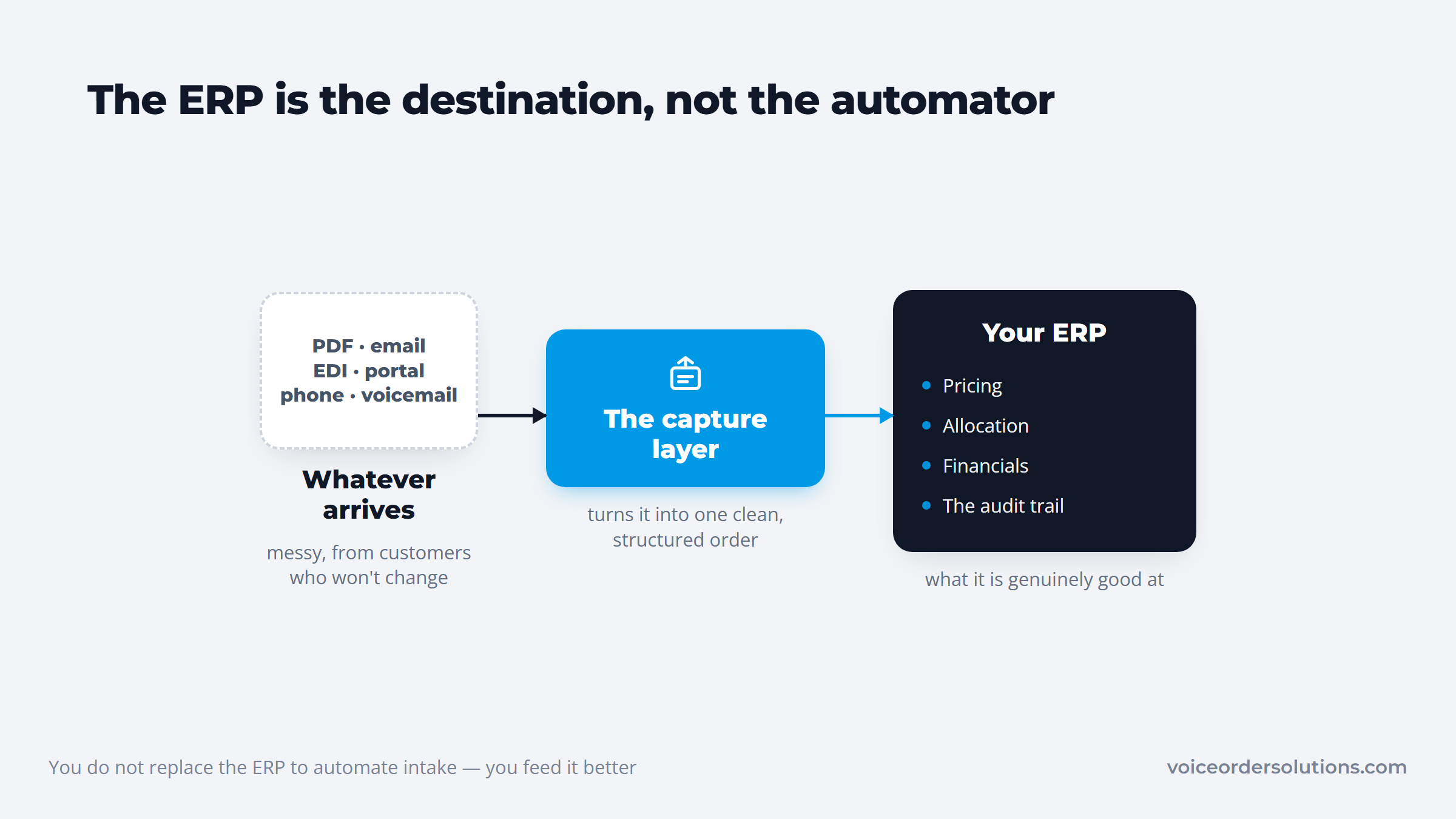
That distinction saves money. You do not replace NetSuite, SAP, Dynamics, or Odoo to automate intake; you feed them better. A capture layer that delivers a clean, structured order through EDI, an API, or a direct integration lets the ERP do what it is genuinely good at: pricing, allocation, financials, and the audit trail.
If the ERP itself is the bottleneck, that is a different project with a different budget, and ERP software for distribution covers that ground.
VoiceOrder Solutions is one example of a capture layer, and a useful one to look at because it is unambiguous about its scope. It covers intake and stops. It is not an ERP and does not replace NetSuite, SAP, Dynamics, or Odoo, it feeds them. That makes it wholesale operations software for the front of the process rather than a rival to the system behind it.
The delivery side is the part that matters for this article. A finished order leaves in whatever shape the receiving end expects: email as a PDF, Excel, or Word file when a human at an order desk works from it, or a direct integration through EDI, an API, or QuickBooks when the ERP can take it straight.
That flexibility is the whole test of a capture layer. If it can only deliver one way, you have not removed the re-keying, you have relocated it to whoever bridges the gap. Setup for independent distributors runs 24 to 48 hours, since most of the work is loading order guides rather than replacing systems. For the voice channel specifically, phone ordering AI goes deeper on the mechanics.
Most guides on this topic are quietly about ecommerce, which is why their advice lands badly in a distribution business. Automated order processing for retail and B2B distribution share a name and diverge almost immediately.
| Ecommerce and retail | B2B distribution | |
|---|---|---|
| How orders arrive | Structured, from your own checkout | PDF, email, EDI, portal, phone, text |
| Pricing | Published, uniform | Negotiated per customer |
| Payment | Captured at order | Credit terms, invoiced later |
| Catalog | Fixed SKUs | Customer-specific order guides |
| The hard part | Fulfillment speed | Getting the order in correctly |
Ecommerce automated order processing systems solve capture by owning the checkout, so their real problem is downstream in fulfillment. Automated order processing for distributors is the reverse: fulfillment is well understood, and the mess is at the front door, where a human still reads and retypes what a customer sent.
Advice built for the first case tends to skip exactly the step that hurts in the second, which is why so much of it disappoints. The distributor-side tooling is covered in software for wholesale distributors.
Automating order fulfillment and processing together sounds efficient and usually is not, at least not as a first project. They are different problems with different owners.
Processing ends when a correct, structured, approved order exists in your system of record. Fulfillment begins there: allocation, picking, packing, shipping. The handoff is the moment the order stops being information and starts being physical goods. It is also where the tooling changes hands, because allocation and picking are the jobs order fulfillment software exists to run.
The handoff between them is a specific moment, not a blur.
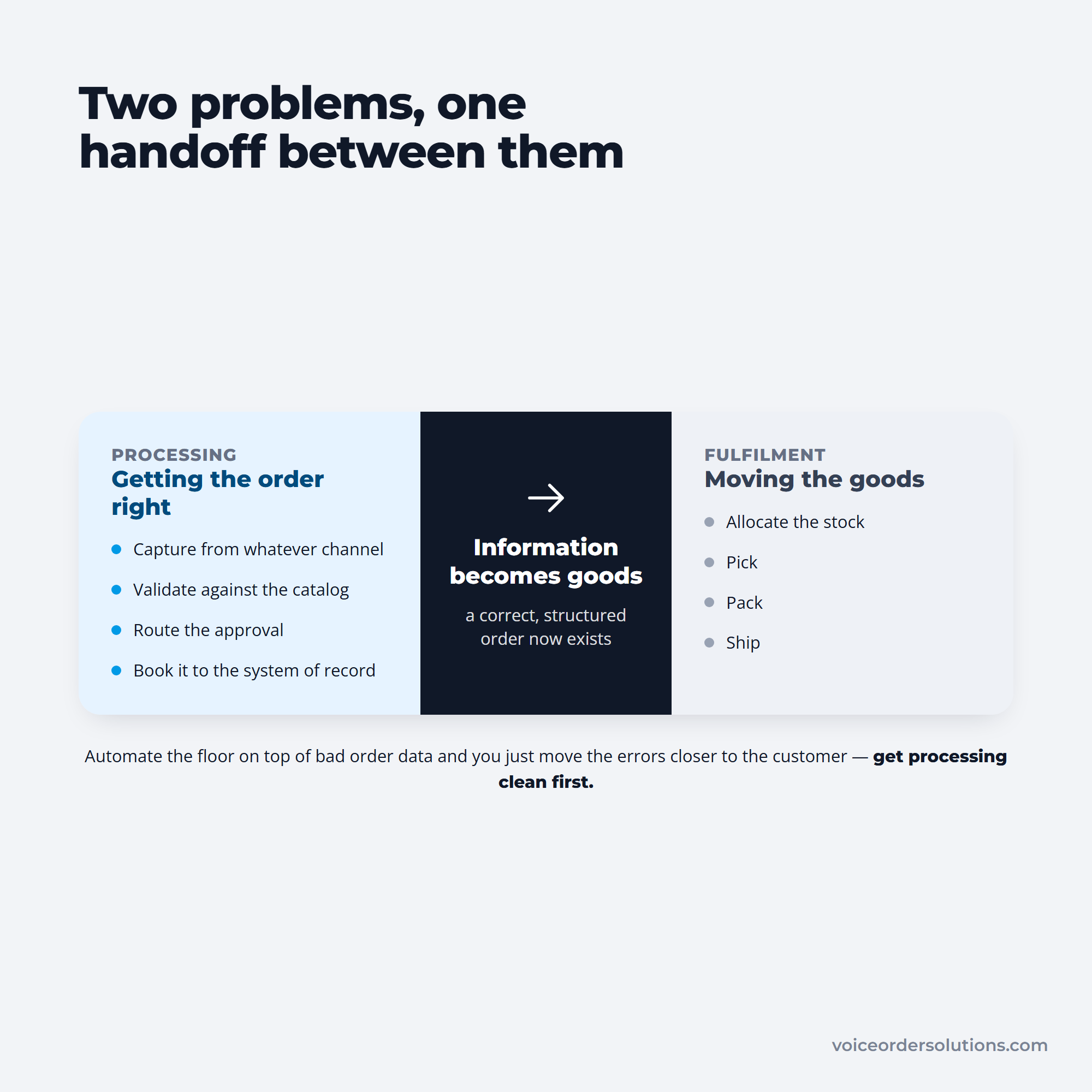
Keep them separate at first, because the sequencing matters. Automating fulfillment on top of bad order data just moves errors closer to the customer, where they cost the most to fix. Get processing clean, then automate the floor. The order-guide layer that makes that intake reliable is covered in customizable ordering software.
Pick your metrics before you buy anything, because the vendor will otherwise pick them for you. The useful ones compare against your own baseline, not an industry average.
| Metric | Target | Why it matters |
|---|---|---|
| Cost per PO | Move toward APQC's ~$14 end | The clearest before-and-after number you have |
| Order accuracy rate | Below 95% signals a systemic issue | Sage's threshold; measures the whole intake |
| Perfect order rate | 90%+ is the working target | Spans accuracy, completeness, timing, condition |
| PO cycle time | Hours, not days | Where approval automation shows up first |
| Exception rate | Falls as source data improves | The honest measure of work actually removed |
McKinsey's procurement analysis is worth reading against those numbers: it puts the achievable gain at 25 to 40 percent more efficient, and notes that routine, well-documented processes like purchase order creation and invoice processing are the ones most susceptible to automation, which is why two-thirds of organizations currently offshore them. Well documented is the operative phrase. If nobody can describe your current process, automating it is premature.
Orders are revenue, so this is not a project you get to fail loudly. The sequence below keeps the blast radius small.
Step 4 is the one teams skip when the timeline slips, and it is the one that catches the rule you got wrong. A week of parallel running is cheaper than a month of credits.
The gap between a $14 purchase order and a $54 one is not a software gap. It is a process gap, and buying a tool without closing it just means paying $54 with better dashboards.
So start with the two questions that decide everything downstream. Which direction are you fixing, the orders coming in or the ones going out? And what happens today when the order does not match the invoice? If the answer to the second is "someone figures it out," that is your project, and no capture technology substitutes for defining it.
Then automate one channel, prove the exception rate, and widen. On the voice channel, VoiceOrder Solutions demos its capture layer, and the ordering flow works page shows the sequence, with the order management breakdown alongside it. Past intake, the warehouse management process picks up where this leaves off, and wholesale order management software covers the systems themselves.
An automated order processing system takes an order from arrival to booked without a person re-keying it, handling capture, validation, approval routing, and delivery into the system of record.
The term covers two different jobs. An automated sales order processing system parses orders customers send you, while the purchase order side automates requisitions and POs you send out. Most tools do one well and the other adequately, so buy for the direction that actually hurts.
Digitize the requisition, route approvals by rule, generate the PO from the approved request, dispatch it on the channel each supplier uses, capture the acknowledgment and shipping notice, record the receipt at the dock, run a three-way match against PO, receipt, and invoice, then post to the ERP.
IBM notes this compresses a two-to-three-day manual cycle into hours. The match step is the one worth building carefully, since approvals without verification just book bad orders faster.
Yes, and the difference is where the work sits. Ecommerce automated order processing systems own the checkout, so orders arrive structured and the hard part is fulfillment speed. In distribution, orders arrive as PDFs, emails, EDI files, portal entries, and phone calls, against negotiated pricing and customer-specific order guides, so the hard part is capture. Advice written for retail usually skips the step distributors most need.
Rarely, because an ERP is a system of record rather than a capture tool. It prices, allocates, and books an order well once it exists in structured form, but it is not designed to read a supplier's PDF or a voicemail.
Most working setups pair a capture layer that turns messy inbound orders into structured ones with an ERP that receives them through EDI, an API, or a direct integration. Replacing the ERP is a much larger project, and usually not the one you need.
Judge it against your current cost per order, not a list price. APQC benchmarking puts the cost of processing a single purchase order anywhere from about $14 to more than $54, with the spread driven mostly by how the process is structured. Establish which end you sit at before you shop, because a tool dropped onto an undocumented process tends to preserve the cost and add a subscription on top.