.webp)
Key takeaways:
Every order that reaches your business runs a gauntlet before it becomes a happy customer: it has to be captured correctly, checked, routed, picked, packed, shipped, and sometimes returned. When that order management workflow is smooth, orders ship fast and accurately. When it is not, the failures show up as wrong quantities, late deliveries, and returns that eat your margin.
Most workflow problems do not come from a missing step; they come from a step that was designed for a smaller operation and never updated. This guide maps the full order management workflow stage by stage, digs into the warehouse portion specifically, and gives you concrete ways to improve each stage in 2026, starting with the one that pays back fastest.
An order management workflow is the sequence of steps that moves a customer order from the moment it is placed to the moment it is delivered and settled. It is broader than order fulfillment, which is just the physical pick-pack-ship part; the workflow also covers capture, validation, routing, and everything after delivery, including returns.
Think of it as the operating system for your orders. Each stage hands off to the next, and a weakness at any handoff, a mis-keyed order, an unvalidated address, a bad pick, ripples downstream and gets more expensive to fix the further it travels. Oracle frames the goal as the "perfect order": fulfilled to specification and delivered as promised.
Getting the workflow right is less about adding steps and more about making each handoff clean. The rest of this guide walks the stages in order, so you can find the one where your orders actually stall.
Most order management system workflow models reduce to the same five stages, whatever a given vendor calls them. Reading them in order is the simplest order management system workflow diagram you can hold in your head, since each stage feeds the next.
| Stage | What happens | Common failure point |
|---|---|---|
| 1. Capture | Order comes in by phone, text, email, EDI, or portal and enters the system | Manual re-keying, missing or garbled items |
| 2. Validation | Check inventory, pricing, credit, and address before the order proceeds | Overselling stock you do not have; bad addresses |
| 3. Routing | Assign the order to the right warehouse or location | Wrong site chosen; slow allocation |
| 4. Fulfillment | Pick, pack, and quality-check the order in the warehouse | Pick errors; slow pick paths |
| 5. Shipping and post-order | Dispatch, track, deliver, and handle returns | Late dispatch; slow, costly returns |
The pattern that matters is where errors are cheapest to catch. A problem stopped at capture costs a correction; the same problem caught at delivery costs a reship, a refund, and a lost customer. That is why the improvements later in this guide start at the top of the workflow, not the warehouse.
Order capture is the first stage and the one most workflows underinvest in. It is no longer simple data entry; it is the moment your business confirms whether an incoming order is complete, readable, and authorized. Get it wrong here and every downstream stage inherits the error.
The failure mode is almost always manual, unstructured intake. On Reddit, one B2B wholesale operator described their real process: customers text the owner what they want, the owner re-texts the list to the warehouse team, and orders arrived with missing items because of that game of telephone. Every manual hop is a chance for the order to drift from what the customer actually asked for.
Structured capture fixes this at the root. For distributors and operators taking procurement orders, VoiceOrder Solutions lets staff speak an order into an app that digitizes, confirms, and timestamps it automatically, then transmits it to the distributor with no re-keying. Capturing the order cleanly the first time, with a unique order number and timestamp, means the validation and fulfillment stages work from accurate data instead of a mis-heard voicemail.
Clean capture is the cheapest quality win in the whole workflow, because it prevents errors rather than catching them. That makes it the first place to look when orders go wrong.
Once an order is captured, validation is the checkpoint that decides whether it should proceed. A strong workflow order management setup verifies inventory availability, pricing and contract terms, credit limits, and the shipping address before the order reaches the warehouse. Anything that fails is flagged as an exception rather than shipped blind.
In practice the checkpoint has only two exits, and one of them has an owner's name on it.
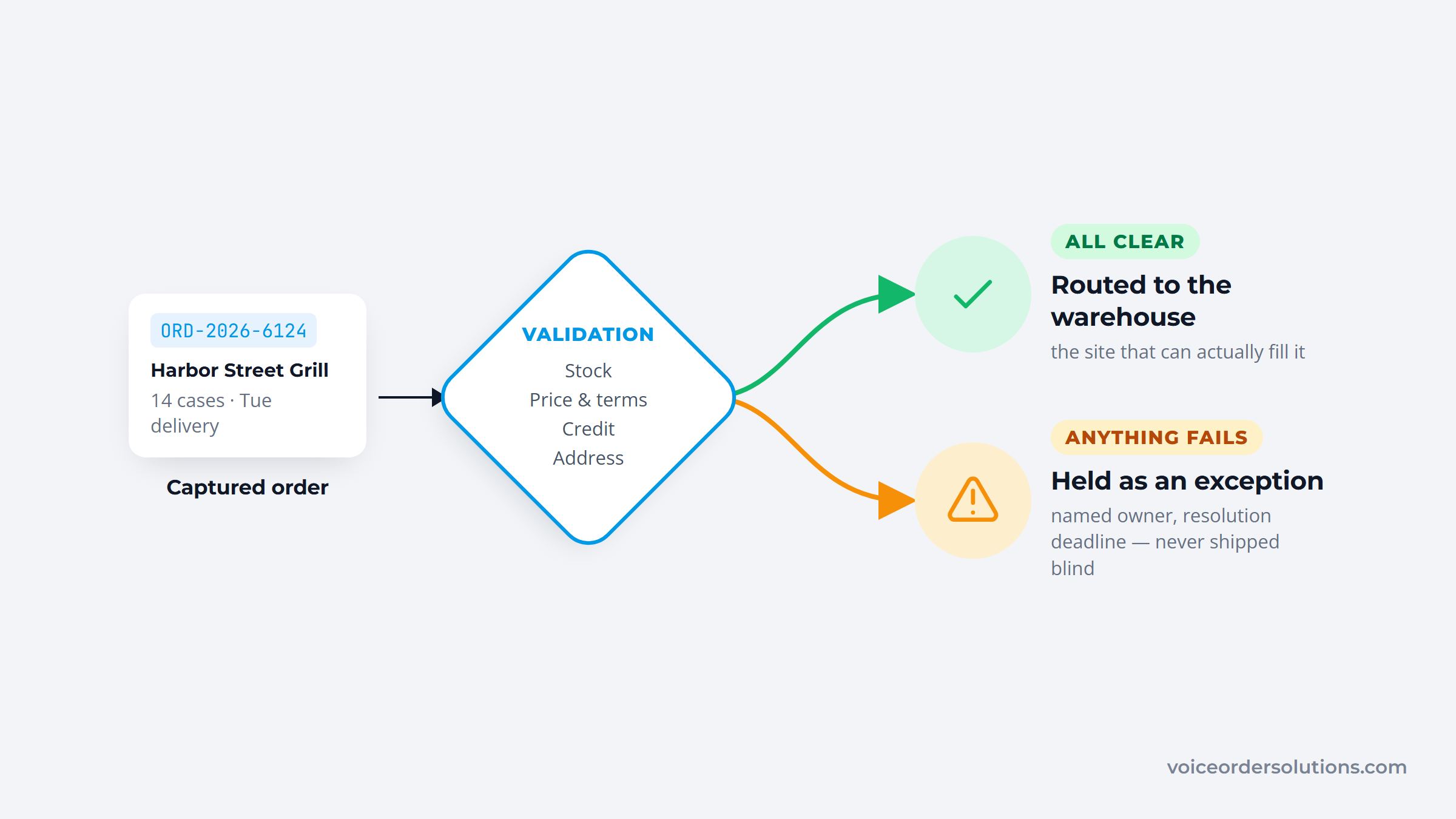
This is also where exception handling earns its own discipline. A workflow is not finished when the happy path works; it needs defined owners and resolution times for failed payments, address failures, inventory mismatches, and integration timeouts. The operations that run smoothly are the ones that designed for exceptions before they needed to.
Routing follows validation: the system assigns each order to the right warehouse or location based on inventory, proximity, and capacity. Done well, routing is invisible; done poorly, it sends orders to a site that cannot fill them and forces a costly reroute. Clean validation and smart routing are what let the warehouse stage run without constant firefighting. Skipping the check to shave a few seconds at capture is a false economy: an unvalidated order that reaches the dock costs far more to unwind than the check would have taken, tying up a picker, a packer, and a customer-service rep to fix one avoidable mistake.
The order management workflow warehouse stage is a full workflow of its own, nested inside "fulfillment." It has four internal steps, and each has its own failure modes and its own room to improve.
Everything downstream depends on stock being where the system says it is. Receive against the shipping notice, inspect for damage, and put items away in the right location with a scan. Optimized putaway alone can lift warehouse productivity noticeably by cutting the travel time to find items later.
Picking is where most warehouse time and most errors live, so the picking method matters. Batch picking groups similar orders to cut travel; zone picking assigns pickers to areas; wave picking combines both. The right choice depends on your order profile and volume.
Speed and accuracy fight each other here, which surprises people. A warehouse manager on Reddit found their fastest, most experienced pickers made the most mistakes from muscle memory, and one site cut its error rate 70% overnight by switching to pick-to-bin, which hides the full order so a picker only sees what is in front of them. Redesigning the step beats telling pickers to be careful.
Pack to protect the goods, scan to confirm the contents match the order, and stage dispatch so carriers load efficiently. A scan-to-confirm step at packing is the last cheap chance to catch a pick error before it becomes a return.
Tie these steps together and the warehouse stops being the place where clean orders go wrong. The gains here are real, but they are capped by how clean the order was when it arrived, which is why capture and validation come first.
Once an order leaves the warehouse, the workflow shifts to shipping, delivery tracking, and the post-order stage most operations neglect: returns. Dispatch generates the label and tracking, the carrier scans move the order to delivery, and proof of delivery closes the outbound loop. Proactive tracking updates at each scan also cut the inbound "where is my order" calls that otherwise flood your support team. That is the practical case for order tracking software: every status change reaches the customer before they think to ask.
Returns are not an edge case; they are a major, growing part of the workflow. The National Retail Federation and Happy Returns reported US retail returns of $890 billion in 2024, up 19.8% from the prior year, with retailers estimating 16.9% of sales would be returned. A workflow that treats returns as an afterthought bleeds margin at that volume.
Build the return path as deliberately as the outbound one: a clear request, an RMA issued and logged, the item quarantined and inspected, and inventory updated on resolution. A practical benchmark is to complete the return-to-refund cycle in under seven days, which keeps customers happy and stock moving rather than sitting in limbo. Capturing the reason for each return feeds the rest of the workflow too, since a spike in one return code often points to a problem upstream at capture or picking that is cheaper to fix than to keep absorbing.
Automation can touch every stage, but it pays back unevenly, and the biggest returns come earliest. Structured, validated capture prevents the downstream errors that are expensive to fix, so automating intake and validation beats automating the warehouse if you can only do one.
The data backs the priority. McKinsey found that AI-driven forecasting can cut supply-chain forecasting errors by 20 to 50% and reduce administration costs by 25 to 40%, but those models only work on accurate data. Feed them garbage from a broken capture stage and the automation optimizes the wrong picture.
Practical automation to prioritize, in order of payback: automated order capture that pulls orders from every channel without re-keying, automated validation that flags exceptions instead of shipping them, status notifications that cut "where is my order" calls, and synchronized inventory so a sale in one channel updates stock everywhere.
At the capture step, a voice-driven tool like VoiceOrder Solutions turns spoken procurement orders into structured, timestamped records automatically, which is exactly the kind of clean intake the rest of the automation depends on. Start at the top of the workflow and work down.
You cannot improve a workflow you do not measure. A small set of order management workflow KPIs tells you which stage is dragging and whether a change actually helped, rather than leaving you to guess.
| KPI | What it measures | Target |
|---|---|---|
| Order cycle time | Order placed to shipped | Under 24 hours |
| Fulfillment accuracy | Orders shipped correctly | 99.5% or higher |
| On-time delivery rate | Delivered by promised date | 95%+ |
| Perfect order rate | Orders with no error anywhere | 90% median, 99%+ best-in-class |
| Return-to-refund time | RMA request to refund | Under 7 days |
Watch the perfect order rate especially, since it spans the whole workflow: an order counts only if it was accurate, complete, on time, and undamaged. Industry benchmarks put the median near 90%, meaning one in ten orders has some flaw, while best-in-class operations clear 99%. Track these as a set, and let the weakest one tell you which stage to fix next.
Even a well-mapped workflow hits predictable bottlenecks, and naming them helps you spot your own. monday.com lists the recurring ones: scattered systems that do not talk to each other, manual bottlenecks, limited tracking visibility, inventory inaccuracy, complex returns, and peak-season capacity. A 2024 Deposco report found that 47% of order management systems could not handle peak-season volume spikes.
The through-line is that most failures are handoff problems, not missing steps. Data gets trapped in one system another cannot see, a routine background process in order management still runs on manual re-entry, or a returns path was never actually designed. None of those is solved by adding a stage; they are solved by connecting the stages you already have.
The practical way to find your own bottlenecks is to run the workflow against your KPIs twice: once during a normal week and once during your busiest. Problems that stay hidden at low volume surface fast under load, which is exactly when a workflow built for a smaller operation tends to break. Fix the stage that fails first, then measure again before moving on.
Good order workflow management comes down to finding the stage that costs you the most and fixing it deliberately, not overhauling everything at once. Use your KPIs to find that stage, then apply the right lever.
Work these in KPI-priority order and the gains compound: cleaner capture makes validation easier, which makes fulfillment faster, which makes the whole workflow cheaper to run. Operators who want to remove manual entry from the capture stage can contact VoiceOrder Solutions to see how voice ordering fits their workflow.
A good order management workflow is not the one with the most software; it is the one where every handoff is clean and every stage is measured. Map your five stages, find the one your KPIs say is dragging, and fix it before moving to the next. In most operations, that first fix is capture, because a clean order at the start saves work at every stage after it.
The workflows that scale are the ones designed for exceptions and built on accurate data from the moment an order is placed. Get the intake right, measure the perfect order rate, and treat returns as a real stage rather than an afterthought, and your orders will move faster with fewer of the errors that quietly cost the most.
An order management workflow is the full sequence an order follows from placement to delivery and settlement: capture, validation, routing, warehouse fulfillment (pick, pack, ship), and post-order returns. It is broader than order fulfillment, which is only the physical pick-pack-ship portion, because it also covers how the order enters your system and what happens after it is delivered.
Most models use five stages: order capture, validation, routing, fulfillment, and shipping with post-order returns. Reading them in order is the simplest order management system workflow diagram, since each stage hands off to the next. A problem caught early, at capture or validation, is far cheaper to fix than the same problem caught at delivery.
Improve the order management workflow warehouse stage by receiving against the shipping notice, optimizing putaway to cut travel time, and choosing the right picking method (batch, zone, or wave) for your order profile. Add a scan-to-confirm step at packing to catch pick errors before they ship. Redesigning the pick step beats simply pushing pickers to move faster.
Track order cycle time (target under 24 hours), fulfillment accuracy (99.5% or higher), on-time delivery rate, perfect order rate (90% median, 99%+ best-in-class), and return-to-refund time (under 7 days). The perfect order rate is the most telling because it spans the entire workflow: an order only counts if it was accurate, complete, on time, and undamaged.
Start at the top of the workflow. Structured, automated capture and validation prevent the downstream errors that are expensive to fix in the warehouse or at delivery, so they pay back faster than warehouse automation. Automate order capture across every channel first, then validation, then status notifications and inventory sync, working down the stages in that order.


