.webp)
Key takeaways:
In 2026, a restaurant phone system is key to taking orders fast and error-free. With more customers expecting quick service, your phone system must keep up. Today's technology goes beyond basic calls. It uses AI and cloud tools to handle calls with greater speed and accuracy.
This article will guide you through choosing the right phone system for your restaurant. It covers how to set it up, what features to look for, and how to use it to handle calls smoothly. You'll also get insights on costs and integrating the system with your existing tools.
Here's a quick look at what this article explores:
Ready to make every call count? Read on.
A restaurant phone system helps you manage calls quickly and smoothly. It started as simple landlines but now includes advanced tools like VoIP and AI-powered virtual receptionists. These systems make it easier to take orders, answer questions, book tables, and handle catering requests without losing time or frustrating customers.
Modern restaurant phone systems use several core technologies. Cloud hosting lets your phone system work over the internet, so you don't need expensive hardware. VoIP (Voice over Internet Protocol) sends calls through the internet, which is cheaper and more flexible than traditional landlines. AI voice agents handle calls using automated speech, so customers can get help even when staff is busy. Interactive Voice Response (IVR) lets callers navigate menus by pressing numbers or speaking, which speeds up getting to the right department.
Here's a quick look at the main tasks these phone systems handle:
Not all phone systems are the same. Some are basic landlines, which are easy but limited. PBX systems add features like call routing but need on-site equipment. Cloud VoIP systems work online and are great for growing restaurants because they're flexible and simple to update. The newest choice is AI phone answering systems for restaurants, which combine automation with smart voice technology to handle more calls without extra staff.
Check out this simple table showing these differences:
| System Type | Features | Best For | Complexity |
|---|---|---|---|
| Landline | Basic calling | Small, single-location places | Low |
| PBX | Call routing, extensions | Medium-sized restaurants | Medium |
| Cloud VoIP | Flexible, internet-based | Growing restaurants | Low–Medium |
| AI Phone System | Automated ordering and answering | High call volumes, fast orders | High |
With the right restaurant phone system, you'll improve speed, accuracy, and customer experience. It's all about making every call count with less effort.
A good restaurant phone system can make ordering faster and easier for your customers. Call management and automation play a big role here. Auto-attendants and IVR menus let customers choose options on their own, like "press 1 for reservations." This reduces wait times and helps callers get to the right place fast.
Call queuing with callback options also cuts down on hold times during busy hours. Plus, AI voice agents let customers place orders anytime, day or night, using natural speech. A well-configured AI phone answering system for restaurant orders understands what people say and takes orders smoothly, even when your team is busy. Answering the call and capturing the order are still two different jobs, and the second one is what order taking software is built to handle.
Integration matters just as much. When your phone system links to your POS system, orders go directly into your register. This means fewer mistakes and quicker prep time. It also opens up chances for upselling, like suggesting extras during the call. CRM integration helps you remember previous orders and preferences, making customers feel valued.
On top of that, analytics dashboards show important data like call volume and average talk time. This info helps you spot trends and improve service fast.
Here's a quick list of key integrations you'll want in a restaurant phone ordering system:
Finally, multi-channel and mobility support let your team handle calls anywhere. Voicemail transcription sends alerts through email or SMS, so no message is missed. Mobile and desktop apps give flexibility to answer calls remotely. You can even set local phone numbers and department routing for each location if you run multiple spots.
For restaurants that also place procurement orders with food distributors, VoiceOrder Solutions offers a voice-powered ordering tool that complements a phone system by automating the specific call a buyer makes to their supplier. Rather than phoning a distributor to restock ingredients, buyers speak their order aloud and the system captures, confirms, and transmits it automatically, saving 20–30 minutes per order without replacing the wider phone setup.
Choosing the best restaurant phone system means picking tools that work together, automate tasks, and give you real-time insights. This creates a smoother, faster ordering experience that keeps customers coming back.
A good restaurant phone system can make a significant difference in revenue and day-to-day work. Missed calls during busy hours mean lost orders and dollars. Studies show restaurants lose up to 15% of orders simply because calls go unanswered when staff are busy.
With AI and cloud technology, missed calls and long hold times drop considerably. AI-powered restaurant phone systems can cut missed calls by 60%, and hold times shrink by half. This means more orders get through without frustrating customers.
Automation also improves order accuracy. Automated phone order systems raise order accuracy rates by up to 25%. Plus, they help with upselling popular menu items, increasing order value by as much as 10%.
Here are some benefits you'll see right away:
Let's look closer at labor savings and order accuracy, two big wins from using a smart restaurant phone system.
By letting AI handle routine calls like repeat orders or simple questions, you free up staff to focus on the floor. This reduces training time since the system keeps customer experience consistent. Plus, multi-location businesses can manage calls centrally, improving consistency and support quality.
A voice-powered ordering tool like VoiceOrder Solutions also helps eliminate missed after-hours procurement orders. When a restaurant buyer needs to place a restocking order with their distributor outside business hours, VoiceOrder Solutions captures the order by voice, timestamps it, and transmits it automatically, cutting errors and speeding up fulfillment without requiring staff to be on hand.
In summary, the best restaurant phone system helps you keep every call, reduce mistakes, save on labor, and provide top service around the clock.
Picking the right restaurant phone system is key to handling orders fast and keeping customers happy. You want a solution that fits your needs without wasting money on features you won't use. Here's how to make a smart choice.
Start by thinking about your restaurant's call traffic. How many orders come in daily? If you get more than 50 calls a day, an AI phone answering system for restaurant orders becomes very useful. It handles orders automatically and frees up staff.
Four answers narrow the field before you look at a single product page.
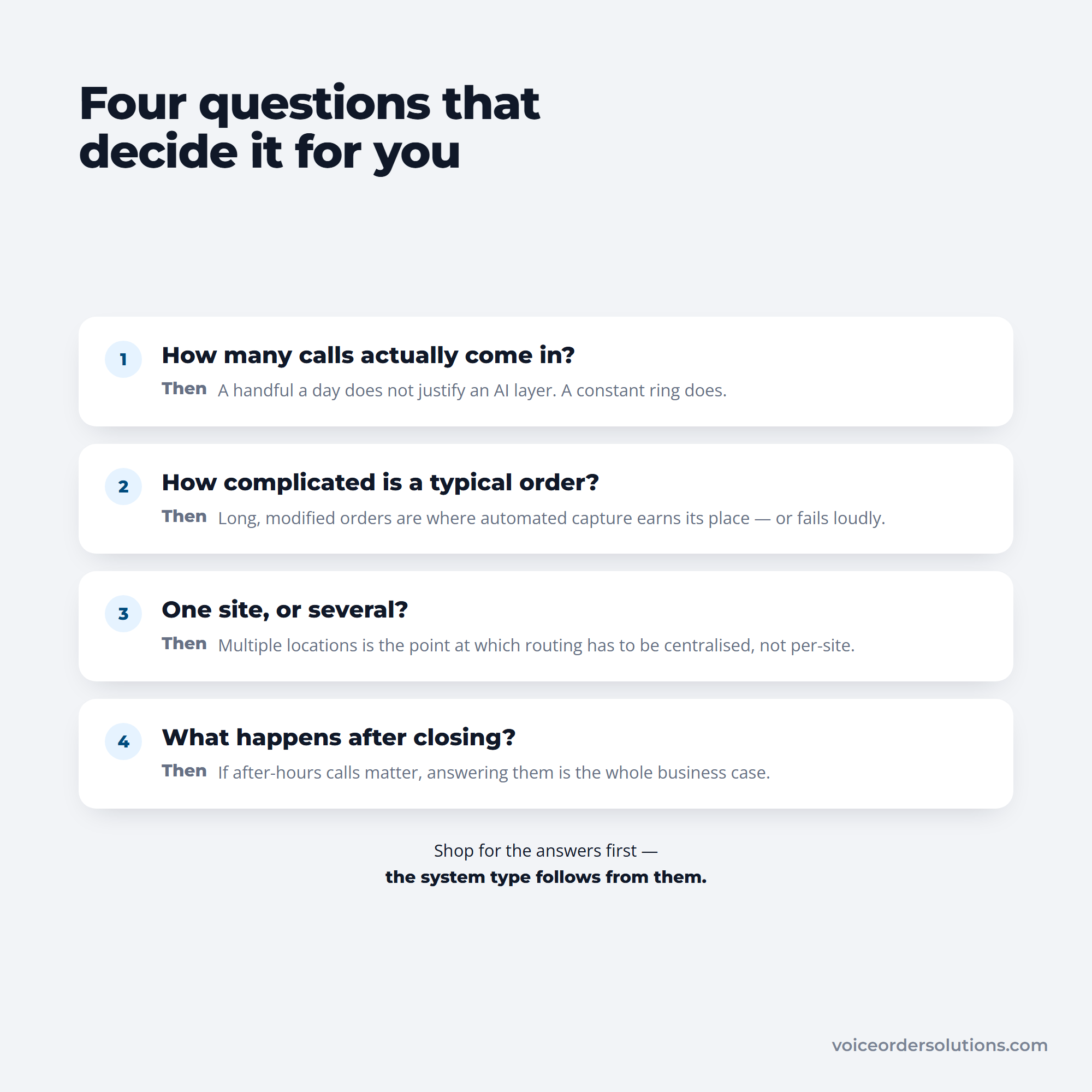
Also, consider if you run multiple locations. Your system should support that smoothly.
Next, look at order complexity. Do customers often customise meals? A simple phone system might not be enough if orders get tricky. Also consider language support if you serve a diverse community. Don't forget about after-hours coverage to catch late calls.
Finally, check how your phone system must connect with other tools. Integration with your POS and CRM can save a lot of time. For food distributors and restaurant buyers who place restocking orders by phone, a companion tool like VoiceOrder Solutions can automate that specific supplier ordering call, freeing your general phone lines for customer-facing communication.
Here's a quick checklist to guide you through your needs:
Once you know your needs, compare types of restaurant phone ordering systems:
| System Type | Monthly Cost | Features | Pros | Cons |
|---|---|---|---|---|
| Landline/PBX | $30–80 | Basic calling | Reliable, simple | Limited features, less flexible |
| Cloud VoIP (Nextiva) | $18–25/user | Voicemail, call routing, mobile apps | Scalable, lots of features | Dependent on internet speed |
| Cloud VoIP (Ooma) | Starts around $19.95 | Virtual receptionist, mobile support | Affordable, easy setup | Extra fees for some features |
| AI Phone Systems | $1.50/completed order (Bite Buddy) | Automated order taking, voice menus | Saves labor, handles peaks | Cost depends on order volume |
When choosing, watch for extra charges like setup fees or hardware costs.
Also, read contracts carefully for the length and cancellation terms. Good customer support can save you headaches later.
Now that you've narrowed your list, here's what to look for before making a final decision:
Choosing the best restaurant phone system doesn't have to be complicated. Match your needs carefully, compare features and costs, and look for a partner who supports you from start to finish. This way, you'll speed up orders and keep your kitchen running smoothly.
Setting up and fine-tuning your restaurant phone system in 2026 is key to speeding up orders and keeping customers happy. With the right tools, you can simplify call handling and improve order accuracy.
Here's a straightforward way to get started and keep improving your system.
Start by understanding how your current calls and orders flow. Track baseline data such as call volume, order times, and wait durations. This will give you a clear benchmark to measure your progress.
Next, configure your system. Set up auto-attendants to greet callers, organise routing menus so calls reach the right staff, and programme schedules and holiday greetings to handle busy or closed hours smoothly.
Before you go live, migrate existing phone numbers to your new system carefully. Then test every call scenario thoroughly to catch any issues. This might include routing delays, greeting clarity, or order input errors.
Here's a simple checklist for deployment:
With this checklist done, your restaurant phone answering system is ready for staff training.
Your team is the heart of the phone ordering process. To get them comfortable, provide clear call scripts and easy-to-follow guides. They should know how to use the system and take orders efficiently.
Run live demos and role-playing sessions. Practising calls with the AI phone answering system for restaurant orders helps staff understand how to interact clearly with callers and the system. This hands-on training builds confidence and speed.
Keep communication open with your team. Encourage feedback on what works and what feels clunky. This feedback loop lets you tweak call flows and menus for a better experience.
Training highlights include:
Once your staff feels confident, you can focus on refining your phone system continually.
Improving your restaurant phone system is an ongoing process. Use analytics from your phone system to watch for missed calls, wait times, and abandoned calls. These numbers show where your system or staffing needs adjustment.
The same four checks keep coming around, which is what makes it a routine rather than a project.
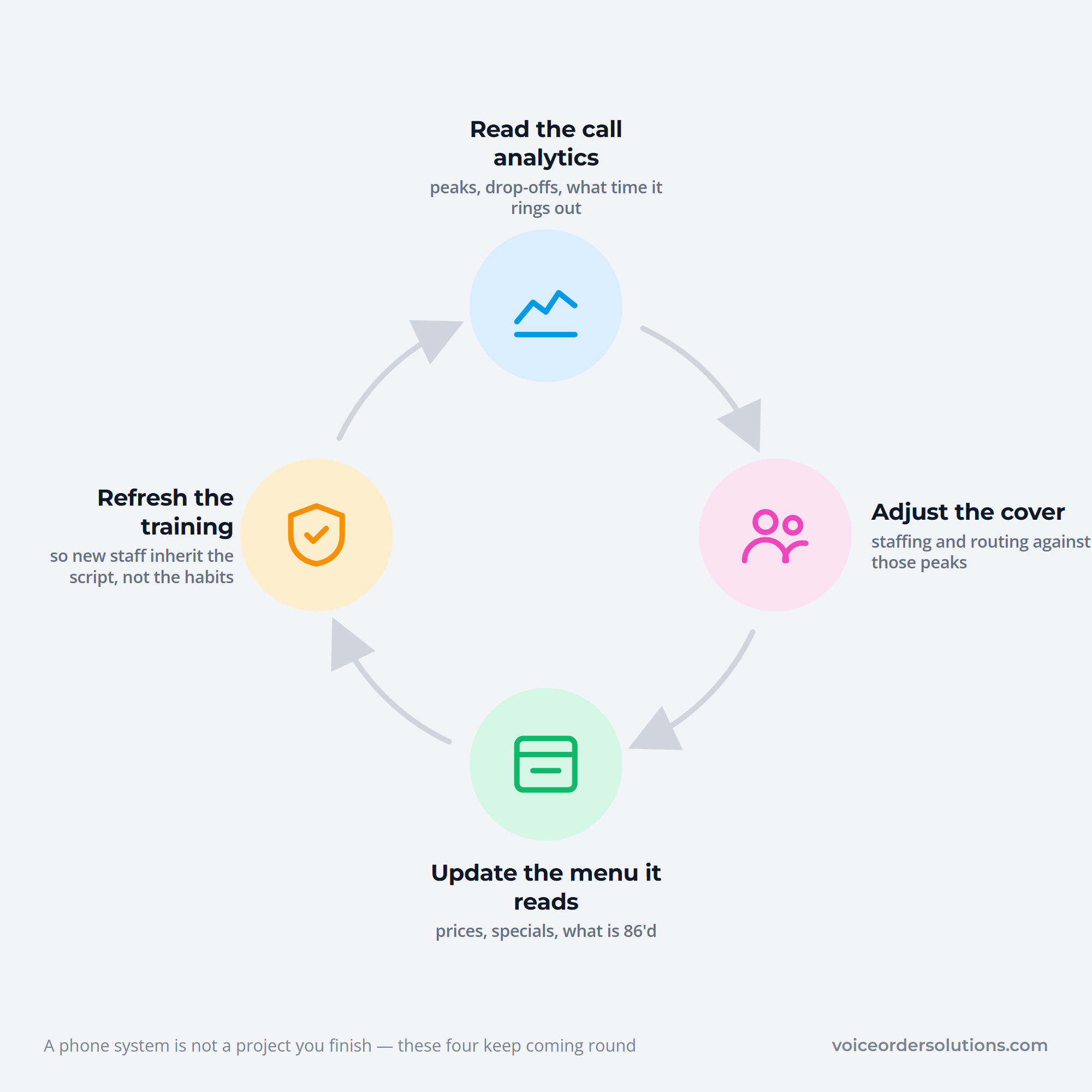
Adjust schedules and call routing during peak hours to prevent long wait times. Also, update your IVR or AI menus regularly to reflect your current menu and promotions.
Don't forget to schedule refresher training sessions. As the phone system updates or your menu changes, keep your staff sharp and ready.
Here's a quick view of ongoing tasks:
| Task | Why It Matters |
|---|---|
| Monitor call analytics | Spot missed calls and long waits |
| Adjust staffing and routing | Handle busy times smoothly |
| Update menus and prompts | Keep ordering options up to date |
| Run refresher training | Maintain staff confidence and skills |
By following these steps, you'll maximise the benefits of the best restaurant phone system and speed up orders noticeably.
In 2026, using the best restaurant phone system can speed up orders and keep your customers happy.
Looking at top AI-powered phone systems first: Bite Buddy stands out with its $1.50/order pricing. It supports multiple languages and links easily to popular platforms like Toast, Square, and OpenTable. Another strong choice is Ultatel, which offers AI voice agents and cloud VoIP. Ultatel provides mobile apps and real-time analytics with prices starting around $18 per user each month.
For cloud VoIP providers with special features for restaurants:
Besides phone systems, some specialised tools add value. Podium Phones gives you AI call summaries and sends automated texts for missed calls. CallHippo and Aircall offer smart queuing and CRM integration designed for restaurants.
For your team's internal communication, Microsoft Teams Direct Routing keeps workflows connected.
For hardware, choose reliable phones like Polycom or Yealink for clear calls and durability. Most systems support plug-and-play installation and mobile apps, so your team can start quickly without hassle.
Food distributors and restaurant buyers who place restocking orders by phone should also consider VoiceOrder Solutions, a voice-powered ordering tool built specifically for the supplier ordering call. It captures spoken orders, confirms them, and transmits them directly to the distributor, saving 20–30 minutes per order compared to a manual phone call. It complements a restaurant phone system rather than replacing it, and is set up in 24–48 hours on iOS and Android.
Adopting an advanced restaurant phone system in 2026 is a smart move to speed up orders and boost your revenue. These modern systems improve call handling, reduce wait times, and minimise errors. When customers get faster, smoother service, they're happier, and that often means more repeat business. Plus, features like AI-powered assistants and cloud-based setups give you the edge over competitors still using outdated phone setups.
Before jumping into new phone technology, look carefully at how your current system handles calls. Are customers waiting too long? Do you miss orders during peak times? Knowing these pain points helps you find solutions that fit your exact needs. Then, decide what you want to achieve. Do you want faster order processing, better call management, or seamless integration with online systems?
To clarify your next steps, consider these points:
Once you've got this down, you can focus on finding the best phone system for your restaurant.
Next, don't hesitate to book demos or use free trials. Experiencing how a restaurant phone answering system works firsthand can reveal useful insights. Talk to vendors about their ability to integrate with your POS or online ordering platforms. Also, ask how easily the system can scale as your business grows.
Here's a handy checklist for the demo and trial phase:
Trying before buying helps you avoid surprises and pick a system that fits your kitchen and front-of-house team.
Once you choose the best restaurant phone system, introduce it gradually. Start with one location or during off-peak hours. This lowers risks and helps your team get used to new tools. Then, collect feedback and track improvements. Use this data to adjust settings or train staff further. Continuous optimisation is key to getting the most from your investment.
Here's why it pays to go slow and steady:
In 2026, using a restaurant AI phone system or a cloud-based phone system is no longer optional. It's essential. These technologies let you automate repetitive tasks like taking orders or answering FAQs. Cloud systems mean your phone setup stays operational during busy days or unexpected events. They also unlock analytics that help you understand customer habits and staffing needs.
To sum up, here's how advanced phone systems help you stay ahead:
| Benefit | Explanation |
|---|---|
| Faster Order Processing | AI assists with quick, error-free calls |
| Flexibility and Scalability | Cloud technology adapts to demand |
| Better Customer Experience | Reduced wait times and personalised service |
| Insightful Analytics | Data drives smarter business decisions |
By embracing these solutions, you position your restaurant for growth and happier customers. A faster, smarter restaurant phone ordering system is a genuine competitive advantage. If your operation also manages supplier ordering by phone, contact VoiceOrder Solutions to see how voice-powered procurement ordering can reduce the time your team spends on supplier calls.
A phone system for restaurant busy times keeps calls moving fast. It lets customers order or book tables without long waits. Automated menus guide callers, and some systems offer callbacks. This lowers staff stress and stops lost orders when lines are really busy.
An AI phone answering system for restaurant understands natural speech and works 24/7. It can take orders, answer common questions, and route calls smartly. This means fewer missed calls and happier customers who get help any time, not just during business hours.
Integration links your phone system with tools like POS and CRM. This means orders go straight to the kitchen and customer information is ready during calls. It helps staff work faster and makes sure customers get personal, accurate service every time.
Small restaurants need simple, cost-effective options that handle orders well and fit budgets. Features like easy setup, mobile app access, and automatic order capture save time. Look for systems that grow with your business and don't require complicated tech skills.
A restaurant phone answering system can connect different teams instantly, even across locations. It routes calls to the right person quickly and supports group messaging apps. This keeps everyone informed and helps solve problems faster on busy days.