For Food Distributors

A TradeGecko Alternative Where Chefs Order Aloud

VoiceOrder Solutions lets restaurants reach you with orders now that TradeGecko's B2B store has closed. In the app, each chef says aloud what is running short, looks over every item, then sends it to you. Stock, purchasing and accounting stay in the system you moved them to.
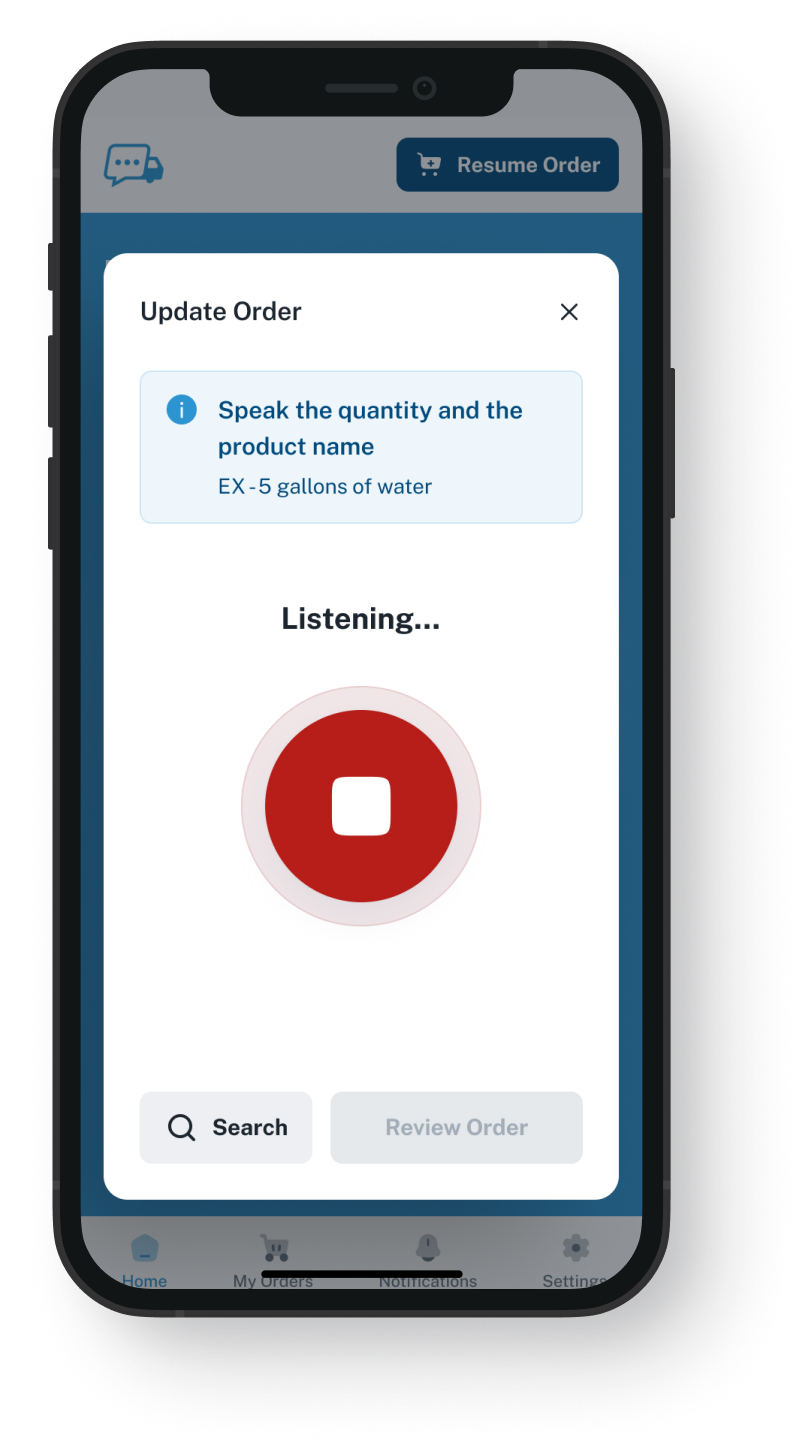
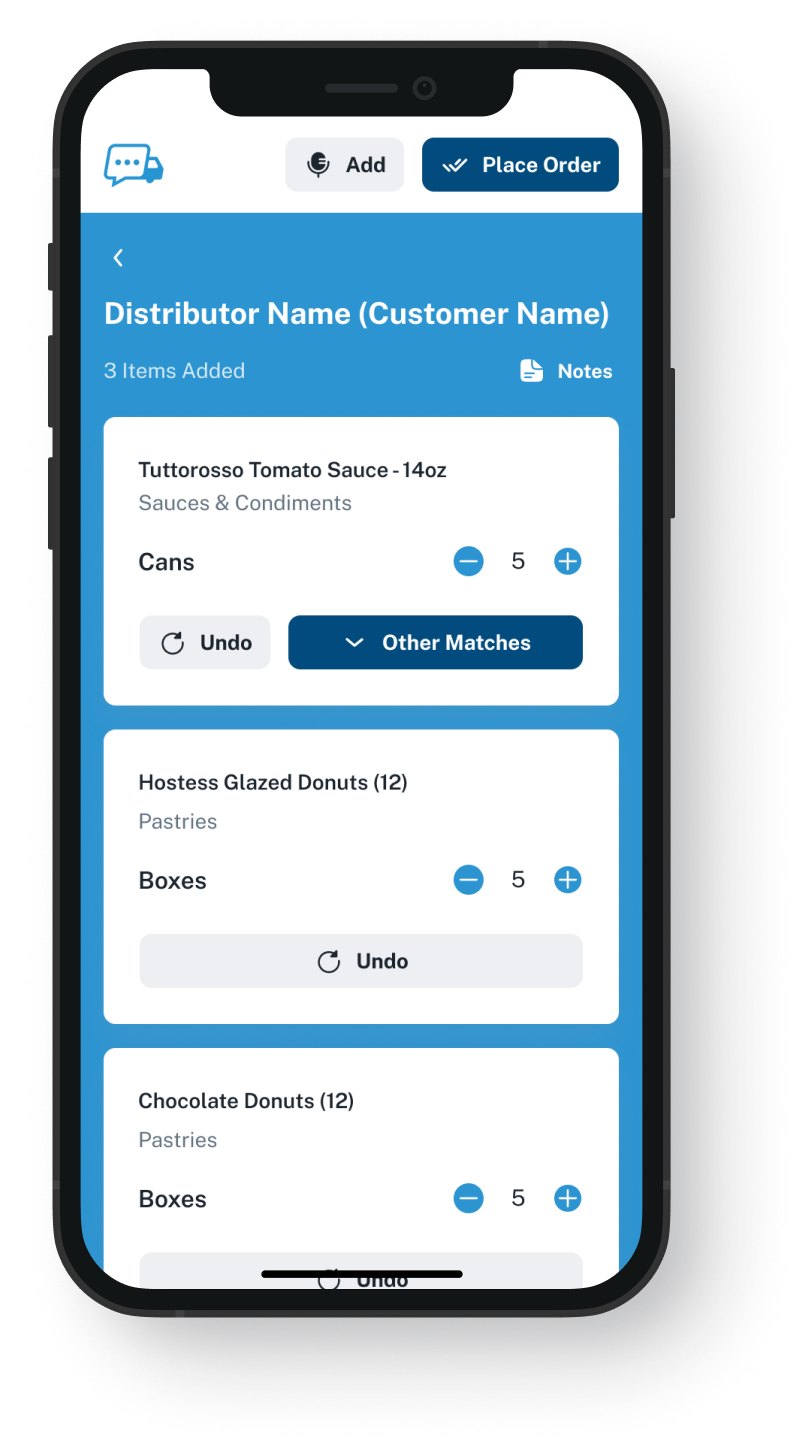
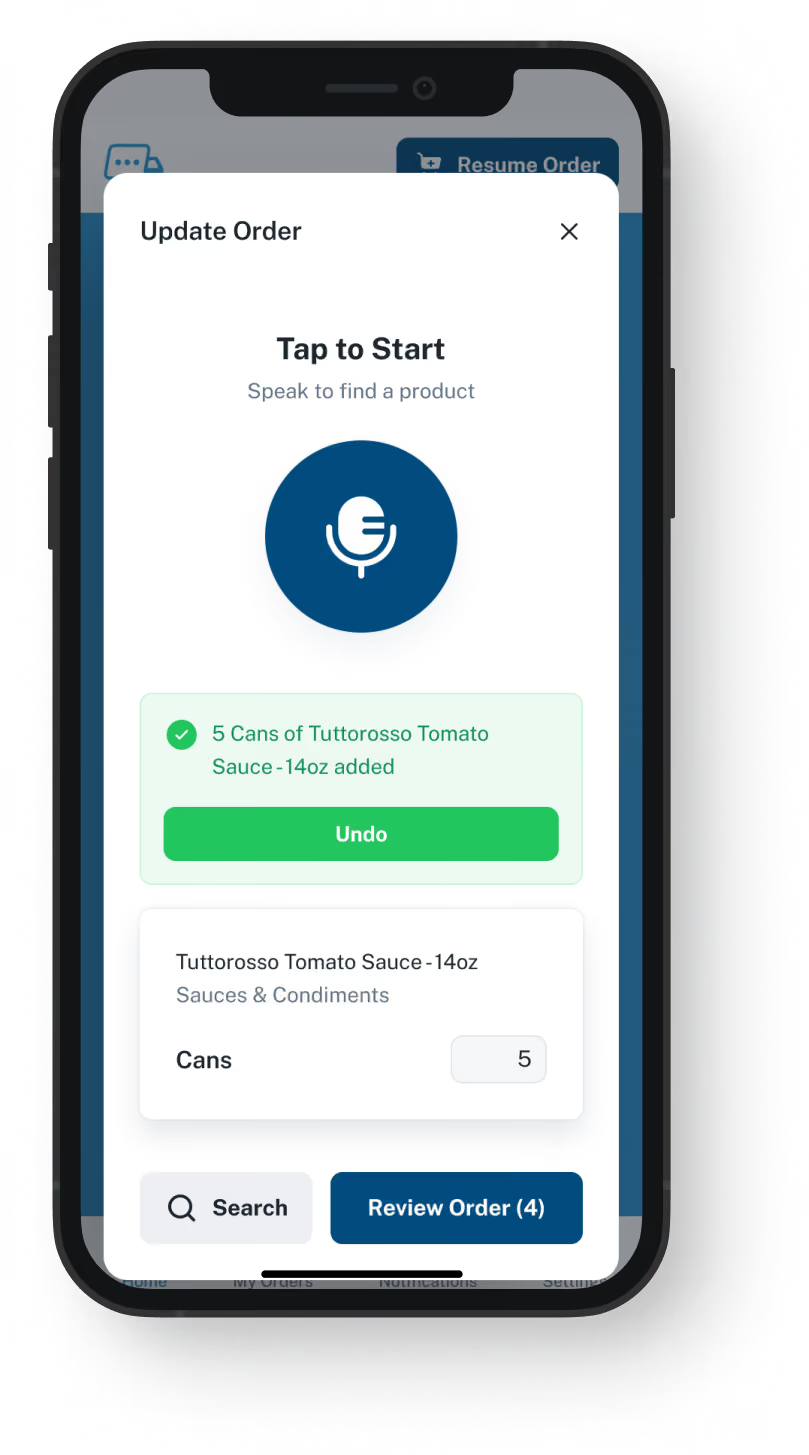
VoiceOrder app ordering screen
20-30 Min

Saved per order, compared with taking it by phone

24/7

Open for restaurant orders, nights and weekends too

24-48 Hrs

Until most distributors are set up and receiving orders

Store Then, App Now

VoiceOrder Solutions and the TradeGecko store.
One ordering job, done by voice.

VoiceOrder Solutions picks up one of the TradeGecko store's jobs again: letting restaurants send orders without calling. As a TradeGecko alternative, we cover that ordering alone: the inventory, purchasing and payments TradeGecko kept under one roof now belong to the software where you track stock.

Feature

VoiceOrder Solutions

TradeGecko's B2B store, as it ran

Each restaurant orders its own items at its own prices
The chef places the order by voice
Searched or repeated a past order, then checked out
Stock, buying and warehouses inside one product
Kept in the software you moved to
Orders can come in after hours and on weekends
An ordering app the chef installs on iOS or Android
A web store; its iPhone app was for your own team
Orders loaded into stock records with nothing retyped
Via EDI or our API if your system takes them; by email, your team keys them in
The customer checks every item before sending
Card payments taken at checkout
Billing stays with the way you invoice today
Restaurants keep their way of ordering if you change stock systems
Closed along with TradeGecko
Since The Store Closed

Looking for a TradeGecko replacement for customer ordering?

TradeGecko, renamed QuickBooks Commerce, closed for good after August 2023, so a TradeGecko competitor today can only be a replacement. If you have since moved your stock to another system, the piece that may still be missing is an easy way for restaurants to send you orders. Orders that reach you by email are still typed up by your desk, but from a list the restaurant already checked. Sent over EDI or our API, they can load straight in if your system accepts them, and the demo answers that for your setup.
Integration icon

The store and the stock records went together

TradeGecko's B2B eCommerce store was part of TradeGecko itself. When TradeGecko was retired, the store went with your stock records, so new inventory software also meant a new ordering routine for every restaurant you serve.
Integration icon

Without a store, orders fall back on the phone

If your new system has no store, or your restaurants did not take to it, those orders come back as calls, texts and voicemails for your desk to key in. Sent from the app, each one arrives already looked over by the chef, with a number and the time attached.
Integration icon

Each restaurant's own list closed with the store

In the store, each restaurant saw its usual products at that account's prices, and could copy a previous order. When the chef calls instead, that list is nowhere in view.
What You Get

What restaurants get in place of the old TradeGecko store

Dashboard mockup
Voice Ordering

Said aloud by the chef, then looked over and sent

The chef taps Push to Speak and names the items the kitchen is short of. Our app matches each one to that restaurant's guide and shows the list. The chef changes anything that came out wrong, then sends it.
Orders can be sent at any hour, weekends included
Saves 20 to 30 minutes compared with the same order by phone
A half-done order waits if the chef is pulled away mid-list
Runs on the chef's own iPhone or Android phone
Order Guides

Every restaurant gets its own items, at the prices you set

TradeGecko let you give each customer a price list of its own. We do the same job with an order guide per account: the items that restaurant actually orders, at your prices, under your item codes. You update each account's guide and prices in our admin platform. Whether price changes can come over from your stock software in bulk is a question for the demo.
Built from a spreadsheet of what each account buys
Accounts, guides and order history in one admin platform
Promos and confirmations reach accounts by notification and text
Restaurants order from their usual items, not your whole range
Dashboard mockup
Dashboard mockup
Delivery Formats

Orders arrive in a form your current system can use

A TradeGecko store order became a TradeGecko sales order by itself. Ours reach you over EDI, through our API, in QuickBooks, or by email as a PDF, Excel or Word file for your team to key in. Whether your current setup can load those electronic orders as they arrive is something a demo can confirm.
Over EDI or the API, when your setup takes it, nobody retypes it
Emailed to whoever takes orders: a rep, the desk, or both
In QuickBooks, the order is entered in your books; ask in the demo whether it carries on into stock
Each order from the app comes numbered, with the time it was sent
Inventory Visibility

Orders in view, with stock left in your software

Each order restaurants send through the app is kept on our admin screens, so your team can see what has been asked for. It does not replace your stock system: that stays in charge, and a demo shows how the levels connect.
Stock numbers come from the system you count with today
Whether stock levels can show in the app is something to ask in the demo
Purchasing and warehouse work carry on in your own software
Dashboard mockup
Getting Started

Three steps before the first spoken order

Setting up needs no login to your systems. Delivery by EDI or the API can come later, and the demo covers what your side would need for it.
1

Export your accounts and their prices

Share what each restaurant buys and at what price, for example as an export from your system.
2

We load a guide for each restaurant

We build a guide for every account under your SKUs and open it, ready for the chef's first order.
3

Restaurants begin ordering

Orders arrive checked by the chef, numbered, timed and in the format you picked.

"I used to spend hours every week ordering food. Now it's simple, super easy, and I have free time to spend on other aspects of my restaurant."

Tony Luna | Owner-Chef, Prairie Moon
Delivery Formats

Orders go out in the formats distributors already use

Each order leaves VOS as an email with a PDF, Excel or Word file, an EDI or API feed, or a QuickBooks entry. No one has to switch software to receive it.
Integration icon

Email

Integration icon

PDF, Excel, Word

Integration icon

QuickBooks

Integration icon

EDI

Integration icon

API Direct

Integration icon

iOS App

Integration icon

Android App

Integration icon

Web Admin

Integration icon

Distributor Platforms

What Goes Where

What this TradeGecko alternative takes over, and what it leaves in place

Whichever TradeGecko alternative now runs your stock keeps that job, along with purchasing and billing. Ours begins when a chef opens the app and ends when you receive the order.
Integration icon

Inventory and buying stay where they are

TradeGecko tracked stock across warehouses and raised the purchase orders for your suppliers. We do neither, so that work stays in the inventory software you rely on now.
Integration icon

Billing stays the way you run it

TradeGecko's store took card payments and showed customers their invoices. Our app has no checkout and takes no payment: you invoice and collect as you do today.
Integration icon

The next system change leaves ordering alone

Our app is not tied to any inventory product. If you change that software again, restaurants keep ordering in the same app from the same guides; how their orders get into the new system is something we check with you in a demo.

See how a kitchen's spoken list reaches you, no web store needed

In the demo we order four or five items by voice, correct one, send them off and open what a distributor's desk receives. Then we go over how that order could reach your records.
FAQ

Questions from former TradeGecko users

Does VoiceOrder Solutions work as a TradeGecko alternative?
As an alternative to TradeGecko's store, yes: your restaurants get an app to say each order in, check it and send it. For stock, purchasing, warehouses and accounting, no: those are jobs for inventory software, and ours works beside the one you run.
Would VoiceOrder Solutions be better than TradeGecko?
Only at one job: letting a chef read out the order, then confirm each item on a phone. TradeGecko did far more, from stock and purchasing to warehouses, and its store orders went straight into its own records.
What happened to TradeGecko?
Intuit bought TradeGecko in 2020 and renamed it QuickBooks Commerce. It stopped taking new customers in June 2021 and was retired in stages: many users lost it in June 2022, and the last version closed after August 31, 2023. If you are looking for a TradeGecko alternative now, the stock side may already be settled.
Will orders go straight into our stock system?
It depends on how each order is sent. VoiceOrder Solutions is a separate product, not part of any stock system. If yours takes orders over EDI or an API, an order can load with no retyping; the demo shows whether it does. By email, it arrives as a file listing every item the chef approved. Your team still enters it, but there is no call to take, write down and read back. Customers, stock and invoices stay on record where they are now; we hold each account's order guide with its prices, plus the orders sent through the app. Phoned orders get no number from us, while every order sent from the app is numbered and timed.
Can restaurants still browse a catalog and pay by card?
Not in our app. It has no catalog to browse, no checkout and no card payment. If browsing and paying online matter to your customers, an online store does that better, and if your current stock software has one, keep it. Our app is for the restaurant that wants to say what it needs and be done.
Can the app mishear an item?
It can happen: the app turns speech into items from that account's list, and it may pick the wrong one. The chef sees the full list before sending and can swap or delete anything. If a mistake still reaches you, you sort it out the way you handle any order mix-up today.
How much is it, and how fast can we start?
We quote each business and list no prices online, so ask us on the demo call. To get started, you send us each account's usual items, often as a spreadsheet; we load them in and set up each account. Your restaurants download the app, and most send a first order the same day. Most distributors are up and running in 24 to 48 hours.
Where do the TradeGecko details on this page come from?
From TradeGecko's own pages as saved by the Internet Archive in June 2020 (home, B2B store, mobile sales app and pricing), and from Intuit's notices about QuickBooks Commerce ending, all reviewed on 9 November 2026. Spot something wrong? Write to us and we will fix it.

Replace the store TradeGecko ran with an app restaurants order in by voice

Give us twenty minutes and see one spoken order go from a chef's phone to a distributor's inbox, and what a desk would receive.