For Restaurant Operators

Not A TouchBistro Alternative: Change Only Your Ordering

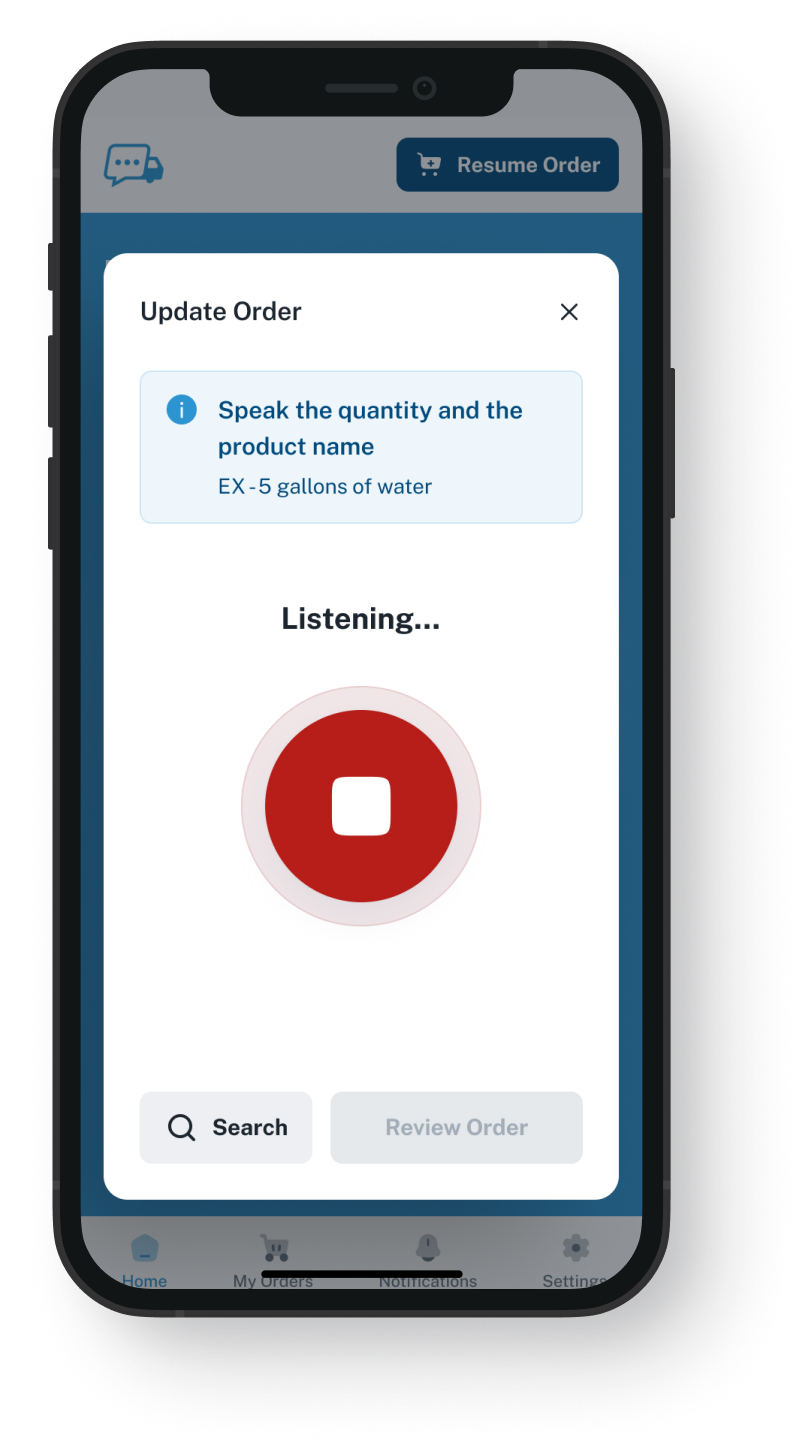
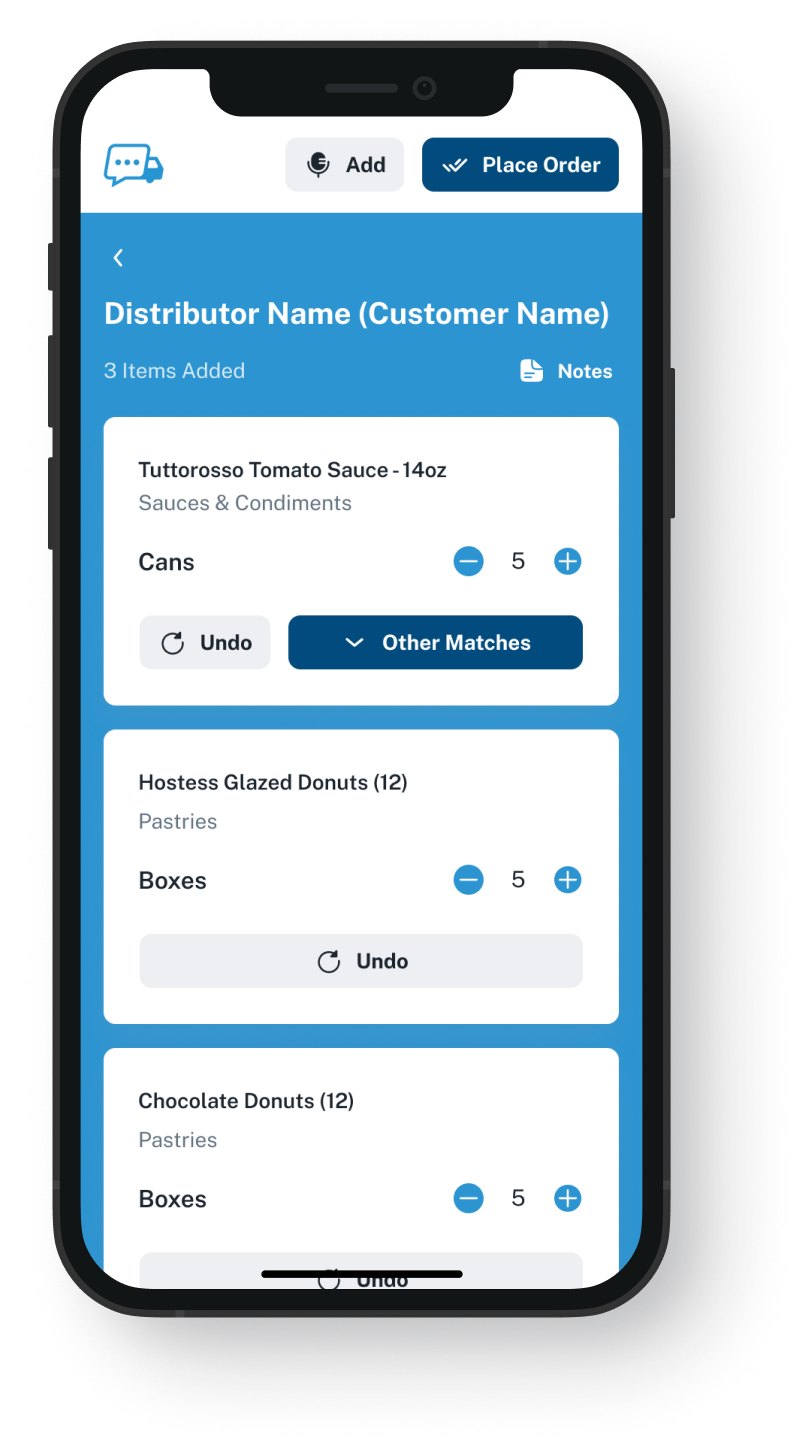
If supply ordering, not service, is why you are looking, keep your POS and speak your orders into our app. Look over each line from your distributor's order guide (your regular items, priced for your account), then send, and the order gets a number. This needs a distributor that has VoiceOrder Solutions.
VoiceOrder app ordering screen
20-30 Min

saved per order, compared with calling your rep

Same Day

is when most kitchens get started, after the distributor adds them

24/7

to place supply orders, after service or before opening

Your POS Stays Put

TouchBistro + VoiceOrder Solutions
vs TouchBistro on its own

Here is what changes for the food you buy, not the meals you sell. The ticks for service, counts and purchase orders are TouchBistro's own, some from add-ons it sells. Voice ordering adds a spoken, checked order with distributors on our app, and needs no TouchBistro alternative.

Feature

TouchBistro + VoiceOrder Solutions

TouchBistro on its own

Tables, payments and tableside orders
Say what you need, then look over the lines
Not listed on their site
Counts and a suggested order for each vendor
Purchase orders emailed, or sent online to some vendors
Items and prices loaded by the distributor before you order
For distributors on our app
Prices updated from invoices, with Profit Management
Recipe costing and food cost reports
Order confirmed back to your phone
Not described on their site
Partner inventory tools linked to the POS
An app for iPhone and Android phones
Which Reason Is Yours?

Why people look for a TouchBistro competitor

An alternative to TouchBistro means swapping the POS and retraining every server on it. Sometimes the reason is service. Sometimes it is how you order from your distributor, and that part can change on its own.
Integration icon

If it's the register or the floor

If the reason is payments, the floor plan or the menu screens, the TouchBistro alternative you need is another POS. VoiceOrder Solutions is not one.
Integration icon

Supply ordering is sold separately

TouchBistro sells supply ordering in two add-ons, Inventory Management and Profit Management, quoted apart from the POS. If you run neither, and no partner tool, your distributor gets the order as it does today: by phone, by message or through the rep.
Integration icon

Built on screen, not spoken

Inventory Management turns the suggestion for each vendor into a PO (purchase order). It emails the PO, or sends it online to select vendors. Both paths have you build the order on a screen. Neither, on their site, has you say it aloud.
What You Get

If the food order is the problem, no TouchBistro alternative is needed

Dashboard mockup
Voice Ordering

Say your list standing in the walk-in

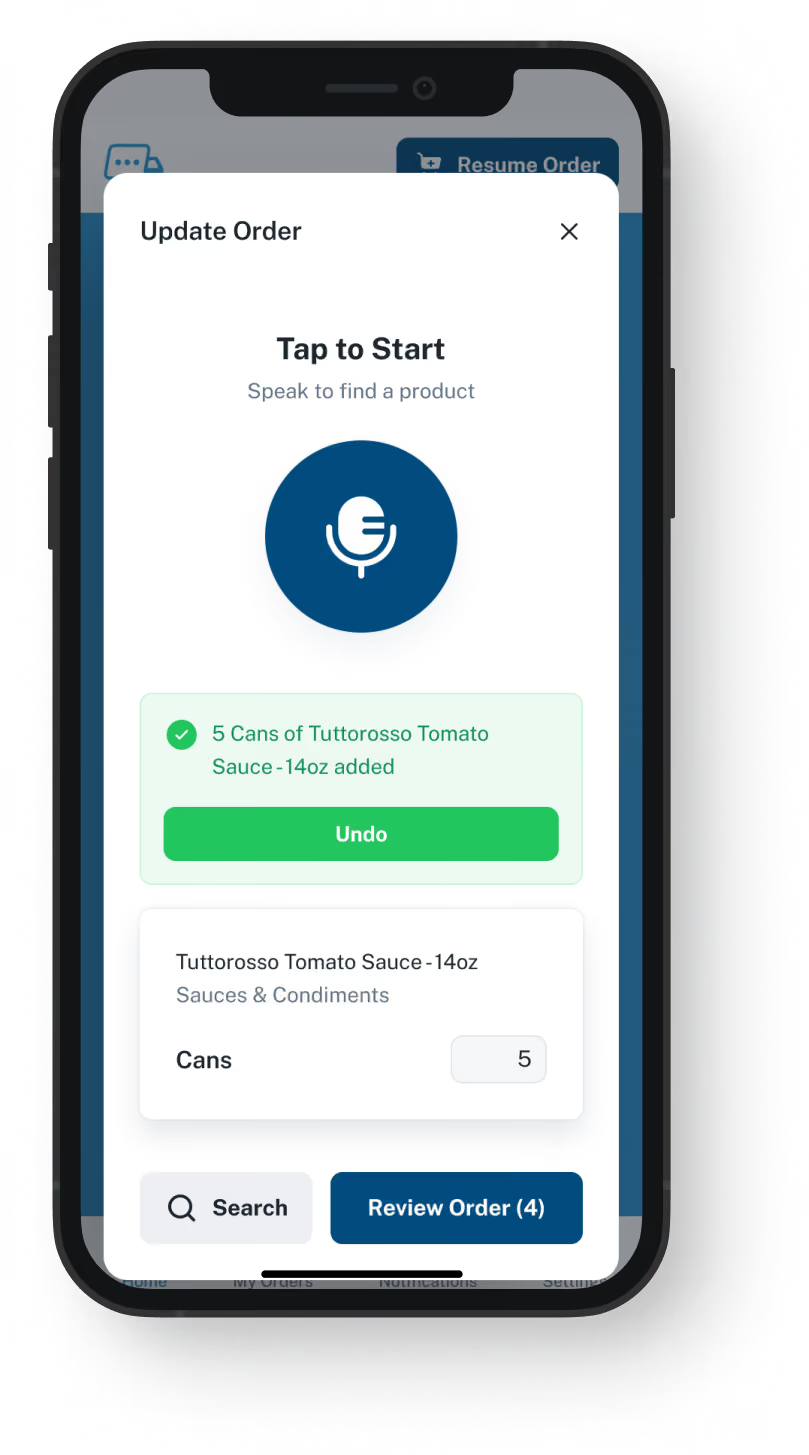
In the walk-in or dry storage, say what you need into the app. What you say shows up as lines from your order guide. Fix an amount or remove a line, then send.
Nothing goes until you have checked the lines
Order at 1 a.m. if that is when you finish
Saves 20 to 30 minutes compared with the same order by phone
Pulled onto the floor mid-order? It waits, saved
The Distributor's List

Your usual items, already priced for your account

The distributor loads the products you buy from them, at the prices they set for your account, under their own item codes, and can change that guide from their side.
Only what you normally buy, not their full catalog
The prices on your account, line by line
No product list for you to type in
Your rep stays your rep
Dashboard mockup
Dashboard mockup
Your Copy Of The Order

Numbered, dated and timed, every time you send in the app

When you send from the app, you get a number, the day and the time on the order, and a confirmation reaches your phone. If cases are missing when it arrives, give your rep that number.
Records the minute you sent it
Confirmation by notification or text
A number to quote when something is missing
Calls and voicemails still get no number from us
Your Front Of House

Servers keep the screens they know

Tables, payments, the menu, tableside orders and guests' online orders all stay in TouchBistro. Nobody on the floor has new software to learn, because our app is only for ordering from your distributor, on your own phone.
Guests keep ordering through TouchBistro
Your counts and recipes are untouched
Sales reports come from the POS as before
Invoices are handled as they are today
Dashboard mockup
Getting Started

How a kitchen gets started

Your distributor sets up the account, so there is nothing to install on the POS and no new hardware.
1

Make sure your distributor has it

If they offer it, they create your login and load your guide. Unsure who to ask? Contact us to find out.
2

Sign in on your phone

Download the app and log in. Your guide is waiting there.
3

Read it out, look it over, send

Speak the items, look over the lines, and send the order.

"I used to spend hours every week ordering food. Now it's simple, super easy, and I have free time to spend on other aspects of my restaurant."

Tony Luna | Owner-Chef, Prairie Moon
Delivery Formats

Orders go out in the formats distributors already use

Each order leaves VOS as an email with a PDF, Excel or Word file, an EDI or API feed, or a QuickBooks entry. No one has to switch software to receive it.
Integration icon

Email

Integration icon

PDF, Excel, Word

Integration icon

QuickBooks

Integration icon

EDI

Integration icon

API Direct

Integration icon

iOS App

Integration icon

Android App

Integration icon

Web Admin

Integration icon

Distributor Platforms

Use Both

Which orders move to our app, and which stay with TouchBistro

This is not a TouchBistro replacement. TouchBistro runs the dining room, and add-ons such as Inventory Management handle counts and costs. Orders move over only for distributors on VoiceOrder Solutions: spoken from the walk-in, then reviewed before they leave.
Integration icon

TouchBistro gets no copy of the order

Nothing you send from our app turns into a PO in TouchBistro's Inventory Management. If you track those items there, record the delivery there yourself, as you would for any order made outside it.
Integration icon

Partner inventory apps stay linked

A partner inventory app linked to TouchBistro keeps its link. Count in it as you do now. Where a distributor uses our app, read out the items you need and check the lines.
Integration icon

Leave online vendors where they are

If a vendor already takes your orders online through TouchBistro, leave that vendor there. Our app is for a distributor you still reach by phone or through the rep.

Follow one sample order from the walk-in to a distributor

Our 20-minute demo speaks a short list into the app, changes one item, and shows what lands at the distributor's end.
FAQ

Questions from restaurants on TouchBistro

Do I need a TouchBistro alternative to speak a supply order?
No. All it takes is a distributor with our app. Then you talk that order into the app, so there is no call to make.
Is VoiceOrder Solutions better than TouchBistro?
The two are built for separate jobs. Payments, tables, tableside orders, guest online orders, staff and stock counts: we do none of these, and we are not a POS. Ours is the order to a distributor on our app, spoken aloud and checked one item at a time. In TouchBistro's add-ons, you put each order together on screen; if you prefer to say it, that takes no TouchBistro alternative.
Do VoiceOrder Solutions and TouchBistro connect?
No. They are separate companies, each with its own help desk, and they share no data. Whatever you say in our app is sent to your distributor alone; neither TouchBistro nor a tool linked to it gets a copy.
If my reason for leaving is the POS itself, will this help?
Not with that part. Payments, tables or menu screens need a different POS, and we do not make one. If you move to another POS later, ordering in our app carries on as before, because it was never connected to TouchBistro.
I already order through TouchBistro Inventory Management. How does this fit?
Stay with it for the vendors you order from online or by email. Where a distributor has our app, you can speak that order instead. Send each distributor's order from one place only, so nothing is ordered twice.
What happens if I say "six" and the screen shows sixteen?
You catch it on the review screen before sending: change the amount, swap the item, or delete the line. That review is the safeguard, so a hurried glance can still let a mistake through. A phoned-in or voicemail order gets no number from us; only orders placed in the app carry one.
How do I get set up, and what does it cost?
Through your distributor: they open your account, and most kitchens place a first order the same day. If yours does not have it, order from them as you do today, and get in touch: we will work out who you should talk to. For cost, ask the distributor you would get the app from; we publish no price. TouchBistro lists prices for its POS plans and gives quotes for its back-office tools.
Where do the TouchBistro details on this page come from?
From touchbistro.com as we read it on 9 November 2026: its POS page, the pages for both back-office add-ons, plus pricing and integrations. On that date we saw nothing there about ordering supplies by speaking. Inventory Management is offered in the continental US and in Canada outside Quebec. We left out TouchBistro's own customer counts and savings claims. If any of it has gone out of date, send us a note and we will put it right.

Ordering supplies was the reason? Keep TouchBistro and speak your next order to the distributor.

Ask your distributor whether they offer VoiceOrder Solutions. If they are hard to reach, ask us and we will check.