For Food Distributors

Not A Sana Commerce Alternative: Calls That Place Orders

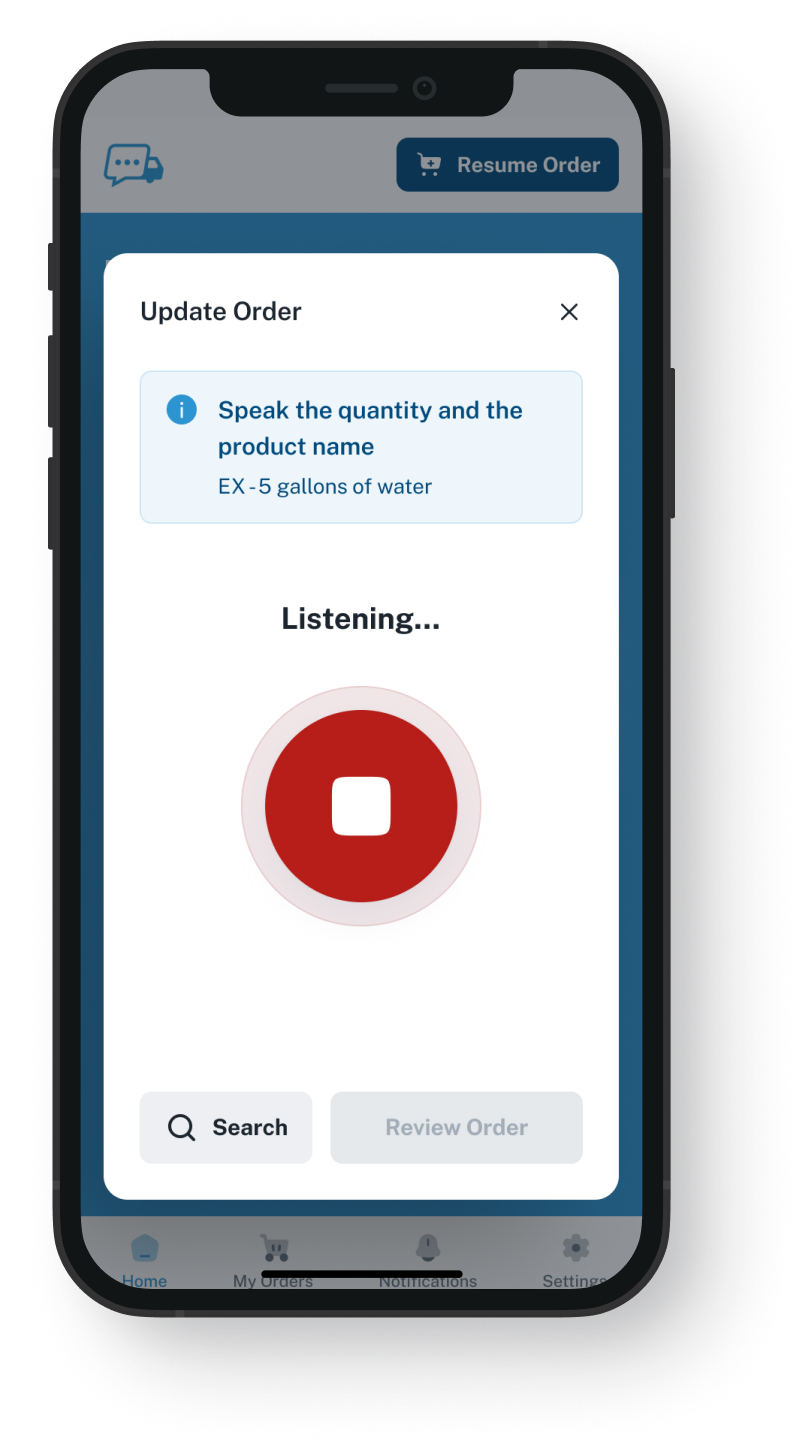
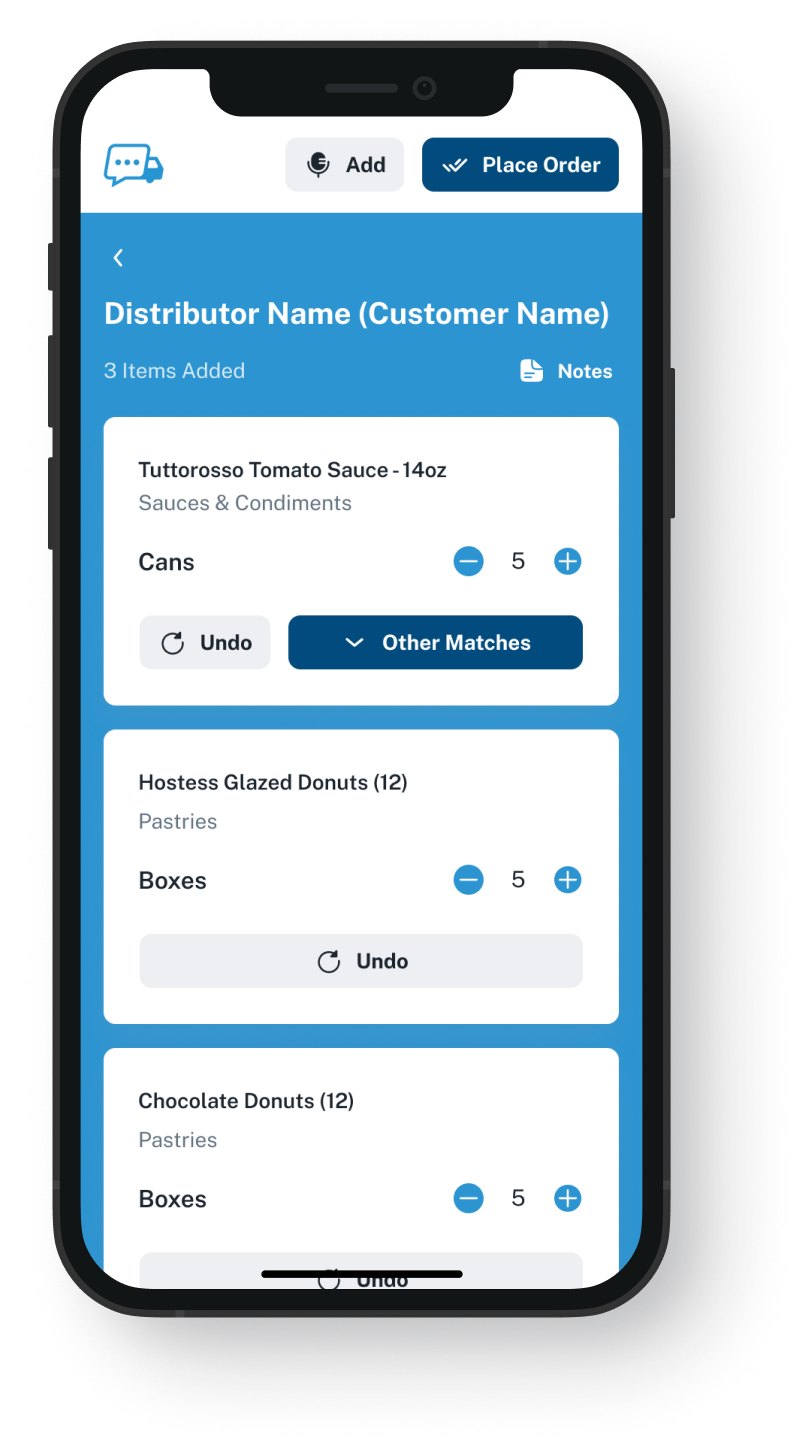
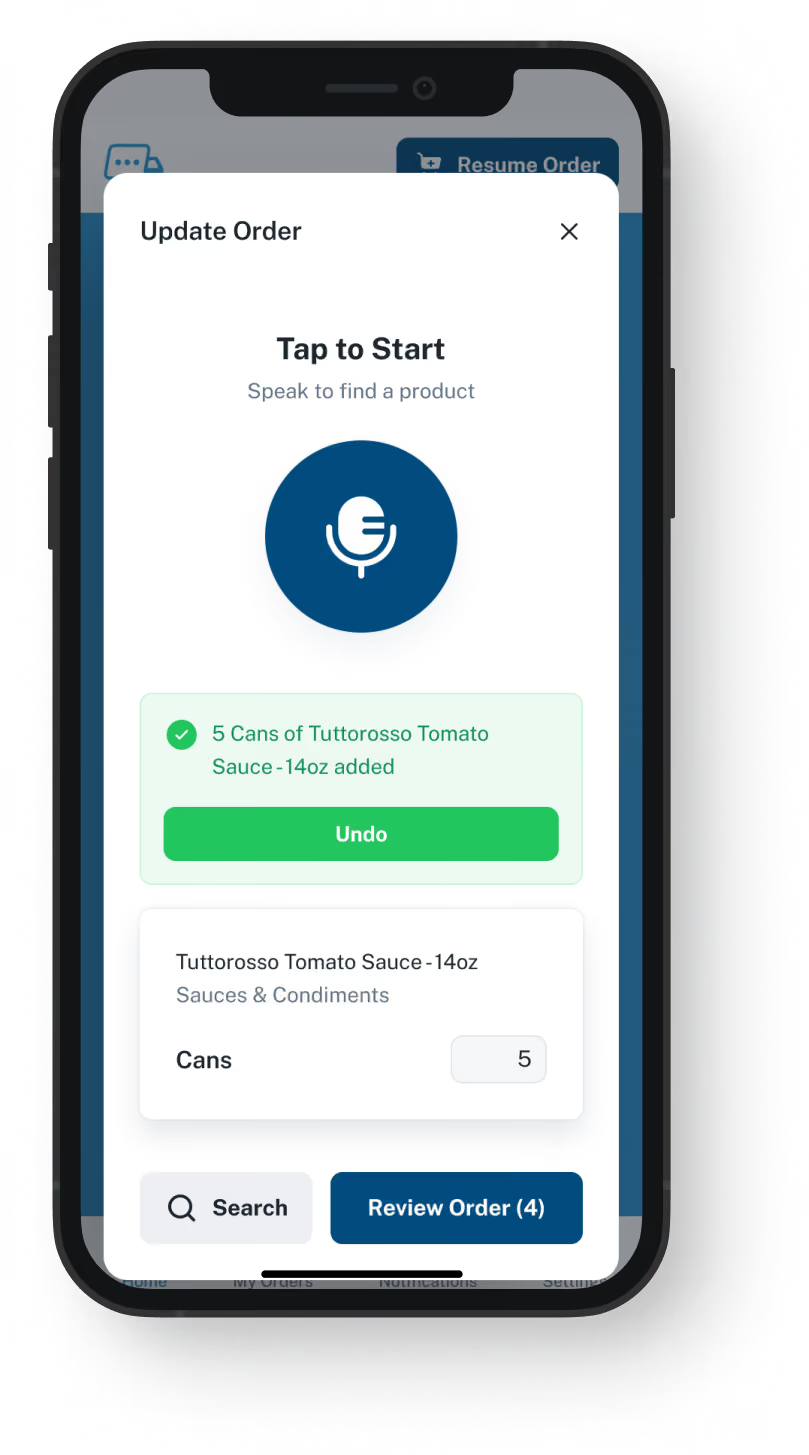
Rather than calling, a chef can open the VoiceOrder Solutions app, say what the restaurant needs, fix any item and send it. Sana Commerce still puts each account's prices and your stock online.
VoiceOrder app ordering screen
20-30 Min

Saved on each order a chef speaks instead of phoning

24/7

Orders taken after close, with nobody at the desk

24-48 Hrs

Setup for most distributors, nothing changed in Sana

Questions And Orders

Sana Commerce plus VoiceOrder Solutions.
Sana answers questions about prices and stock. Calls where the chef reads out an order can move to our app.

Sana's web store shows each customer their prices, your stock and what they ordered before, and lets them reorder once they log in. Our app is for the chef who reaches for the phone instead: they speak every item, see it listed and send it once it is right. This is not a Sana Commerce alternative: you run both, as two separate products with no link set up between them.

Feature

Sana Commerce + VoiceOrder Solutions

Sana Commerce on its own

Each customer's own prices, taken from your ERP
A chef who phones today can say the order and check each item
Taken by phone, then entered in your ERP by your team
Live stock and back-in-stock dates shown online
Order templates and reorders from past online orders
A chef who once phoned now sends an order that our app numbers and times
Numbered once it is keyed in by hand
Web store orders load into your ERP as they are placed
An app the chef installs on an iOS or Android phone
A web store that opens in the phone's browser
Sales reps can place an order on a customer's behalf
Invoices, shipment status and returns online
The Calls Sana Leaves

What sends food distributors looking for a Sana Commerce competitor

Sana Commerce sets out to move customers online, from questions about what things cost to routine reorders, all behind a store login. That leaves the chef who reads out every item over the phone, and a Sana Commerce alternative that is just one more web store would not reach that chef either. Move that chef to our app and what reaches you by email still gets keyed into your ERP, but from a list approved by the chef before it was sent.
Integration icon

Sana moves questions and reorders online

Sana's homepage asks whether your customers still phone you about prices or stock, and it moves routine reorders online too. It does both by putting what your ERP knows on a screen the customer logs in to.
Integration icon

Some calls are not questions: they are the order

A chef phoning after service is not asking about anything: they are reading out a list from the walk-in. That call is the order, and someone at your desk has to take it down.
Integration icon

Not every chef takes to shopping online

In Sana's case study of a Sydney food distributor selling to restaurants and cafes, service staff helped customers learn the web shop, and some needed more onboarding than others. A chef who never takes to the web store is still on your phone.
What You Get

Not a Sana Commerce alternative: what the chef who calls gets instead

Dashboard mockup
Voice Ordering

The chef says the order as they would on the phone

Standing at the walk-in, the chef names what the kitchen needs. Our app matches each spoken item to that restaurant's guide and lists them, so the chef can change an item or an amount before sending. Speaking replaces searching and filling a basket.
Each item is on screen to check before the order goes
Orders can be sent at any hour, including after you close
Saves 20 to 30 minutes compared with the same order by phone
If service interrupts, the order is saved where the chef stopped
Order Guides

Each restaurant orders from its own guide

Export what each restaurant usually orders, with its prices, from your ERP. We load that as the account's guide under your own item numbers. You update each account's guide and prices in our admin platform, where you also manage the accounts. Whether price changes can come over from Sana or your ERP in bulk is a question for the demo.
The chef sees the restaurant's regular items, not your whole range
Each item carries the price you set for that account
Edit a guide in the admin platform whenever an account changes
Setup runs from a spreadsheet, with nothing installed
Dashboard mockup
Dashboard mockup
Delivery Formats

Arrives in a format your desk already handles

A finished order goes to your team by email, attached as a PDF, an Excel sheet or a Word document. It can also go out over EDI, through our API or into QuickBooks, though a QuickBooks order lands in your books, not in your ERP's sales orders. Whether an EDI or API order can load straight into your ERP depends on how yours is set up, and the demo shows that.
Addressed to a rep, a manager or your full order desk
Over EDI or the API, when your setup takes it, nobody retypes it
The file shows each item the chef approved
Picking and invoicing still run from your ERP
Inventory Visibility

Order activity and stock in one view for your team

VoiceOrder Solutions gives you real-time inventory visibility tied to order activity. It does not replace your stock system: that stays in charge, and a demo shows how the levels connect.
Counts live in your ERP; Sana still shows them online
Your team gets fewer stockout surprises
Stock numbers come from the system you count with today
Sana still tells customers when sold-out items return
Dashboard mockup
Getting Started

Adding the app beside Sana Commerce

You send each account's regular items, often exported as a spreadsheet. We build the guides, and the chefs download the app.
1

Send us an ERP export

A list of what each account buys, with its prices and your item codes, is usually all we need.
2

Start with the restaurants that phone

Each one gets its guide and an account, then the chef downloads the app and is ready to order.
3

Spoken orders reach your desk checked

Each one carries an order number and the time it was sent, in whichever format you picked.

"I used to spend hours every week ordering food. Now it's simple, super easy, and I have free time to spend on other aspects of my restaurant."

Tony Luna | Owner-Chef, Prairie Moon
Delivery Formats

Orders go out in the formats distributors already use

Each order leaves VOS as an email with a PDF, Excel or Word file, an EDI or API feed, or a QuickBooks entry. No one has to switch software to receive it.
Integration icon

Email

Integration icon

PDF, Excel, Word

Integration icon

QuickBooks

Integration icon

EDI

Integration icon

API Direct

Integration icon

iOS App

Integration icon

Android App

Integration icon

Web Admin

Integration icon

Distributor Platforms

Web Store And App

What Sana Commerce keeps doing, and where our app fits

We are not an alternative to Sana Commerce: Sana keeps serving the customers who log in, and the app is there for chefs who only ever call to order.
Integration icon

Keep web store customers on Sana

Restaurants already ordering online through Sana get their own prices and reorder from saved templates there. Leave them where they are.
Integration icon

App orders can still show in Sana's account pages

Sana says each customer's account pages list orders entered straight in your ERP as well as web orders. When an order from our app reaches your ERP, it can appear there beside that restaurant's other orders.
Integration icon

New and seasonal products stay on Sana

The guide we build for a restaurant starts from the items it usually orders. To show chefs your wider range or a seasonal catalog, Sana is still the place.

Watch a chef's regular call arrive as an order they approved

The demo takes 20 minutes. We dictate one order, switch out a product, send it, then open what your desk receives. Then we go over how that order could get into your ERP, while Sana stays as it is.
FAQ

What distributors on Sana Commerce ask

Do we need a Sana Commerce alternative for spoken orders?
No. Sana Commerce carries on with its online work, from account pricing to web orders. Our app is for each chef still calling: they read each item into it, look the list over, and what was a call reaches you already checked.
Is VoiceOrder Solutions better than Sana Commerce?
At one thing: the order from a chef who likes saying it more than logging in to shop. Sana covers far more, from quotes and payments to returns, so we run alongside it and are not a Sana Commerce alternative.
Does Sana Commerce have its own app or voice ordering?
Not that we found. Its store is built to work in a phone's browser. The older Sana mobile app in its help pages was made for sales agents, and we did not find it on the current site. We searched for voice or phone-order tools built for Sana and came up empty. Ours is an app on the chef's own phone.
Will my desk still type these orders?
It depends on how they reach you. Our app and your web store come from different companies, each supporting only its own software. Through EDI or the API, our order can go into your ERP with no retyping if your system takes orders that way, and the demo will show whether it does. By email, it arrives as an attached file, and your desk enters it from that. What your desk saves is the call: no order to take down, write out and read back, just a list the chef looked over before sending. Looking it over does not rule out mistakes, since speech becomes items from the guide and a chef can miss a wrong one or change their mind after sending. Your ERP stays the record for customers, stock and invoices; we hold each restaurant's order guide, with the prices you set, plus the orders sent through the app. A phone call still gets no order number from us.
Will an app order show up in Sana?
Not as a web order, because it never passes through the Sana store. Once your ERP has it, it is an ERP order, the same as one your team took by phone, and Sana can still list it on that customer's account, since Sana shows ERP orders there too.
Sana already cut our price and stock calls. Which calls are left?
Often, the order calls themselves. Sana goes after routine reorders too, with order templates, reorders of earlier purchases and subscriptions, for customers signed in to the store. Any calls still coming from chefs who would rather read out a list than open a store are the ones we built the app around.
When could we start, and what does it cost?
Setup is 24 to 48 hours for most distributors, with Sana and your ERP left untouched. You send what each account regularly orders, often exported from your ERP. We load those items into our admin, set up each account, and the restaurants get the app on their phones; most send in a first order that same day. Sana publishes two timelines for building its own store, three or six months with someone from your team on the project. Sana asks you to request pricing for each plan, and we quote per distributor as well. A Sana Commerce replacement would put a new store in front of web customers already happy on Sana, which is not what we offer.
Where do the Sana Commerce details on this page come from?
From sana-commerce.com, as we found it on 9 November 2026: the homepage, the distribution, wholesale, pricing, onboarding, self-service portal, order management and integration pages, and its food-distributor case study, plus Sana's help pages on its older mobile app. We checked for add-on ordering tools that same day. Seen a detail that is no longer right? Email us and we will update the page.

Sana keeps your online store. Chefs on the phone get an app to talk into.

Book twenty minutes to see how a chef's usual call turns into an order they checked in the app, and to go over which calls Sana already handles for you.