For Food Distributors

Not An inFlow Inventory Alternative: For Kitchens Still Calling

Give the kitchens who still phone you, even with an online Showroom promising "No more phone orders," an app to order in. Their chef says each item, fixes any that came out wrong, and sends the checked list. inFlow Inventory still looks after stock, the Showroom and your sales orders.
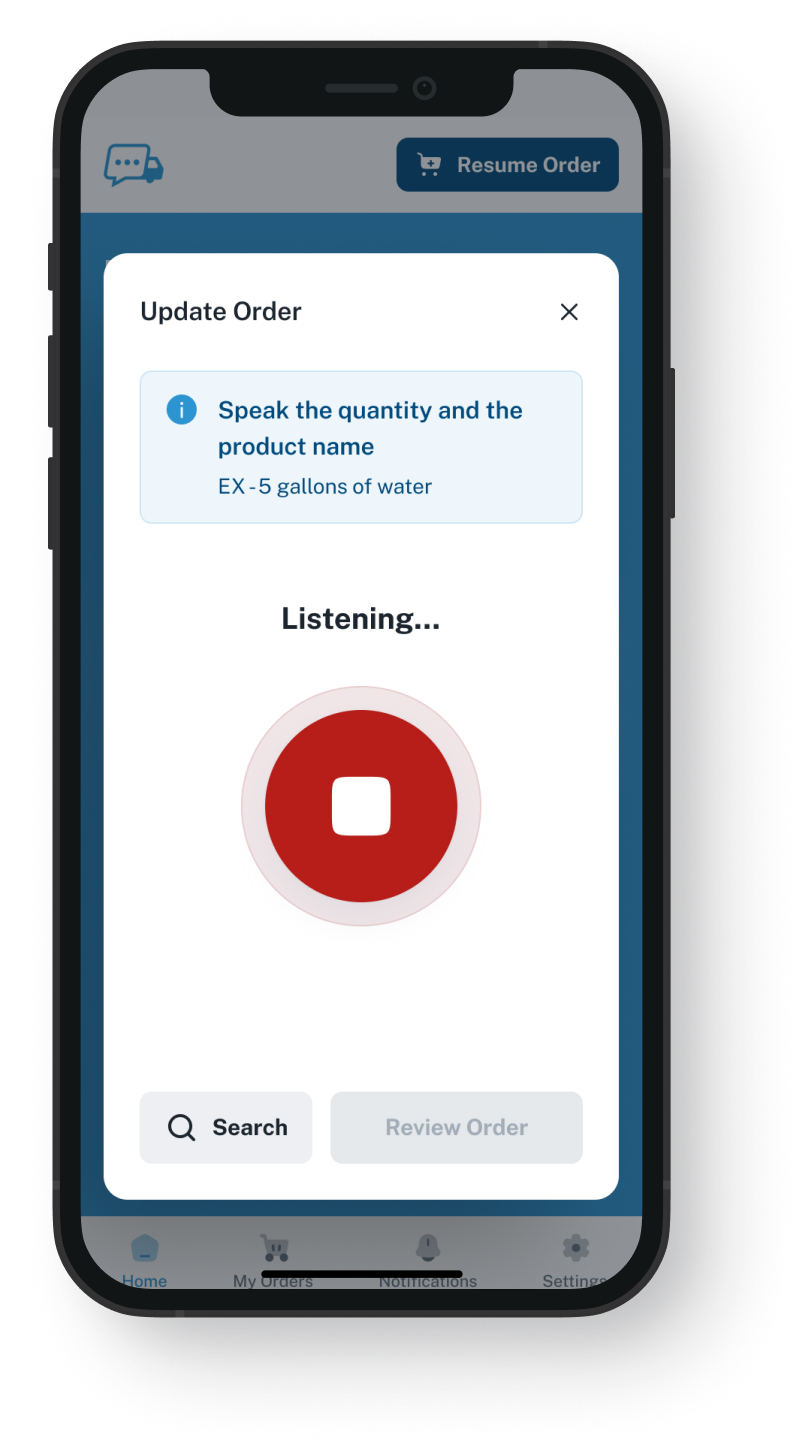
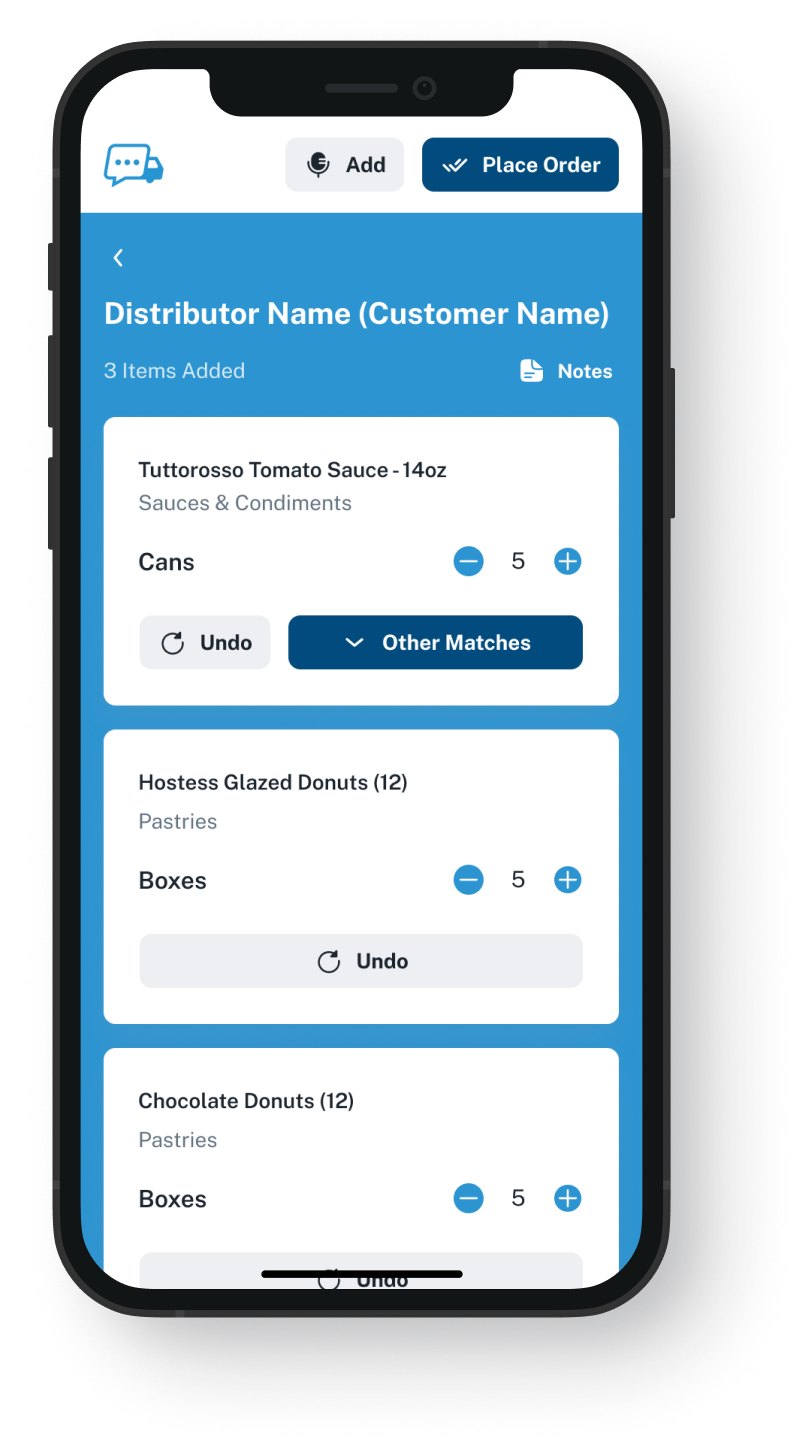
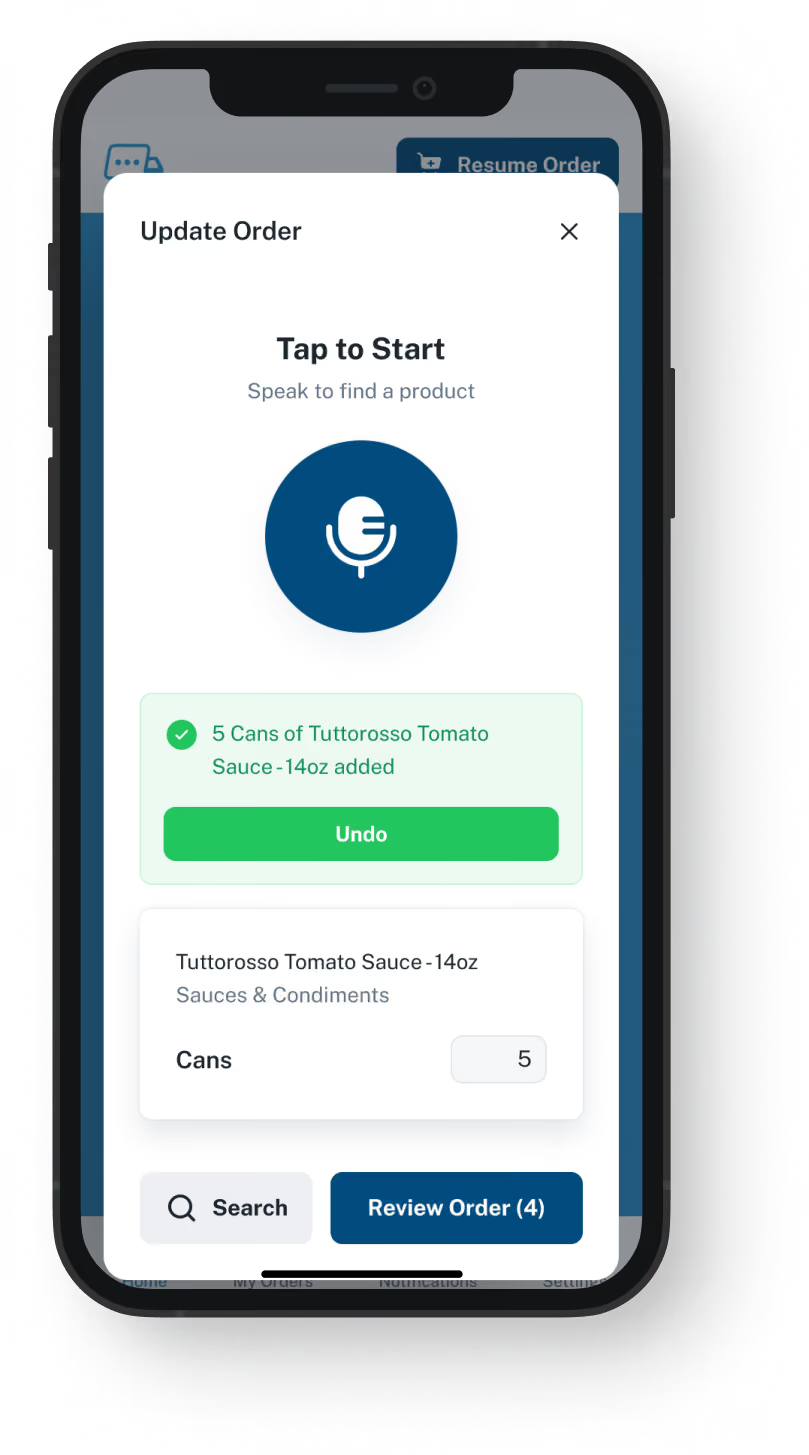
VoiceOrder app ordering screen
20-30 Min

Saved on each order that replaces a call

24/7

Kitchens can send an order, whatever the hour

24-48 Hrs

To go live, for most distributors

inFlow, Plus Spoken Orders

inFlow Inventory plus VoiceOrder Solutions.
One more way for kitchens to order.

A chef who would rather not scroll through products can say the items out loud instead. inFlow Inventory keeps handling stock, invoicing and the Showroom. What changes is how a chef who calls today gets the order to you: by saying it into an app. This is not an inFlow Inventory alternative: the two stay separate, and nothing built into either one joins them.

Feature

inFlow Inventory + VoiceOrder Solutions

inFlow Inventory on its own

Stock by location and bin, with counts and reorder points
The chef names the items at the shelf, then checks them over
Not listed on their site
Showroom: a private online catalog per customer, at that customer's prices
Lot numbers and expiry dates, traceable for recalls
Order without scrolling a catalog
Showroom: browse, add to cart, check out
A restaurant that used to phone now sends a numbered, timed order
A call your team types into a sales order
Barcode scanning, picking, packing and shipping
A mobile app for your staff: sales, stock checks, receiving
Invoicing and accounting sync
Why People Look

The usual reason to look up an inFlow Inventory competitor

Look up an inFlow Inventory alternative and the reason is often a set of kitchens Showroom never won over: their chefs would rather name items than shop for them, so they keep calling. Once they order in our app, an emailed order still gets keyed into inFlow by hand, though from a list its chef has reviewed. Through EDI or our API it can skip that step if your setup allows it; we check that with you in the demo.
Integration icon

Showroom is built for shopping

inFlow describes its Showroom as a place to browse products and add them to a cart, "just like on an ecommerce site." That suits an account choosing from pictures. A chef at the walk-in who already has the list in mind wants to name those items, not scroll for them.
Integration icon

Not every call stopped

inFlow says a Showroom order flows straight into inFlow, so nobody has to pick up the phone. For the kitchens that use it, that holds. The ones that never open it go on phoning, and someone at your desk turns each call into an inFlow sales order.
Integration icon

Showroom starts with an emailed invite

Each customer gets into Showroom through an email invite. The inFlow Learning Center says an invite is valid for two weeks. A chef who never opens it keeps calling, and that order still lands on your desk.
What You Get

Not an inFlow Inventory alternative: what we add for the kitchens that call

Dashboard mockup
Voice Ordering

Said at the walk-in, sent from the same spot

The chef presses Push to Speak, names each item, and our app matches it to that restaurant's own guide. The chef fixes any item the app misheard, then sends.
The chef looks over every item first
Takes orders 24/7, Sundays and holidays too
Saves 20 to 30 minutes compared with the same order by phone
An interrupted order is saved and picks up where the chef stopped
Order Guides

Each account's usual items, from your inFlow export

Send us an export from inFlow of what each account normally buys, with its prices. We load that list as the account's guide under your own codes, so each chef orders from that restaurant's usual items. You keep each guide's prices current in our admin; whether they can update from inFlow is a question for the demo.
Not your whole range, just what that account buys
Prices set by you, one account at a time
Add or drop items in our admin when an account's buying shifts
Setting up changes nothing inside inFlow
Dashboard mockup
Dashboard mockup
Delivery Formats

Orders reach your desk by email, EDI or the API

Each order leaves as an email with a PDF, Excel or Word file, or travels over EDI, through our API, or into QuickBooks. Whether EDI or the API can bring it into inFlow at your end is a question the demo answers.
Sent to one rep or a shared order inbox
Over EDI or the API, when your setup takes it, nobody retypes it
Each app order carries a number and the time it was sent
Picking and shipping carry on in inFlow
Inventory Visibility

Stock in view while orders come in

VoiceOrder Solutions gives you real-time inventory visibility tied to order activity. It does not replace your stock system: that stays in charge, and a demo shows how the levels connect.
Counts stay in inFlow; ask in the demo how its levels connect
Fewer stockout surprises for your team when a big order lands late
Stock numbers come from the system you count with today
inFlow tracks lots and expiry, as it does now
Dashboard mockup
Getting Started

From inFlow export to first spoken order

Your part is one export out of inFlow; loading guides and opening accounts is ours.
1

Send us an inFlow export

A spreadsheet listing what every account orders and pays, with your own codes, is usually all we need.
2

Guides loaded, accounts opened

We load each guide and open its account. The chef downloads the app, and most kitchens send a first order the same day.
3

Orders arrive already checked

Each arrives reviewed by the kitchen, numbered, timed and in the format you chose.

"I used to spend hours every week ordering food. Now it's simple, super easy, and I have free time to spend on other aspects of my restaurant."

Tony Luna | Owner-Chef, Prairie Moon
Delivery Formats

Orders go out in the formats distributors already use

Each order leaves VOS as an email with a PDF, Excel or Word file, an EDI or API feed, or a QuickBooks entry. No one has to switch software to receive it.
Integration icon

Email

Integration icon

PDF, Excel, Word

Integration icon

QuickBooks

Integration icon

EDI

Integration icon

API Direct

Integration icon

iOS App

Integration icon

Android App

Integration icon

Web Admin

Integration icon

Distributor Platforms

Who Keeps What

What inFlow keeps, and the one step we add

Think of it as an extra way in, not an alternative to inFlow Inventory: shoppers keep the Showroom, callers get the app, and inFlow runs the rest.
Integration icon

inFlow stays your system of record

inFlow remains where your customer list, stock levels, lot tracking and invoices are kept. We look after every account's order guide, at prices you update in our web admin, and the orders their chefs send from the app.
Integration icon

Showroom shoppers can keep shopping

Customers who like browsing pictures and checking out online can stay on the Showroom. Our app is built for the kitchens that pick up the phone. A call that still comes in gets no number from us; in the app, each order is numbered and timed.
Integration icon

Restocking still runs on inFlow's reorder points

Its reorder points and suggested purchase orders still guide when you buy. We never raise purchase orders; we only bring in what each restaurant orders.

Hear a chef order a full list without browsing

In a twenty-minute demo we speak a practice order as a chef who skips the Showroom would, correct an item, send it, and show how it could reach inFlow on your side.
FAQ

Questions distributors on inFlow tend to ask

Is an inFlow Inventory alternative the only way to get kitchens speaking their orders?
No. inFlow stays, Showroom stays for those who enjoy shopping, and the restaurants still on the phone with you get our app. You receive orders the chef has spoken and then checked, and inFlow handles stock and sales orders as before.
Is VoiceOrder Solutions better than inFlow Inventory?
Not overall. We do better with one kind of customer: the chef who keeps calling because browsing a catalog for a known order feels slow. Stock counts, Showroom orders and all the work once you have the order belong to inFlow, so we sit beside it as an addition, not an inFlow Inventory alternative.
Doesn't inFlow's Showroom already end phone orders?
It can, for the customers who take to it. Showroom gives each one a private catalog with its own prices and live stock, a cart and a checkout. A kitchen that will not shop for its order that way tends to keep calling. For that kitchen, our app offers a different habit: speak the list, review it, send.
Can our restaurant customers order through inFlow's mobile app or its AI?
inFlow built both for your team. Its mobile app gives each team member a login to make sales, check stock, pick and receive. Its built-in AI writes reports on request, and through its MCP server, a link for outside AI tools, an AI assistant can raise an order that someone on your team asks for. Its API also lets other speech or AI order tools be built or connected, so ours is not the only way. What we add is a ready-made app on the chef's own phone, holding only that restaurant's guide, with every item reviewed before it is sent.
Can inFlow Inventory and VoiceOrder Solutions be linked, and does my team still key in orders?
Not directly. The two come from different companies, nothing joins them out of the box, and each company answers only for its own product. If your inFlow account is able to accept orders by EDI or through an API, they can land there with no retyping; a demo will tell you whether yours does. By email, it lands as a file in the inbox, every item already reviewed by the chef, and one of your people keys it in from there, not from a call or a voicemail.
How quickly are we set up, and what will it cost?
For most distributors it takes 24 to 48 hours, and nothing in inFlow changes for it. inFlow lists its plan prices on its website; ours are not published, and each distributor gets a quote. A true inFlow Inventory replacement would first have to take over your products, customers and sales history. We start from a single export and leave that history in inFlow.
Do invoices and card payments change?
No. inFlow still invoices each order and, in the US and Canada, can take card payments through inFlow Pay. We send you only the order; billing and getting paid are still handled in inFlow.
Where do the inFlow details on this page come from?
From inflowinventory.com and inFlow's Learning Center, as we found them on 9 November 2026: the homepage, the inFlow Inventory, Showroom, wholesale, sales, mobile, integrations, pricing and onboarding pages, and inFlow's own comparison pages. Its prices are public; we left the figures off because they change. The note on other tools comes from a web search for inFlow ordering add-ons. Spot anything out of date and we will update it.

Leave the Showroom to shoppers. Give the callers an app to speak into.

Book twenty minutes and follow a single spoken order all the way to your desk, checked by the chef on the way.