For Food Distributors

Not A Conexiom Alternative: Orders From Your Catalog

Get orders from the restaurants that still phone, picked from a guide in your own item numbers and prices. With VoiceOrder Solutions, each chef tells our app what the kitchen needs and reviews every item before it is sent. Conexiom keeps turning the POs your other customers email into ERP-ready orders.
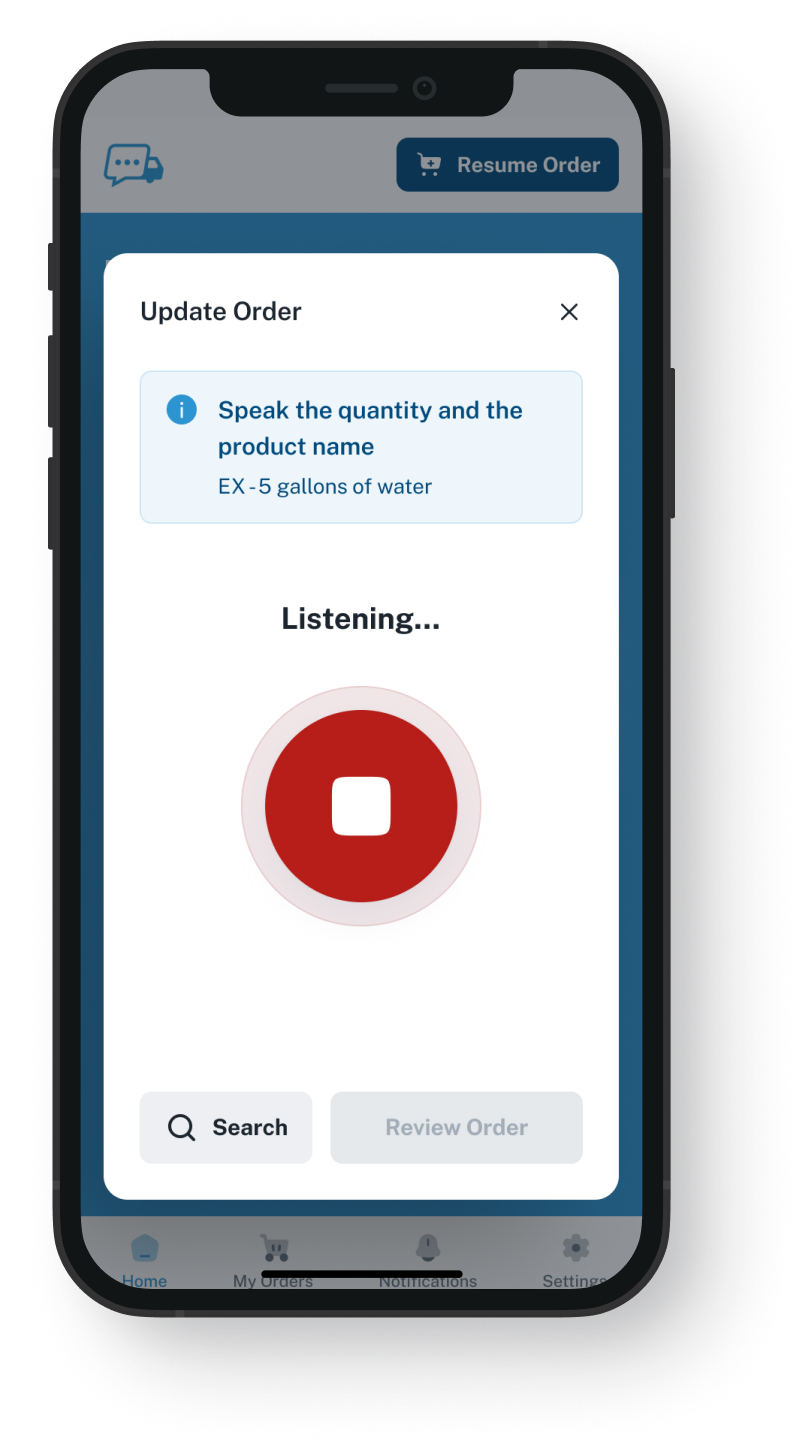
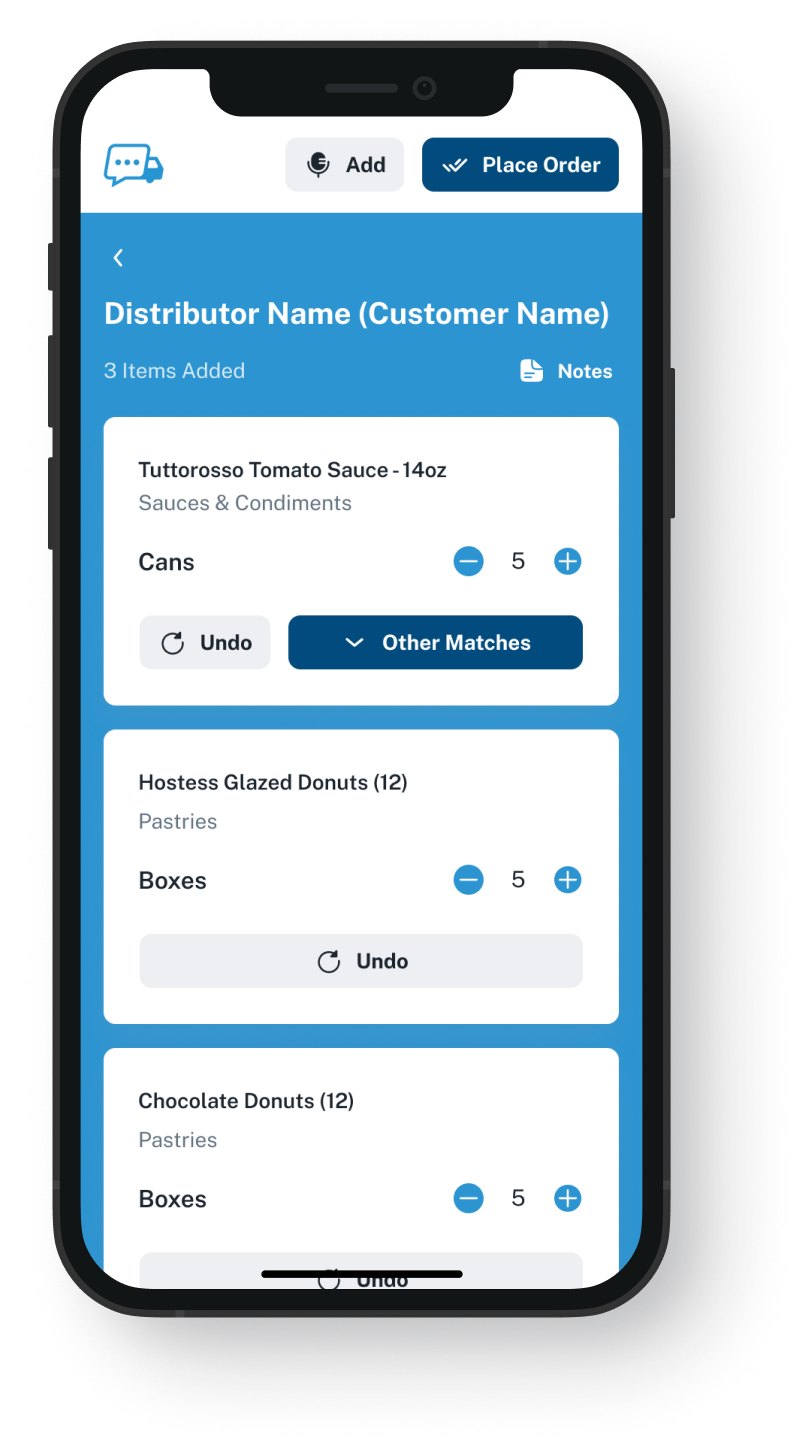
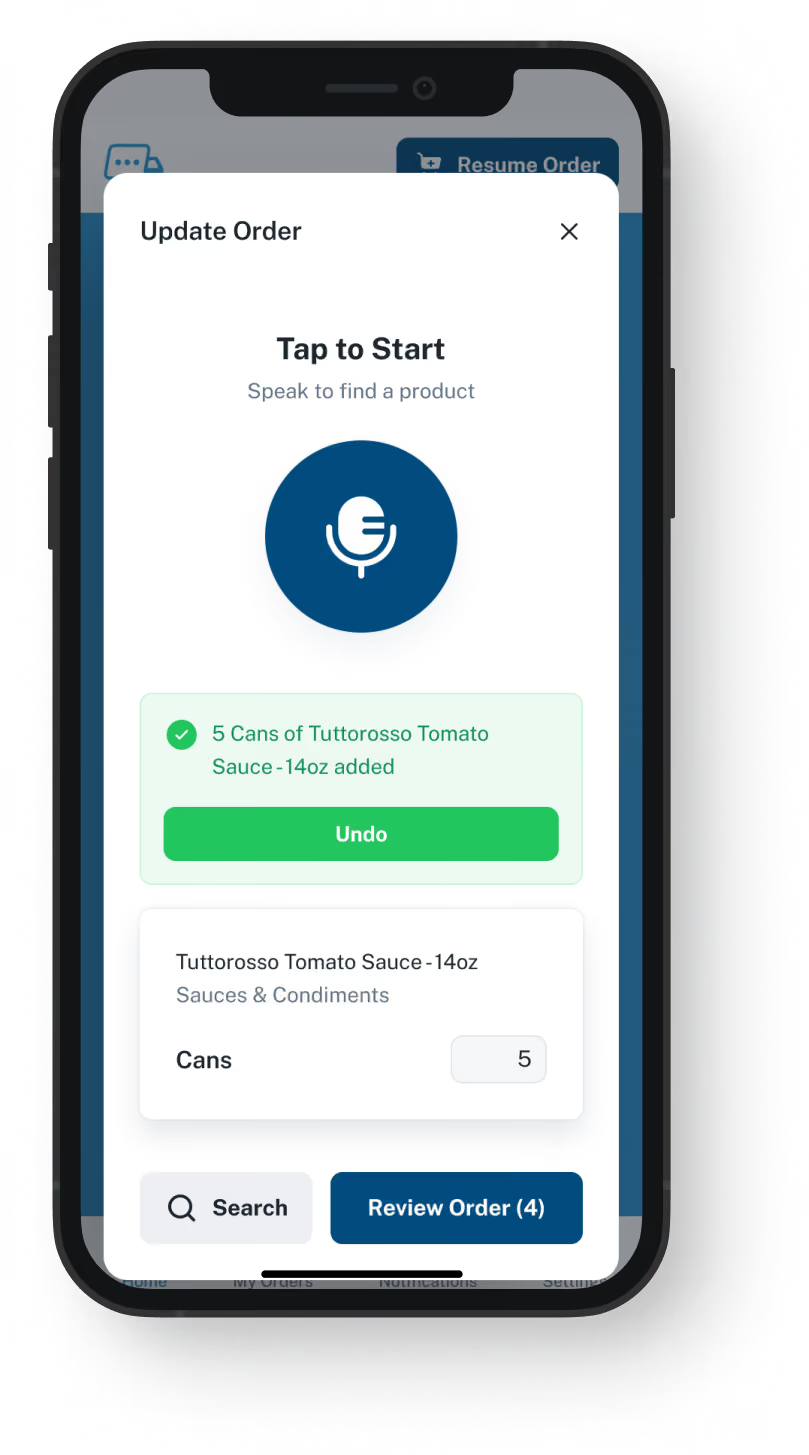
VoiceOrder app ordering screen
20-30 Min

Saved on each order a chef sends in the app, not by phone

24/7

When a chef who once phoned can send tomorrow's order

24-48 Hrs

For most distributors to go live, with Conexiom unchanged

Your Codes From The Start

Conexiom reads what customers send.
Our app starts each order from your guide.

Any restaurant that orders by calling you gets our app with a guide of your products, so what its chef says is matched to your list. Conexiom is at its best on purchase orders written in each customer's own layout and part numbers, which it matches to yours, and a calling restaurant produces no such document. Keep both: ours is not a Conexiom alternative, and no link between them comes built in.

Feature

Conexiom + VoiceOrder Solutions

Conexiom on its own

Emailed PDF and spreadsheet POs converted for your ERP
A restaurant that used to call sends a list built from your guide
Keyed in by your team, unless the customer agrees to email a PO
A customer's own part numbers matched to your items
Every restaurant gets a guide of your items at its prices
Customers order from their own documents
Prices on incoming POs checked against your pricing
Texts and notes written by hand read into orders
Late at night, a chef who would have called still gets an order in
The call waits for someone to answer it
Problems on an incoming PO flagged in plain words
Supplier invoices matched to your POs, too
What A Call Leaves Out

What can Conexiom read when a restaurant phones?

Conexiom's work starts with a document a customer writes its own way, and Relay, its order reader, turns it into an order your ERP can take. A restaurant that only phones writes nothing for it to read. An order from our app that reaches you by email is still entered by your team, but each item on it was checked by the chef first.
Integration icon

Calls are missing from its list of formats

Relay reads email, PDFs, images, spreadsheets, text messages, ecommerce orders and handwritten notes. Speech is not among them. Conexiom's own FAQ answers phone orders by asking that customers email them in.
Integration icon

Every customer names items its own way

Conexiom's pages say each trading partner has its own layout, part numbering and quirks. Relay matches what each customer writes to your items, using your master data and your rules, and hands your team any it cannot place, with the reason.
Integration icon

Conexiom says the hard part is filling in your codes

It calls reading a PO a solved problem; what remains, it says, is what the PO leaves out: your part numbers, your prices, how you stock each item. Its rules fill those gaps once the PO is in. A guide in our app has your SKU and that account's price on every item before a word is spoken.
What You Get

Not a Conexiom alternative: orders built from your own item list

Dashboard mockup
Voice Ordering

Said by the chef, shown as your own products

From the walk-in or the prep table, the chef says what the restaurant needs. The app looks up each item in the guide and puts it on screen, where the chef can change an item or an amount before sending. In place of a call, you get an order the restaurant has looked over.
Items are matched to that restaurant's guide
Orders can go in at 2am, on Sundays and on holidays
Saves 20 to 30 minutes compared with the same order by phone
Pulled away mid-order, the chef comes back to it as it was
Order Guides

A guide for every restaurant, in the codes your warehouse uses

Export each restaurant's usual items and what it pays, and we load them as its guide, each item under the number you already give it. Every guide and its prices are yours to change in our admin, which is also where you manage each account. Whether price changes can come over from your ERP in bulk is a question for the demo.
A chef sees what that restaurant buys, not your whole range
Each account orders at the prices you set for it
Add or drop items on a guide yourself in our admin
Setting up needs no login to your ERP
Dashboard mockup
Dashboard mockup
Delivery Formats

Handed over by email, EDI or API

A finished order goes to you as an email with a PDF, Excel or Word attachment, or through EDI, our API or QuickBooks. Arriving by email, it becomes your team's to enter, from a list somebody at the restaurant has read through. Sent by EDI or through the API, your ERP may take it in without retyping, if it accepts orders that way; a demo answers that.
Over EDI or the API, when your setup takes it, nobody retypes it
Addressed to a rep, or to the inbox the whole desk shares
App orders get a number and a send time; a phoned one gets none from us
Picking, invoicing and the rest stay in your ERP
Inventory Visibility

Stock levels shown next to incoming restaurant orders

VoiceOrder Solutions gives you real-time inventory visibility tied to order activity. It does not replace your stock system: that stays in charge, and a demo shows how the levels connect.
Stock numbers come from the system you count with today
Fewer stockout surprises at the order desk
We do not count stock, buy it or receive it
Counts and purchasing stay in your ERP
Dashboard mockup
Getting Started

From your product codes to a chef's first order, beside Conexiom

It starts from the products and prices on your books today. We load each restaurant, and its chef installs the app.
1

Export your codes and prices

A spreadsheet out of your ERP is usually all we need: the products each account takes, at its prices, with your item numbers.
2

We build each guide in your codes

We load its guide and set up the account, then the chef downloads the app. Most restaurants send a first order the same day.
3

Orders matched to your guide

Each one holds the items its chef looked over, is stamped with an order number and the time it was sent, and arrives in the format you set up.

"I used to spend hours every week ordering food. Now it's simple, super easy, and I have free time to spend on other aspects of my restaurant."

Tony Luna | Owner-Chef, Prairie Moon
Delivery Formats

Orders go out in the formats distributors already use

Each order leaves VOS as an email with a PDF, Excel or Word file, an EDI or API feed, or a QuickBooks entry. No one has to switch software to receive it.
Integration icon

Email

Integration icon

PDF, Excel, Word

Integration icon

QuickBooks

Integration icon

EDI

Integration icon

API Direct

Integration icon

iOS App

Integration icon

Android App

Integration icon

Web Admin

Integration icon

Distributor Platforms

Who Keeps What

Not a Conexiom competitor: what it keeps reading, and what we add

Emailed purchase orders still go through Conexiom. Our app is an addition, not an alternative to Conexiom, built for the restaurants that would otherwise pick up the phone.
Integration icon

Emailed POs stay with Conexiom

Customers whose own purchasing systems produce POs go on emailing them, and Relay goes on loading them into your ERP. For those accounts you need no Conexiom alternative.
Integration icon

Texting chefs can go on texting

Some chefs like to text their order, and they can carry on: if Relay reads those messages today, it keeps doing so. Nobody has to switch; the app is there for the callers.
Integration icon

Your supplier paperwork stays automated

Conexiom's checks on supplier invoices and vendor acknowledgements are untouched. We only handle restaurant orders, up to the moment they reach you.

Watch spoken words turn into items on your guide

During a 20-minute demo, our team speaks a typical restaurant order into the app, swaps one product for another, sends it, then opens whatever reaches your end so you see which item details your desk receives. Then we look at how it would get into your ERP alongside Conexiom.
FAQ

Questions from teams running Conexiom

Do we need a Conexiom alternative for spoken restaurant orders?
No. Conexiom goes on reading the POs customers email you, and none of its rules change. VoiceOrder Solutions is for the restaurants that call: the chef names each item aloud in our app, sees each one matched to a product on the guide for that kitchen, and reviews it all before it goes to you.
Is VoiceOrder Solutions better than Conexiom?
At one thing: getting a restaurant that still calls to send its order already matched to your catalog. Reading POs, invoices and other paperwork in whatever layout it arrives is Conexiom's work, so we work next to it and are not a Conexiom alternative.
Conexiom reads text messages. Why not ask chefs to text?
A text comes in the chef's own shorthand, such as "romaine, two", so Relay still has to work out which of your products it means. In our app, each spoken item is matched to the restaurant's own guide, and the chef sees which of your products was picked before sending.
Does it connect to Conexiom, and do we still key orders in by hand?
Not directly. They come from two different companies, no link joins them as standard, and each company looks after its own software only. Over EDI or our API, the chef's order can go into your ERP and nobody types it again, if your ERP is set up for it; we check that in a demo. By email, you get it as an attachment. Whether your Conexiom setup can read that file is something to ask Conexiom: we have built nothing for it and make no promise. If it cannot, one of your people keys it in from the list the chef already checked, with no call to take, write down and read back. Your accounts, your stock and your invoices still live in your ERP. We hold the restaurant guides, the prices on them, and copies of what chefs send through the app.
Conexiom maps each customer's format. What does adding a restaurant take?
Conexiom's FAQ describes mapping each customer's PO format with your customer service team, usually rolling out to a handful of customers first. A new restaurant needs no mapping, because there is no customer format to learn: the guide starts from what you already sell that restaurant, and the chef's spoken order is matched to it.
How long until we are live, and what does it cost?
Most distributors are up and running in 24 to 48 hours, with no change made in Conexiom. You send us the items each account usually orders, most often as a spreadsheet export, and we load them into our admin and set up every account. Once the restaurants have the app on their phones, most of them order the same day. Conexiom sells by subscription and quotes each business, with no price on its site, and we quote per distributor too. A Conexiom replacement would mean rebuilding every customer's mapping and rules in another reader, a separate job from putting an app in front of the chefs still calling you.
Does the app get every item right?
Not always. It turns the chef's words into items from the guide, and a chef can overlook a wrong one or change their mind once it is sent. The difference is that the person who decided the order reads it on screen before it goes, and each item the app matches comes from that kitchen's guide.
Where do the Conexiom details on this page come from?
From conexiom.com, as we read it on 9 November 2026: the homepage, the Platform, Relay, Headless Platform and Solutions pages, its FAQ and About pages, and its glossary pages on line item capture, price checks and unit conversion. Searching the web that day turned up no voice or call ordering tool for Conexiom. If any of it has moved on, write to us and we will correct the page.

Restaurant orders built on your guide, beside the POs Conexiom reads

It takes twenty minutes: see how a guide is set up from your items, and what a chef does with it.