For Food Distributors

Not A Brightpearl Alternative: Fix Mistakes Before Automation

Stop a wrong item before your automation sends it on to picking and invoicing. With VoiceOrder Solutions, each chef speaks into our app, then reads the list and changes anything that is off before sending. Brightpearl goes on handling your stock, pricing and automation.
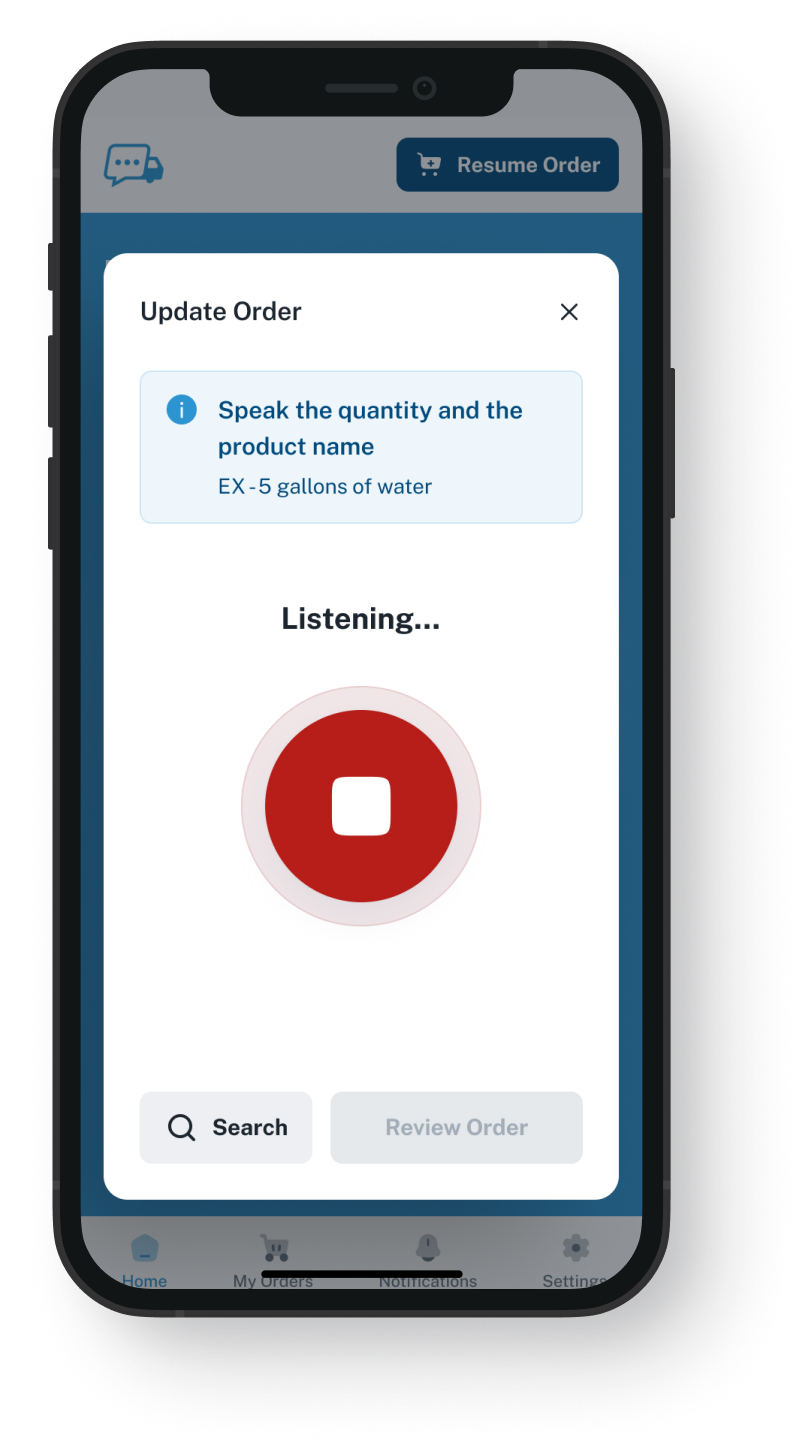
VoiceOrder app ordering screen
20-30 Min

Saved per order sent in the app instead of by phone

24/7

When kitchens can send an order, staffed or not

24-48 Hrs

Setup for most distributors, Brightpearl left as is

Accuracy Before Automation

Brightpearl plus VoiceOrder Solutions.
Your rules get an order the chef went over.

A product misheard on a call, then typed in, looks like any other order, so your system can route, reserve stock for and invoice it under the rules you set. When the chef orders in the app, every item is on their own screen to check before it goes. This is not a Brightpearl alternative: you keep both, and the two are not linked.

Feature

Brightpearl + VoiceOrder Solutions

Brightpearl on its own

A single stock figure for stores, online sales and wholesale
A chef who phones today can speak instead and see each item
Heard on a call and typed in by your team
Price lists by account, account group or sales rep
Automation rules for routing, stock and accounting
Each kitchen's app order comes with a number and a send time
Numbered once your team enters it
Online ordering through a partner webstore or portal
Orders from EDI trading partners download on their own
A chef who would phone can still order after you close
Left as a voicemail until someone is in
Barcode picking with lot and expiry tracking
Why People Search

When food distributors weigh a Brightpearl competitor

Brightpearl's automation acts on whatever order it is given, so swapping it for a Brightpearl alternative would not fix an item misheard on a call. An order from our app that reaches you by email is still typed in by someone on your team, but from items the chef has gone over. Sent through EDI or our API, it can load on its own if your Brightpearl setup accepts it, and that is something we check with you in the demo.
Integration icon

Phone orders go in once your team types them

Brightpearl's wholesale page treats a call-in order like one from email or a webstore: once it is taken, order details and inventory update in one place. For a call, taking it means someone on your team listens and keys in every item.
Integration icon

The restaurant never sees its order before it is entered

The chef knows what the kitchen is short of, but what got typed is checked, if at all, at your desk. If an item was misheard, nobody at the restaurant saw it before it was entered.
Integration icon

To the rules, a mistake looks ordinary

Brightpearl's Automation Engine promises to automate the ordinary and catch the exceptional. A mistyped item seldom looks exceptional: it reserves stock, heads to picking and reaches the invoice like a correct one, unless a rule you wrote catches it.
What You Get

Not a Brightpearl alternative: what changes before your rules run

Dashboard mockup
Voice Ordering

The chef sees every item before Brightpearl does

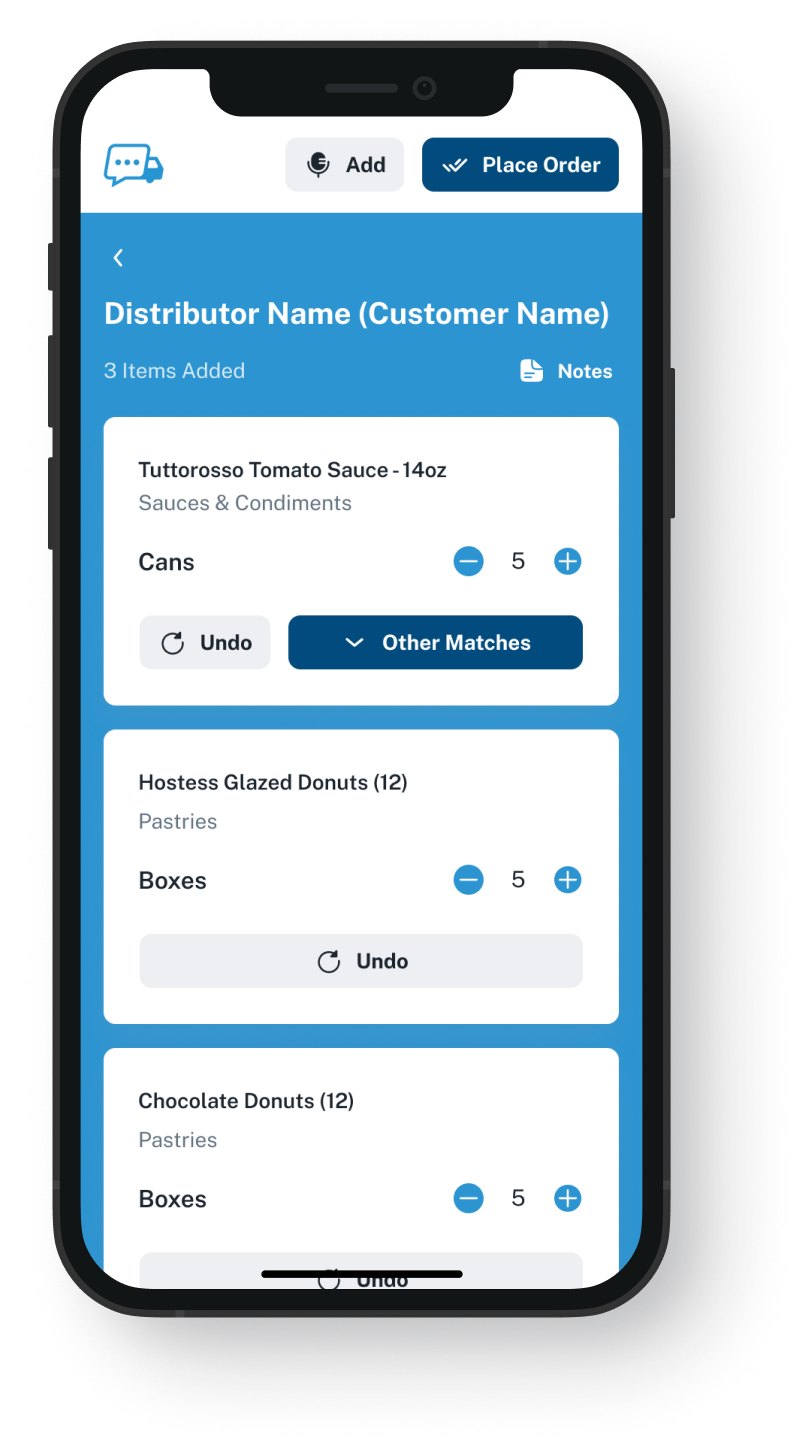
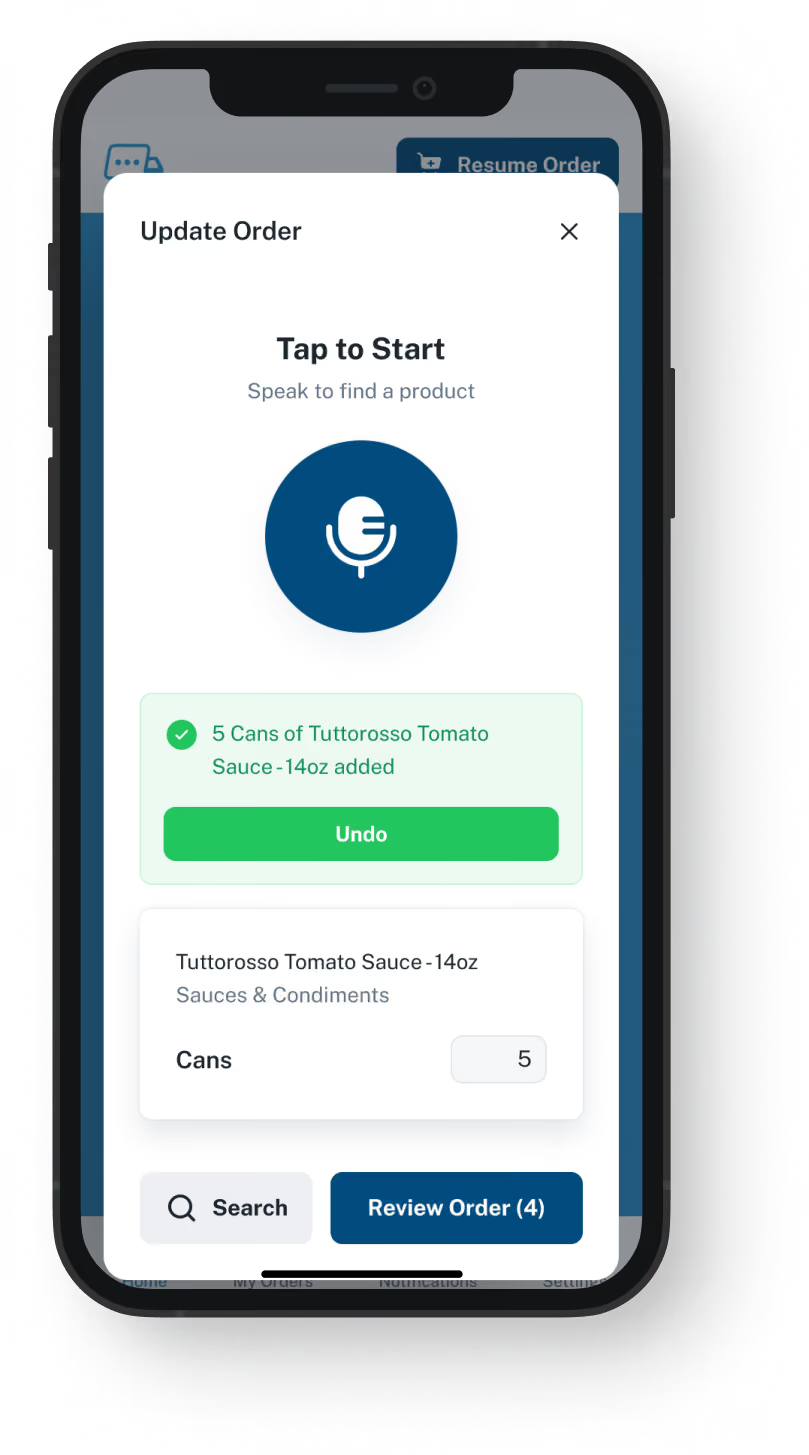
Standing at the shelf, the chef lists what the kitchen needs. Our app matches what was said to the items in that restaurant's guide, then shows the list so the chef can change an item or amount right there. Your team gets a list in place of a call.
Nothing is sent until the chef has seen each item
Late-night and holiday orders go through too
Saves 20 to 30 minutes compared with the same order by phone
If service interrupts, the order picks up where the chef left off
Order Guides

Guides that keep each restaurant to its usual items

Send us a spreadsheet of what each restaurant orders and pays. We build its guide using your own item numbers and its usual prices. Brightpearl still holds the full catalog and its price lists. Whether guide prices could update from Brightpearl is a question for the demo.
A restaurant sees what it normally buys, not your whole range
You update each account's prices whenever they change
A guide you edit at noon is the list the chef works from that evening
Setup asks for an export, not a Brightpearl login
Dashboard mockup
Dashboard mockup
Delivery Formats

Sent in a form your desk can use

A finished order leaves by email with a PDF, Excel or Word attachment, or through EDI, our API or into QuickBooks. A QuickBooks delivery goes to your books, not into Brightpearl. Sent by EDI or the API, it can go straight into Brightpearl if your setup is built to take it, and the demo shows whether yours is. Either way, the items in it are the ones the chef approved.
Addressed to a single rep or a team inbox
Over EDI or the API, when your setup takes it, nobody retypes it
The chef's corrections are already in the file you get
Picking and dispatch stay the way they run today
Inventory Visibility

Stock seen next to incoming orders

VoiceOrder Solutions gives you real-time inventory visibility tied to order activity. It does not replace your stock system: that stays in charge, and a demo shows how the levels connect.
Counts, lots and expiry dates are still kept by Brightpearl
Fewer stockout surprises for your inside team
Stock numbers come from the system you count with today
Purchasing suggestions still come from Brightpearl
Dashboard mockup
Getting Started

How kitchens start ordering beside Brightpearl

Your team pulls one export. We set up the accounts, and the kitchens install the app.
1

Pull one export

A spreadsheet from Brightpearl is usually all we need: each account's regular items and prices, under your codes.
2

We load each kitchen

Its guide goes in, the account opens and the chef downloads the app. Most kitchens have a first order in the same day.
3

Your rules start from the chef's list

Orders from the app were looked over by the chef and carry their own number and send time, in whichever format you set.

"I used to spend hours every week ordering food. Now it's simple, super easy, and I have free time to spend on other aspects of my restaurant."

Tony Luna | Owner-Chef, Prairie Moon
Delivery Formats

Orders go out in the formats distributors already use

Each order leaves VOS as an email with a PDF, Excel or Word file, an EDI or API feed, or a QuickBooks entry. No one has to switch software to receive it.
Integration icon

Email

Integration icon

PDF, Excel, Word

Integration icon

QuickBooks

Integration icon

EDI

Integration icon

API Direct

Integration icon

iOS App

Integration icon

Android App

Integration icon

Web Admin

Integration icon

Distributor Platforms

Before Send, After Send

What Brightpearl keeps, and what we add

This is not an alternative to Brightpearl: we only handle each restaurant's order until it leaves the chef's phone, and your rules take it from there.
Integration icon

Brightpearl keeps the stock and the books

Customers, stock, purchasing and invoices stay in Brightpearl. On our side sit each kitchen's guide and its prices, which you keep current in the VoiceOrder Solutions admin platform, plus every order made through the app.
Integration icon

Leave webstore and EDI accounts as they are

Accounts ordering through a B2B website or by EDI already reach Brightpearl with nobody typing, so keep them on that. The app is for the ones that phone instead. Calls to your office still get no order number from us; orders from the app always carry one.
Integration icon

Your Automation Engine rules stay as you wrote them

Nothing in your workflows changes. Once our order is in Brightpearl, whether it came by EDI, through the API or was keyed in from the emailed file, your rules route and invoice it as usual.

Watch a mistake get fixed before it ever reaches Brightpearl

In 20 minutes we say one order into the app, swap a misheard product for the right one, press send and show what your desk would receive. Then ask how it would fit beside the way you run Brightpearl.
FAQ

Questions we hear from Brightpearl users

Would a Brightpearl alternative be needed for spoken orders?
No. Nothing in Brightpearl changes: not the stock, the price lists or the Automation Engine. What changes is what those rules receive: for a restaurant that phones today, the chef now says its order in the app, looks down the list and fixes any mistake first, rather than your team typing it from a call.
Is VoiceOrder Solutions better than Brightpearl?
For one task, yes: letting the chef who decided an order see and fix each item before your rules act on it. Everything after that, from picking to the invoice, is Brightpearl's work, so we sit next to it and are not a Brightpearl alternative.
Brightpearl's automation catches exceptions. Won't it spot a mistake?
Its rules can flag the orders you define, such as risky or high-value ones, so a rule can catch some mistakes, like an amount far above normal. An item that was misheard usually looks ordinary: a product that account buys anyway, in a normal amount. Our app puts each item in front of the chef before sending, so the one who knows the kitchen's needs gets a chance to catch it.
Couldn't our restaurant customers just order on a B2B webstore?
Some will. Brightpearl can link to a separate B2B website built on an ecommerce platform, and partners sell portals and ordering apps that create Brightpearl sales orders. Other companies build ordering and AI tools on its API too, so ours is not the only way to add ordering. We built it for the chef who picks up the phone today: they speak the items, see the list and fix a wrong one before it reaches you.
Can the app still send a wrong order?
Yes. The app turns speech into items from the guide, and a chef can miss a mistake or change their mind after sending. What changes is that the chef, who knows the kitchen, reads down the order before it goes, instead of hearing it read back over a call, if it is read back at all.
Is it linked to Brightpearl, and will my desk still type orders?
Each comes from its own company, with no built-in link between them, and each supports its own software only. If Brightpearl is set up to accept orders through EDI or the API, ours can go in without anyone retyping them; the demo is where we find out. By email, the attachment shows each item the chef checked, and someone on your side enters it from that instead of from a call or a voicemail.
How fast is setup, and how is it priced?
Most distributors are ready in 24 to 48 hours, and nobody has to change a thing in Brightpearl. Brightpearl quotes each business rather than listing prices, and we quote per distributor too. A Brightpearl replacement would shift your stock, warehouse and books to a new system, while adding us leaves every workflow you built where it is.
Where do the Brightpearl details on this page come from?
From brightpearl.com (Brightpearl by Sage) as it stood on 9 November 2026: the homepage, the wholesale, automation, inventory, warehouse, pricing, implementation and Why Brightpearl pages, one customer story, and the app store page for its EDI connection. The ordering tools came from a search for Brightpearl add-ons. Seen something here that has since changed? Let us know and we will update it.

Keep Brightpearl. Let chefs fix their own orders before it acts on them.

Give us twenty minutes to talk one order through, change a product on screen and show the file your desk would get.