.webp)
Key takeaways:
A restaurant inventory list is a crucial tool that helps you keep track of your ingredients, supplies, and equipment. It makes ordering easier by showing exactly what you have and what you need. Using an organized inventory list keeps your kitchen running smoothly.
The key benefits include better cost control, less waste, more accurate orders, and smoother daily operations. When you know what’s on hand, you avoid overbuying or running out during busy hours. This saves money and reduces food waste.
In this article, you’ll learn how to make a restaurant inventory list from scratch and manage it efficiently. The guide also covers how to use tools like VoiceOrder Solutions to streamline the reordering process once your list is in place. By the end, you’ll have practical steps and a restaurant kitchen inventory list template to get started quickly.
Managing your restaurant inventory well has a big impact on food costs and profits. Typically, food costs make up 25-35% of a restaurant’s expenses. If your inventory isn’t accurate, you can lose money without even realizing it. Keeping a precise restaurant inventory list helps track exactly what you have on hand. This way, you avoid overbuying or running out of key ingredients, which keeps costs in check and profits healthy.
Accurate inventory also reduces waste, spoilage, and theft. When you know what’s in stock, you can use items before they go bad and spot missing goods early. Without a clear inventory list for restaurant supplies and food, it’s easy to lose track and throw away valuable stock. Using a restaurant kitchen inventory list template makes this process simpler and more reliable, so you always stay on top of your products.
Now, let’s look at some benefits that go beyond cost control.
Here are three practical benefits of good inventory management:
These points lead us to why a detailed inventory system is a valuable tool.
With a solid restaurant inventory list, you gain data-driven insights. You can analyze which menu items use the most ingredients, helping you plan portions better and reduce food waste. This insight also lets you adjust menus seasonally or based on popular items.
In short, learning how to make a restaurant inventory list and updating it regularly is a smart step to improve your kitchen’s efficiency, control food costs, and boost overall profitability.
Creating a restaurant inventory list is the first step to smooth ordering and managing your stock. To make it truly useful, you need to organize your list into clear restaurant inventory categories list. This helps you find items quickly and avoid mix-ups.
Start by grouping your items into five main categories:
Using consistent units like pounds, cases, or single units helps you keep numbers clear. For example, always measure cheese in pounds, soda in cases, and forks in units. Also, name items clearly with no abbreviations that may confuse staff.
Next, consider par levels. These are the minimum amounts you want on hand to avoid running out. Set reorder points for each category based on how fast you use items. For example, keep 10 cases of soda as a par level and reorder when you drop to 5.
A solid inventory list also tracks expiry dates. With perishables and beverages, you want to follow the First In, First Out (FIFO) principle. This means using older stock before newer deliveries. Track batch numbers if possible to make this easier and avoid waste.
To sum up, your restaurant kitchen inventory list template should be organized, use consistent measurements, set par levels, and track expiry dates with FIFO in mind. This approach will save time, reduce waste, and make ordering easier every time.
Creating an accurate restaurant inventory list is the key to smooth ordering and cost control. It keeps your kitchen running smoothly and helps avoid running out of essential items. Here’s how you can create and maintain a reliable inventory list for your restaurant.
Start by organizing your storage areas clearly. Separate kitchen supplies, bar ingredients, and cleaning materials. Assign specific staff to manage each area so everyone knows their responsibility.
Set up a consistent counting routine. Count high-use and perishable items daily to prevent waste. Other items can be counted weekly or monthly, depending on how fast you use them. Make sure you use systematic counting methods. Count items shelf by shelf, moving in a clockwise direction to avoid missing anything. Convert quantities correctly, like pounds to ounces or bottles to cases, so the data stays accurate.
Next, track pricing by using recent invoices. This information helps calculate the Cost of Goods Sold (CoGS) correctly, giving you a clear view of your expenses. Use formulas and conditional alerts to compare current stock to what you should order. This saves time and reduces errors, especially if you’re using a restaurant kitchen inventory list template or a sample restaurant inventory list to get started.
Here’s a quick list to help you remember the key steps:
Once your process is set, regularly reconcile your physical counts with sales data or POS reports. This step helps spot discrepancies caused by waste, theft, or over-portioning.
When it’s time to place a reorder with your food distributor, VoiceOrder Solutions removes the manual work from that step. Staff speak their order aloud while walking through the facility, and the app captures, confirms, and timestamps each order automatically before transmitting it to the distributor. No phone calls, no manual entry, and no transcription errors.
Each reorder is digitized and auditable, saving 20–30 minutes per order.
Knowing the right metrics helps you manage your inventory better. The basic CoGS formula is:
CoGS = Beginning Inventory + Purchases - Ending Inventory
Break this down by category, like food, beverages, and supplies, to see where your money goes. This helps with expense tracking and menu pricing adjustments.
Another important metric is the inventory turnover ratio. Ideally, you want to turn over inventory 4 to 6 times per month. This balance means you’re not holding too much stock, which ties up money, but also not running out too often.
Food cost percentage is another key figure. It’s calculated by dividing food cost by food sales. Tracking this percentage and its variance over time tells you how well your kitchen is controlling costs and waste.
The most revealing number is not a percentage at all. It is a difference.
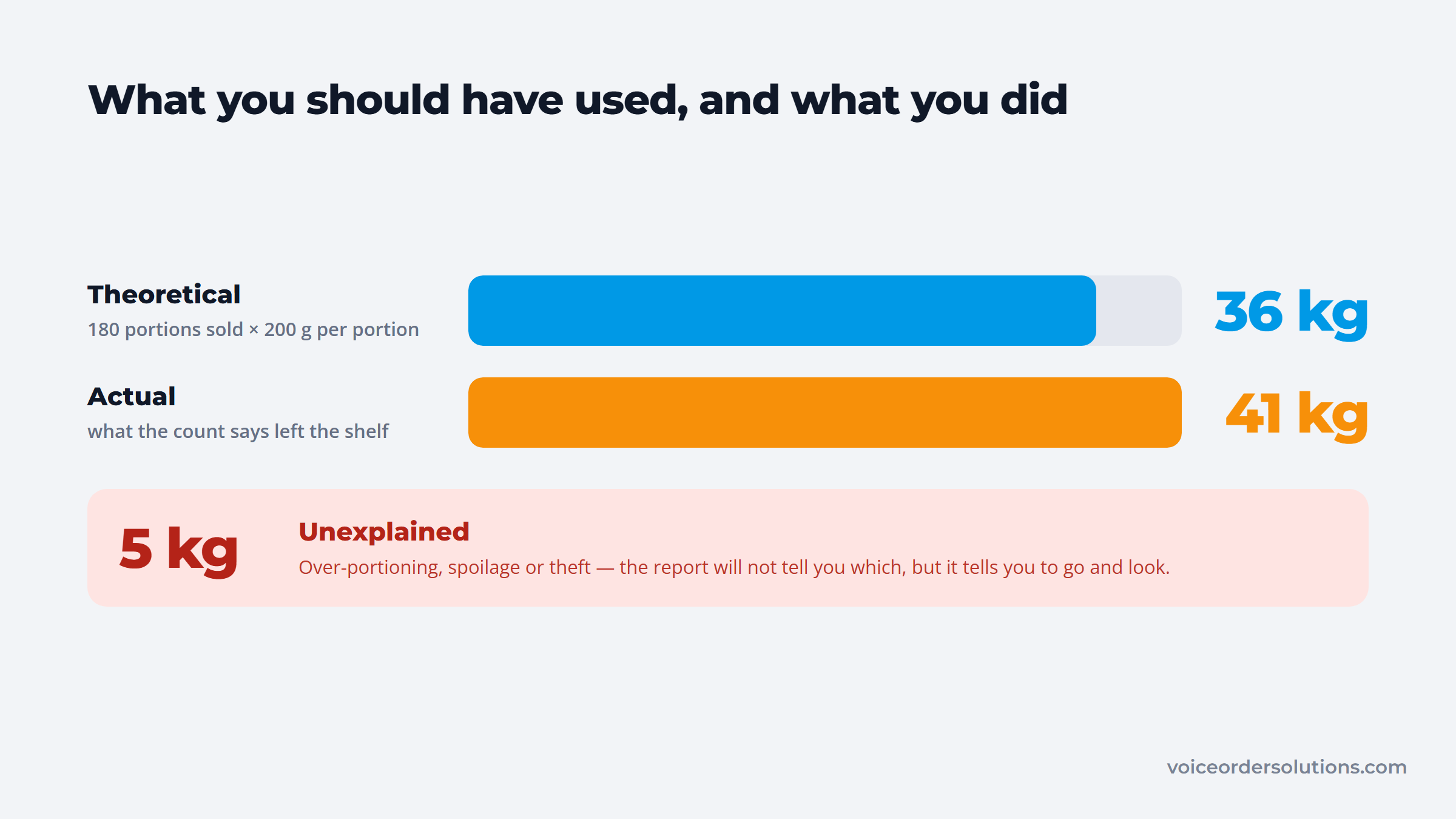
A useful concept to watch is theoretical vs actual usage. Theoretical usage is what your recipes call for, while actual usage is what’s recorded in inventory changes. A big gap here can show losses from waste, theft, or over-portioning.
Here are the key metrics to track:
By following this practical guide on how to make a restaurant inventory list, you’ll ensure your stock is accurate and orders are spot on. Using a restaurant kitchen inventory list or a restaurant inventory categories list makes the entire process faster and more reliable.
Keeping a clear restaurant inventory list is essential for smooth ordering and minimizing waste. Luckily, technology makes this easier than ever. Using the right tools and systems can save you hours every week and help you stay organized.
Several platforms now combine inventory management with point-of-sale (POS) systems. This integration lets you update stock in real time, see what’s selling fast, and reorder before running out. Let’s look at some popular options:
| # | Software | Real-Time Tracking | Vendor Management | Auto Recipe Costing | Usage Reports | Reorder Alerts | Pricing Model |
|---|---|---|---|---|---|---|---|
| 1 | MarketMan | Yes | Yes | Yes | Yes | Yes | Subscription, scalable |
| 2 | Rezku POS | Yes | Limited | Yes | Yes | Yes | Pay-per-use or monthly |
| 3 | Orderly Inventory | Yes | Yes | Yes | Yes | Yes | Monthly, small to large |
| 4 | Lightspeed Restaurant | Yes | Yes | Optional | Yes | Yes | Tiered subscription |
| 5 | Restaurant365 | Yes | Yes | Yes | Yes | Yes | Enterprise focused |
These tools help you track stock levels in real time and manage vendors smoothly. They also automate recipe costing, so you know exactly how much each dish costs to make. You’ll get usage reports to identify trends and reorder alerts to avoid running out.
Pricing and scalability vary widely. Small restaurants can start with affordable monthly plans, while larger operations might need comprehensive solutions like Restaurant365. Choose what fits your size and budget.
VoiceOrder Solutions works alongside these platforms as a companion ordering tool rather than a replacement. When stock falls to the reorder point, staff place the procurement order to their food distributor by voice directly from the facility floor.
The order is confirmed, timestamped, and transmitted via email, EDI, or API without manual entry, complementing existing inventory or POS systems without requiring any overhaul. It also offers voice inventory management as a standalone option for restaurants without a dedicated platform.
Using the right hardware speeds up inventory checks and cuts down errors. Barcode scanners and RFID tags let you scan items quickly instead of counting each by hand. This means fewer mistakes and less time spent counting.
Mobile apps like the Orderly App or MarginEdge bring your inventory list for a restaurant right to your phone or tablet. You can check stock levels anywhere in your kitchen or storage room. These apps sync with your software, so data stays up to date.
Integrating inventory data with sales and accounting systems is another smart move. It makes your workflow seamless from ordering to payment. You’ll always know what you have and what you need to buy, saving money and avoiding overstock.
Here’s a quick list of how hardware and automation can help:
Using these tools together creates a well-oiled inventory system. You’ll find it easier to keep an accurate restaurant kitchen inventory list template and know exactly when to reorder. This keeps costs down and your kitchen running efficiently.
Using your restaurant inventory list well can save you money and keep your kitchen running smoothly. The key is turning that list into smart decisions about ordering and controlling costs. When you track what you have and what you use regularly, you get great insights into how much to order. This way, you avoid both running out of important items and overbuying, which ties up cash and leads to waste.
Thanks to technology, ordering is easier and smarter than ever. Setting reorder alerts based on your restaurant inventory categories list helps you stay stocked without guessing. For example, you set par levels (minimum stock amounts for each item). When you hit that number, your system alerts you to reorder. A restaurant stock control software setup takes it one step further and turns that alert into the order itself.
The delay that costs you is not in noticing. It is in what happens next.
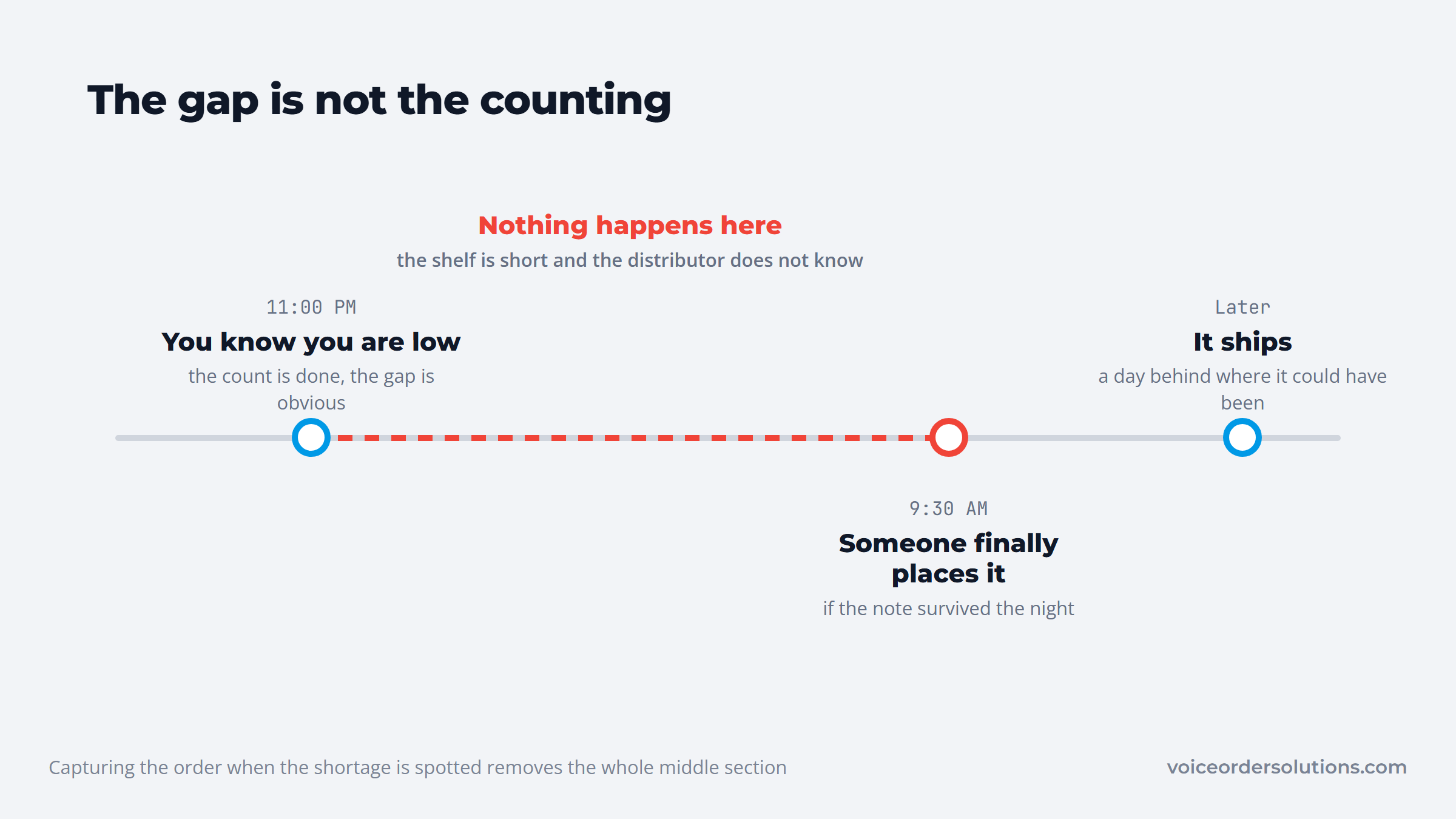
Then, there’s sales velocity (how fast you use each item). If chicken sells fast on Fridays, your alerts adjust to reorder sooner. This keeps your kitchen stocked for busy times without overbuying.
Using historical sales data is a game-changer, especially for seasonal changes. If you sell more ice cream in summer or special dishes around holidays, your system predicts these trends and adjusts orders automatically.
Vendor management workflows also keep purchase orders running smoothly. You track which vendors supply what, compare prices, and send orders quickly, saving time and avoiding mistakes.
Here’s a quick list showing how automated ordering helps:
For the reorder step itself, VoiceOrder Solutions removes the delay between spotting a low-stock alert and getting an order to the distributor. Staff speak the order aloud while moving through the facility, and the app captures, confirms, and transmits it automatically. Real-time inventory visibility updates as orders are placed, helping keep stock levels accurate and reducing the risk of missed reorders.
Controlling waste and stopping theft also relies on your inventory list for restaurant management. To catch losses early, monitor variance reports that compare what you should have versus what you actually have. Big differences might signal waste, spoilage, or theft. Variance reporting of that kind is standard in most restaurant management software, so check whether the system you already run can produce it.
Regular spot checks focus on high-loss and high-value items like alcohol and pricey proteins. These checks must be unannounced and done often.
Training staff is just as important. Teach them how to portion food accurately and follow inventory procedures. This reduces waste and saves money.
Let’s look at four practical ways to reduce waste and theft:
Using these tips with your restaurant kitchen inventory list can make a big difference. Together, automated ordering and waste control keep your restaurant efficient, profitable, and ready for anything.
With a good system and smart use of data, you’ll always know how to make a restaurant inventory list work for easy ordering and better cost control.
Keeping a clean and accurate restaurant inventory list can be tricky. Many restaurants face challenges like inconsistent counting and staff turnover. To tackle this, focus first on training your team well. Use standardized processes that everyone follows. When staff changes happen, new employees will have clear steps to count and record items, so your inventory stays steady.
Price changes are another big hurdle. Prices can fluctuate due to seasons or supplier shifts. To stay ahead, regularly update your prices and compare vendors to find the best deals. This simple habit helps you avoid surprises when ordering.
Another common problem is overstocking. It ties up money and space. The best way to fight this is by practicing Just-In-Time (JIT) inventory. Keep only what you need and reorder just before you run out.
Manual tracking can lead to errors, especially if you use spreadsheets. Moving to an integrated digital system reduces mistakes and saves time. This switch makes managing your restaurant kitchen inventory list faster and more reliable.
Finding the right balance for counting your inventory is key. Counting too often disrupts operations, but not counting enough causes inaccuracies. Try cycle counting, where you count different sections regularly without shutting down the whole process. A fixed weekly rhythm is what makes stock control stick, because a count that moves around the calendar quietly stops happening.
Here’s a quick list to remember the main points:
By following these steps, your restaurant inventory list will stay accurate and easy to manage. Plus, using a restaurant kitchen inventory list template can help you get started quickly. With the right tools and habits, you’ll make ordering smoother and smarter every time.
A detailed restaurant inventory list is key to smooth ordering and keeping costs low. It helps you track what you have and what you need. Using a good restaurant kitchen inventory list template makes this process easier and more accurate.
For 2026 and beyond, mix smart routines with the right technology. This means setting regular check-ins and using tools that can analyze your data. To get started, here’s what to focus on:
Next, review a sample restaurant inventory list to see how everything fits together. For the reordering step, VoiceOrder Solutions lets staff place procurement orders to their food distributor by voice, cutting the time spent on phone calls and manual entry every time stock needs replenishing. Take small steps today, and enjoy a smarter inventory tomorrow.
One mistake is mixing units, like pounds and cases, causing confusion. Another is not updating the list frequently enough, which leads to inaccurate stock levels. Also, unclear item names make it hard for staff to know what to count or order next.
Start by customizing the template to fit your unique items and categories, then train your team to use one counting method. Update it regularly to reflect actual stock and include notes on damaged or expired goods to keep your list accurate.
Group items by how fast they move and where they’re stored, like perishables in the fridge and non-perishables in the pantry. This helps counting flow smoothly and prevents missing anything. Clear labeling on shelves also speeds up the process.
High-use items need daily checks because they run out fast. Other goods can be counted weekly or monthly depending on usage trends. Sticking to a schedule means orders are timely, and you won’t run out or waste money on excess stock.
Equipment lasts longer but still needs maintenance and replacement tracking. Keeping it separate prevents confusion with food items and helps plan budgets for repairs or upgrades. It also ensures everything is ready for daily operations without surprises.